3-14 Operating the PTX-PRO PTX-PRO User and Technical Manual
Licensing Tab
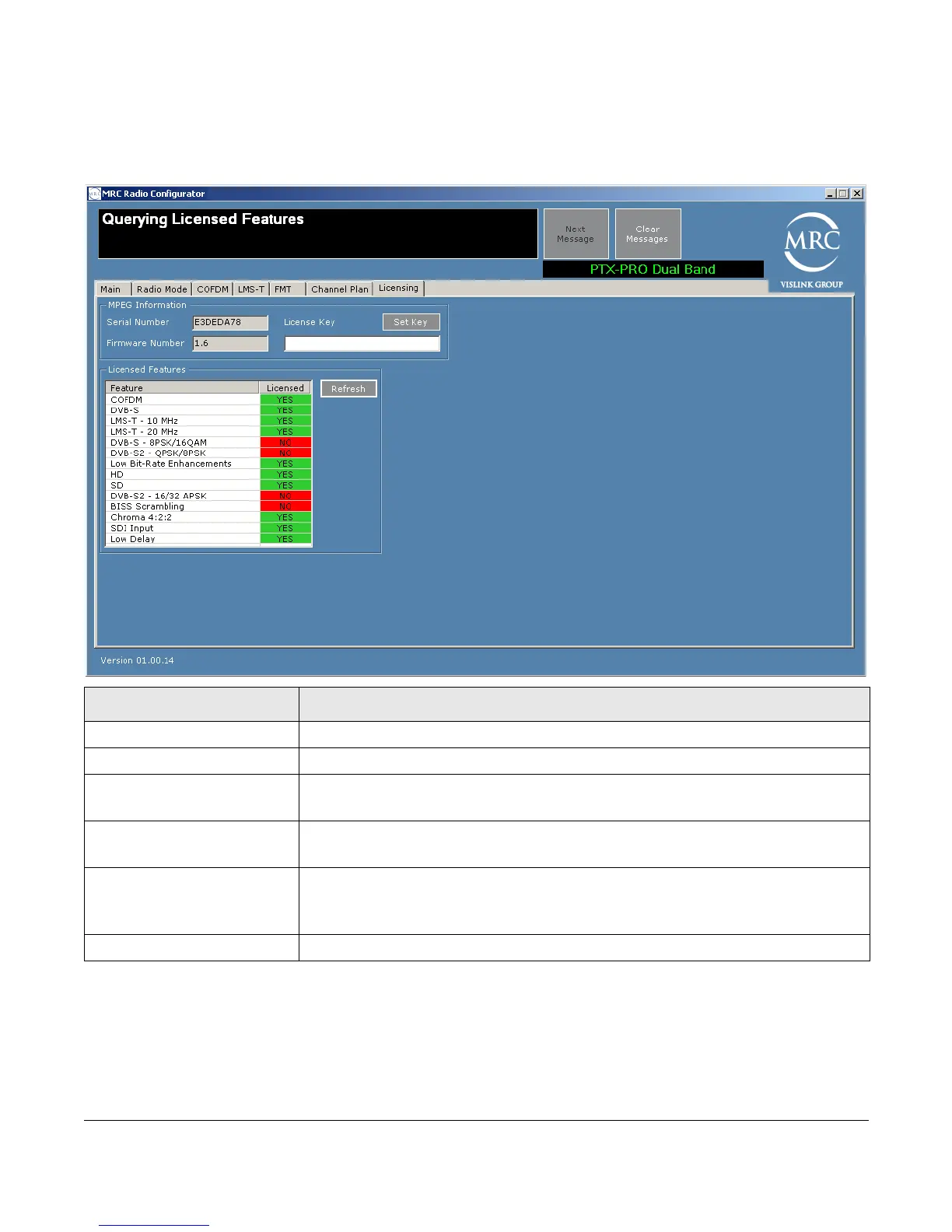
The Licensing Tab screen displays a list of features that your PTX-PRO has. If an item indicates
that a feature is not licensed, you can purchase and obtain it by contacting Vislink Customer
Support. Vislink supplies a license key that you enter to enable the licensed feature.
Field Option
Serial Number Displays the serial number of your PTX-PRO.
Firmware Number Displays the firmware number of your PTX-PRO.
License Key Enter the license key obtained from Vislink Customer Service then click
the Set Key button.
Set Key button Submits the licence key value; if valid, the corresponding license is
enabled.
Licensed Features box Displays the features you can use with your PTX-PRO. To obtain
additional features, contact Vislink Customer Service (see Section 4.1,
Getting Support for Your PTX-PRO on page 4-1).
Refresh Button Click this button to refresh the license list.



 To Next Page