4
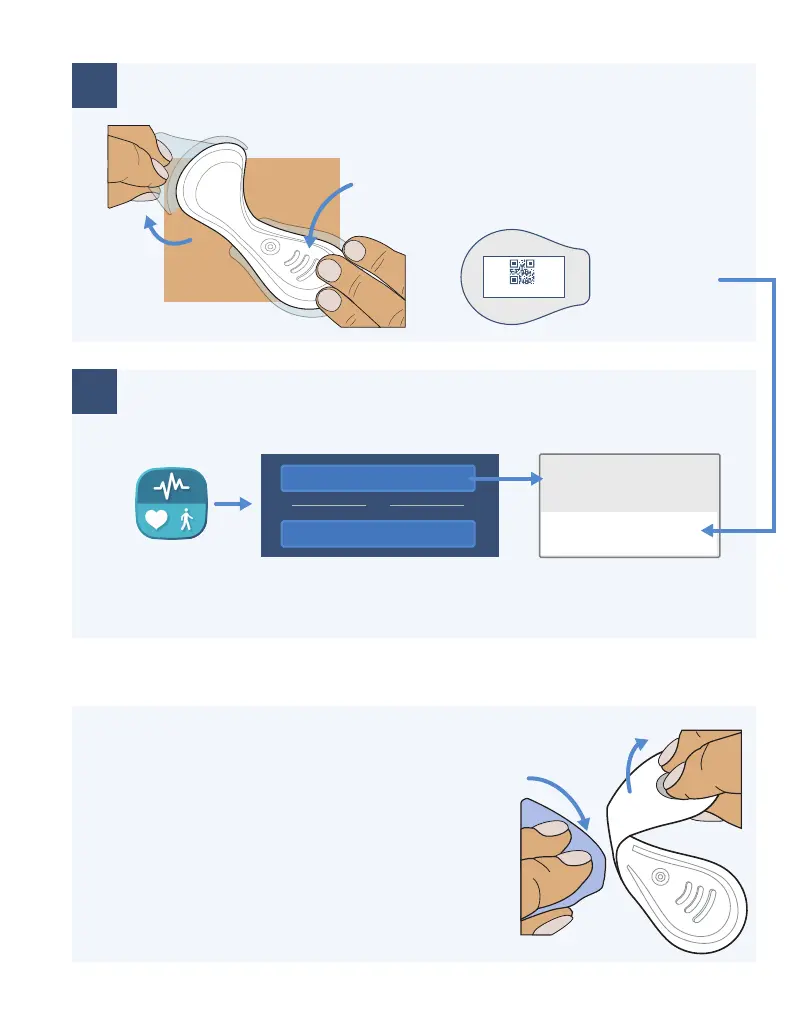
Hold Down and Remove Backings
4
Use VistaPoint to Search for ID and Connect
5
Remove VitalPatch Biosensor
List of Patches
VC2B008BF_0032EA
B0:08:BF:00:32:EA
Press against chest to adhere.
Do not shower or exercise for 30
minutes after application.
When monitoring session is complete:
• Select
Disconnect in VistaPoint.
• Remove biosensor.
• Dispose per local laws for routine
electronic waste.
Keep backing
with Patch ID
AVC2B008BF_0032EA
vitalconnect
Press
Peel
Connect Screen
VistaPoint
Select Patch ID
Peel Off
Sweep adhesive
removal pad
Search for VitalPatch ID
Manually Enter VitalPatch ID
or
Start VistaPoint. If you do not see the Connect screen, select Disconnect to
end the previous session. Follow the on-screen instructions to calibrate.
4


 To Next Page