EN
18
Commissioning
To start up your table, plug the power cable in.
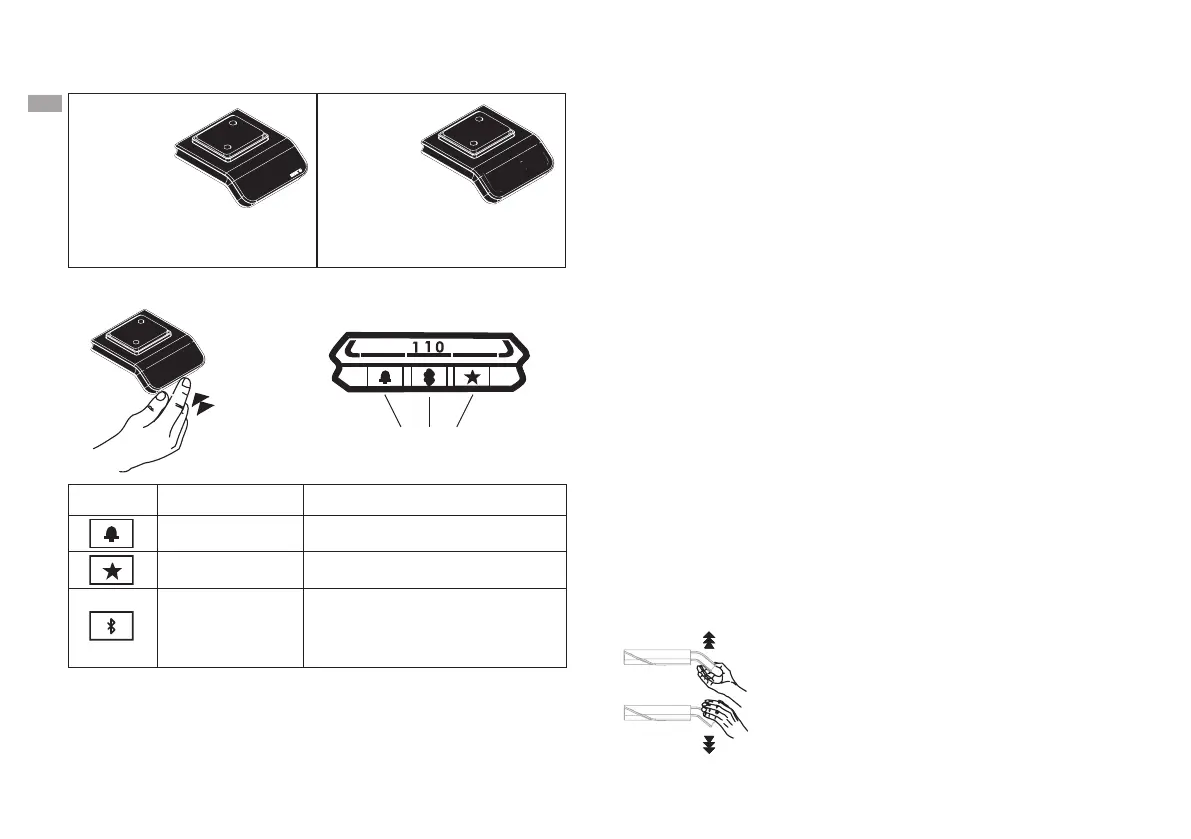
To move your table, press and hold the
handset in the direction you want your table
to move. Your table will stop
automatically when you remove your hand
from the handset.
Height adjustment Up/down
Symbol Description Function
Reminder Set reminders
Favourites Save favourite position
Bluetooth
Connect the Desk Control
app via Bluetooth wireless
technology *
Handset description
Control buttons
with symbol and function
• Up/down
• LED light bar
• Display
• Height display
• Up/down
Control buttons description
(DPG1C02-000006)
DPG1C
02-000006
DPG1K
* The Desk Control app can be found at:
https://cdn.linak.com/-/media/files/user-manual-source/
de/deskline-dpg-desk-panels-und-desk-control-app-mon-
tageanleitung-dt.pdf



 To Next Page