The VIVO MOUNT-E-UP80D is a motorized TV stand with remote control, designed to provide a concealed and automated solution for displaying a television. This instruction manual outlines the assembly, installation, and usage of the product, emphasizing safety precautions and proper setup.
Function Description:
The primary function of the MOUNT-E-UP80D is to lift and lower a television into and out of custom cabinetry. This allows the TV to be hidden when not in use, providing a clean and minimalist aesthetic for any room. The motorized lift mechanism is controlled via a remote, offering convenient operation. The stand supports a TV bracket and VESA brackets, ensuring compatibility with a wide range of television models. It is designed for integration into custom furniture, requiring specific clearance measurements for optimal performance and safety.
Important Technical Specifications:
- SKU: MOUNT-E-UP80D
- Weight Capacity: Do not exceed 132 lbs (60 kg). Exceeding this limit can result in serious injury or damage.
- Clearance Requirements for Custom Cabinetry:
- Sides and Front of TV: At least 50mm (approximately 2 inches) of clearance.
- Top of TV: At least 10mm (approximately 0.4 inches) of clearance.
- Hardware Included:
- Motorized Lift (A): 1 unit, the core component of the system.
- Mounting Plate (B): 1 unit, for securing the lift.
- Shelf Support (C): 2 units, for supporting the shelf.
- Shelf (D): 1 unit, for the top surface of the cabinet cutout.
- TV Bracket (E): 1 unit, attaches to the mounting plate.
- VESA Bracket (F): 2 units, attach to the TV.
- Control Unit (G): 1 unit, manages the motorized lift.
- AC Adapter (H): 1 unit, powers the system.
- Adapter Cover (I): 1 unit, covers the AC adapter.
- Power Cable (J): 1 unit, connects to the AC adapter.
- Remote (K): 1 unit, for wireless control of the lift.
- Screws: A variety of screws are included for different assembly stages:
- S-A (ST5.5x16mm): 16 units
- S-B (ST4.2x20mm): 2 units
- S-C (M6x12mm): 12 units
- S-D (M10x20mm): 4 units
- M-A (M6x14mm): 4 units
- M-B (M8x16mm): 4 units
- M-C (M6x30mm): 4 units
- M-D (M8x35mm): 4 units
- Nuts:
- Washers:
- Spacers:
- M-F (Small Spacer): 4 units
- M-G (Large Spacer): 4 units
- Wrenches:
- T-A (4mm Allen Wrench): 1 unit
- T-B (6mm Allen Wrench): 1 unit
- T-C (16mm Wrench): 1 unit
- Tools Needed (Not Included): Phillips Screwdriver, Drill.
Usage Features:
- Remote Control Operation: The system is operated wirelessly using the included remote (K). This allows for convenient raising and lowering of the TV from a distance.
- Pairing Process: The remote (K) must be paired with the Control Unit (G) during setup. This involves pressing a side button on the Control Unit with a small tool, waiting for a beep, and then pressing the "SET" button on the remote. A series of beeps confirms successful pairing.
- Custom Cabinetry Integration: The design is specifically intended for integration into custom-built furniture. This allows users to create a seamless and hidden TV solution that blends with their interior design.
- VESA Compatibility: The inclusion of VESA brackets (F) and various screw sizes (M-A, M-B, M-C, M-D) along with washers (M-E) and spacers (M-F, M-G) ensures broad compatibility with different TV models and VESA mounting patterns.
- Safety Features: The manual includes a "TIPOVER WARNING" and "CHOKING HAZARD" warning, emphasizing the importance of proper installation, securing the stand to a wall (if applicable), and keeping small parts away from children. It also strictly advises against exceeding the weight capacity.
Maintenance Features:
- Regular Checks: While not explicitly detailed as "maintenance," the initial warning about checking for missing or defective parts implies the importance of a thorough inspection before and during assembly to ensure the longevity and safe operation of the device.
- Proper Installation: Adhering to the installation instructions, including using the correct screws and tools, is crucial for the long-term stability and functionality of the motorized lift. Incorrect assembly can lead to damage or serious injury.
- Weight Capacity Adherence: Strictly observing the 132 lbs (60 kg) weight limit is the most critical maintenance aspect to prevent structural failure and ensure the motor's lifespan.
- Customer Support: VIVO provides comprehensive customer support for any issues, including damaged or defective parts. They offer assistance via email (help@vivo-us.com), phone (309-278-5303), and live chat on their website (www.vivo-us.com). Their support hours are Monday-Friday from 7:00 am to 7:00 pm CST, with stated average resolution times of less than 15 minutes and average response times of 1 hour 8 minutes. This robust support system acts as a key "maintenance" feature, ensuring users can get help when needed.
- Online Resources: The product page (https://vivo-us.com/products/mount-e-up80d) offers helpful videos and specifications, which can assist users with troubleshooting or understanding the product better, serving as a self-service maintenance resource.

 Need help?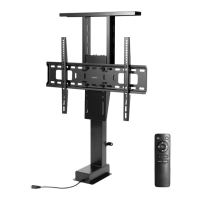

 To Next Page
 General