The provided document is an instruction manual for the VIVO Black Clamp-on Keyboard Tray, model SKU: MOUNT-KB05ES.
Function Description:
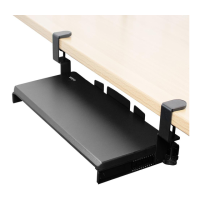
The VIVO Black Clamp-on Keyboard Tray is designed to provide an ergonomic solution for keyboard placement, allowing users to position their keyboard and mouse at a comfortable height and distance from their desk. This accessory clamps directly onto the edge of a desk, eliminating the need for drilling or permanent installation. It features a sliding mechanism that allows the tray to be moved forward and backward, enabling users to adjust its position to their preference. The clamp-on design makes it a versatile option for various desk types and setups, providing flexibility for users who may not want to alter their existing furniture. The product is intended for use in office or home environments to improve typing posture and reduce strain.
Important Technical Specifications:
- Model Number: MOUNT-KB05ES
- Weight Capacity: The keyboard tray has a maximum weight capacity of 11 lbs (4.99 kg). Exceeding this limit can lead to serious injury or damage to the product.
- Components: The package includes:
- Keyboard Tray (A): 1 unit
- Slider Bracket (B): 2 units
- Clamp (C): 2 units
- M4x7 Screws (D): 6 units (used for assembling slider brackets to clamps)
- M5x12 Screws (E): 8 units (used for assembling slider brackets with clamps to the keyboard tray)
- Pads (F): 2 units (placed on the underside of clamps to protect the desk surface)
- Tools Needed: A Phillips screwdriver is required for assembly.
- Installation Type: Clamp-on design, requiring no drilling into the desk.
- Adjustability: Features a sliding mechanism for forward and backward adjustment of the keyboard tray.
Usage Features:
- Easy Assembly: The manual outlines a straightforward, three-step assembly process using a Phillips screwdriver.
- Step 1: Assemble the slider brackets (B) to the clamps (C) using M4x7 screws (D).
- Step 2: Attach the assembled slider brackets with clamps to the keyboard tray (A) using M5x12 screws (E). It's crucial to ensure the clamps are positioned on the opposite end from the center cable guide.
- Step 3: Place protective pads (F) on the underside of each clamp, then position the assembled keyboard mount on the edge of the desk and tighten the clamps. The manual advises against over-tightening to ensure the keyboard tray remains level.
- Adjustable Position: Once installed, the keyboard tray can be slid forward or backward to achieve the desired ergonomic position.
- Desk Protection: The included pads (F) are designed to be placed between the clamps and the desk surface, preventing scratches or damage to the desk.
- Ergonomic Design: By allowing the keyboard and mouse to be positioned below the desk surface, the tray helps promote a more ergonomic typing posture, reducing strain on wrists, arms, and shoulders.
- Cable Management: The keyboard tray features a center cable guide, although its specific function isn't detailed, it suggests an integrated solution for organizing keyboard and mouse cables.
Maintenance Features:
- Regular Inspection: Users are advised to check for any missing or defective parts before installation.
- Weight Capacity Adherence: It is critical not to exceed the 11 lbs (4.99 kg) weight capacity to prevent damage or injury.
- Proper Tightening: During assembly, screws should be tightened securely but clamps should not be over-tightened to maintain the tray's level position.
- Cleaning: While not explicitly stated, general cleaning with a soft, damp cloth would likely be appropriate for maintaining the product's appearance.
- Troubleshooting/Support: VIVO offers customer support Monday-Friday from 7:00 am to 7:00 pm CST. Users can contact them via email (help@vivo-us.com), phone (309-278-5303), or live chat on their website (www.vivo-us.com) for assistance with damaged or defective parts, or any installation doubts. They also provide helpful videos and specifications via a QR code and a direct link (https://vivo-us.com/products/mount-kb05es).
- Choking Hazard Warning: The product contains small parts and is not suitable for children under 3 years old, requiring adult supervision.
The manual emphasizes safety warnings, including the importance of understanding directions, checking for parts, and not exceeding weight capacity to prevent damage or injury. It also highlights VIVO's commitment to customer satisfaction, offering to replace damaged or defective parts to ensure a fully functioning product.

 Need help?
 General



 To Next Page