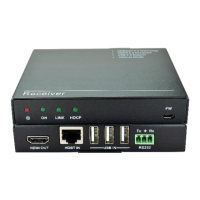
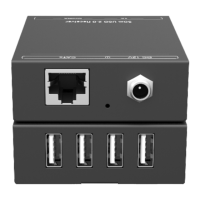
The VivoLink VL120007 is an HDBaseT Extender Set designed to transmit HDMI signals and bi-directional IR over a single Cat5e/Cat6 cable up to 70 meters. This set includes both a transmitter (VL120007T) and a receiver (VL120007R), eliminating the need for power at the receiver end due to its Power over Cable (PoC) support.
Function Description:
The VL120007 extender set takes HDMI signals as input into the transmitter. It then uses HDBaseT technology to transmit these signals, along with bi-directional IR control, to the receiver over a single Cat5e/Cat6 cable. The receiver subsequently outputs the HDMI signal to a display. The PoC feature allows the receiver to be powered directly via the Cat5e/Cat6 cable from the transmitter, simplifying installation by removing the requirement for a separate power supply at the display location.
Important Technical Specifications:
- Model: VL120007T (Transmitter) and VL120007R (Receiver)
- Input Signal (Transmitter): 1 HDMI, 1 IR
- Input Connector (Transmitter): HDMI female, 3.5mm mini jack
- Output (Transmitter): 1 RJ-45, 1 IR
- Output Connector (Transmitter): RJ-45, 3.5mm mini jack
- Input Signal (Receiver): 1 IR, 1 RJ-45
- Input Connector (Receiver): 3.5mm mini jack, RJ-45
- Output (Receiver): 1 HDMI, 1 IR
- Output Connector (Receiver): HDMI female, 3.5mm mini jack
- Video Signal: HDMI 1.4
- Audio: Digital audio, transmitted through HDMI audio
- Transmission Mode: HDBaseT
- Resolution Range: 800x600@60Hz to 4Kx2K
- Maximum Transmission Distance:
- 230 ft. (70 m) for 1080p
- 131 ft. (40 m) for 4Kx2K over single Cat5e/Cat6 cable
- SNR: >70dB @ 100MHz-100M
- Bandwidth: 10.2Gbps
- THD: <0.005% @ 1KHz
- HDMI Standard: Supports HDMI 1.4 and HDCP
- Impedance: 75Ω
- Operating Temperature: 0~50℃
- Reference Humidity: 10% ~ 90%
- Power Supply: DC 12V, 1A (via included power adapter)
- Power Consumption: 9.6W
- Dimensions (WHD): 61 x 24 x 120 mm (for both TX and RX)
- Weight: 0.28Kg (for both TX and RX)
Usage Features:
- Full HD Support: Delivers high-resolution images including 1080p 3D and 4Kx2K.
- HDBaseT Technology: Utilizes HDBaseT for extended capability and reliability in signal transmission.
- Bi-directional IR Control: Allows for control of source devices from the display location and vice-versa. The IR IN port connects to an IR receiver, sending signals out via the other unit's IR OUT. Conversely, IR OUT connects to an IR emitter, receiving signals from the other unit's IR IN.
- PoC (Power over Cable): The transmitter can power the receiver via the Cat5e/Cat6 cable, simplifying installation by eliminating the need for a power outlet at the receiver end.
- CEC Support: Compatible with Consumer Electronics Control for integrated system control.
- LED Indicators: Both the transmitter and receiver feature LED indicators to show real-time operational status.
- Green Indicator:
- Connected, HDCP Compliant: Illuminates steadily.
- Connected, Not HDCP Compliant: Blinks.
- Disconnected: Off.
- Yellow Indicator:
- Connected (linking status): Illuminates steadily.
- Disconnected: Off.
- Easy Connection Procedure:
- Connect the HDMI source to the HDMI In port of the transmitter.
- Connect the TP OUT port of the transmitter to the TP IN port of the receiver using a Cat5e/Cat6 cable.
- Connect an HDMI display to the HDMI Out port of the receiver.
- For bi-directional IR control, connect an IR emitter to the IR OUT port on either unit and an IR receiver (with a 3.5mm stereo plug) to the IR IN port on the other unit.
- Connect the DC 12V power adapter to the transmitter; the receiver will be powered synchronously via PoC.
- Cable Recommendation: For optimal transmission, a Cat5e cable with low impedance (shielded twisted pair is recommended and should be well grounded) is advised. Cable connectors must be metallic, and the shielded layer of the cable must be connected to the connector's metal shell.
- T568B Standard: Cat5e/Cat6 terminations for HDBaseT devices should follow a straight-through TIA/EIA T568B standard. TIA/EIA T568A is not recommended.
- Versatile Application: Suitable for various settings including computer realms, monitoring, big screen displays, meeting rooms, education, and banking/securities institutions.
Maintenance Features:
- Troubleshooting Guide: The manual provides a comprehensive troubleshooting section for common issues such as "No image on display" and "Color loss or poor picture quality."
- No Image: Check display input, HDMI cable connections and functionality, Cat5e/Cat6 cable integrity (T568B termination), power supply grounding, and compatibility with older HDMI 1.2 source devices.
- Color Loss/Poor Picture Quality: Verify HDMI cable quality and connections, power supply grounding, and ensure all components are properly grounded to a common ground to prevent static or picture degradation.
- Safety Precautions: Emphasizes careful unpacking, following basic safety rules (fire, electrical shock), avoiding dismantling or modification, using specified parts, referring servicing to qualified personnel, protecting from moisture, avoiding heavy items on cables, ensuring proper ventilation, keeping away from liquids, and proper disposal of scrapped devices.
- Warranty: The product comes with a three-year limited warranty covering defects in materials and workmanship, starting from the purchase date. Proof of purchase is required for warranty service.
- Warranty Exclusions: The warranty does not cover expired warranty, altered/removed serial numbers, damage from normal wear and tear, use of non-specified parts, lack of proof of warranty, product model mismatch, force majeure, unauthorized servicing, or issues not related to product defects. Delivery, installation, or labor charges are also excluded.
- Technical Support: Users are encouraged to contact customer support via email (obsupport@eet.dk) or phone, providing product version, name, detailed failure situations, and case formation for assistance.

 Need help?

 To Next Page
 General