EasyManua.ls Logo

VivoLink VLHDMIEXTFIB - User Manual

Default Icon
16 pages
Print Icon
To Next Page IconTo Next Page
Loading...
VLHDMIEXTFIB
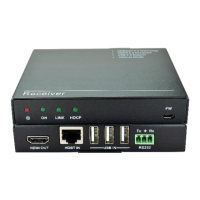
HDMI 2.0 Fiber Optical Extender
All Rights Reserved
Version: VLHDMIEXTFIB_2022V1.0
User Manual

Questions and Answers

  • D
    Desiree KingAug 11, 2025
    What to do if there is no output on the VivoLink Extender display?
    • M
      Melissa RobinsonAug 11, 2025
      If there is no output on the display, first, ensure that both the source and the display are powered on. Next, verify that the DVI ports are making good contact. If the issue persists, the display might not support the current resolution. In this case, connect the display to the transmitter to capture its EDID data before use.
  • P
    Philip FieldsAug 20, 2025
    Why the power LED is off and the VivoLink Extender operations don’t work?
    • C
      cassandrawalkerAug 20, 2025
      If the power LED is off and the operations don’t work, it could be due to the unit not being powered or poor contact. First, ensure that the unit is powered on. Then, check the power adapter to make sure it is making good contact.
  • K
    Kevin GoodAug 29, 2025
    How to fix color losing or vague/double image in HDMI display with VivoLink Extender?
    • A
      Anthony SmithAug 30, 2025
      If you are experiencing color loss or a vague/double image in the HDMI display, the issue might be due to the poor quality of the optical fiber cable. Change the cable for a qualified OM3 cable.

VivoLink VLHDMIEXTFIB Specifications

General IconGeneral
CategoryExtender
TypeHDMI Extender
Transmission MediumFiber
InputHDMI
OutputHDMI
Maximum Distance300m
Fiber TypeSingle-mode
Power Supply5V DC
Operating Temperature0°C to 50°C (32°F to 122°F)
Storage Temperature-20°C to 70°C (-4°F to 158°F)
Maximum Resolution4K (3840 x 2160) @ 30Hz
Transmission Distanceup to 300m

Related product manuals