HDBaseT Extender Set 70m
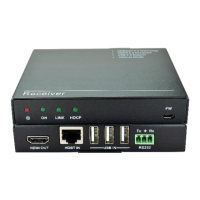
2.2 Appearance of VL120007R
1) HDMI Out: Connect to HDMI display.
2) IR IN: Connect to an IR receiver, the IR signal received from this port can only send
out via VL120007T.
3) IR OUT: Connect with IR emitter, the sent IR signals are received by VL120007T.
4) Power Indicator: illuminate when power up
5) TP IN: Connect to the HDBaseT port on the VL120007T via CAT5e/ CAT6 cable.
Note: VL120007 boasts 2 indicators to show real-time operation information:
Show input signal
connection
HDCP Compliant: Illuminate;
Not HDCP Compliant: Blink.
Disconnected: Off
Indicate linking status of
the transmitter and the
receiver


 To Next Page
 Loading...