HDBaseT 2.0 KVM Extender Set
2
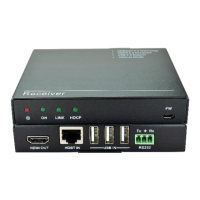
2. Panel Description
2.1 Transmitter
OFF: No power
RED: DC power present
ON: Working status indicator
OFF: Not operational
Blinking GREEN: Normal operation
LINK: HDBT Link status indicator
OFF: No Link
GREEN: Link successful
Blinking GREEN: Link problem
HDCP: HDCP compliant indicator
OFF: No HDMI traffic(no picture)
GREEN: HDMI signal with HDCP
Blinking GREEN: HDMI signal without HDCP
Micro USB port, used for firmware update.
Firmware updated need auxiliary equipment, please contact
with our after-sales department for more details.
Connect with HDMI source.
Connect to the HDBT IN port on rear panel of the Receiver
via CAT5e/CAT6a cable, compliant with HDBT2.0 and
support unidirectional PoC to power the Receiver.
DC 12V
Tx Rx
RS232HDBT OUTHDMI IN USB OUT
FW
ON LINK HDCP
1
3
4
5
6
7
2
Front
Rear


 To Next Page
 Loading...