VIVOTEK
56 - User's Manual
The frame rate will decrease if you select a higher resolution.
■ Intra frame period
Determine how often for rmware to plant an I frame. The shorter the duration, the more likely you
will get better video quality, but at the cost of higher network bandwidth consumption. Select the intra
frame period from the following durations: 1/4 second, 1/2 second, 1 second, 2 seconds, 3 seconds,
and 4 seconds.
■ Dynamic Intra frame period
High quality motion codecs, such as H.264, utilize the redundancies between video frames to deliver
video streams at a balance of quality and bit rate.
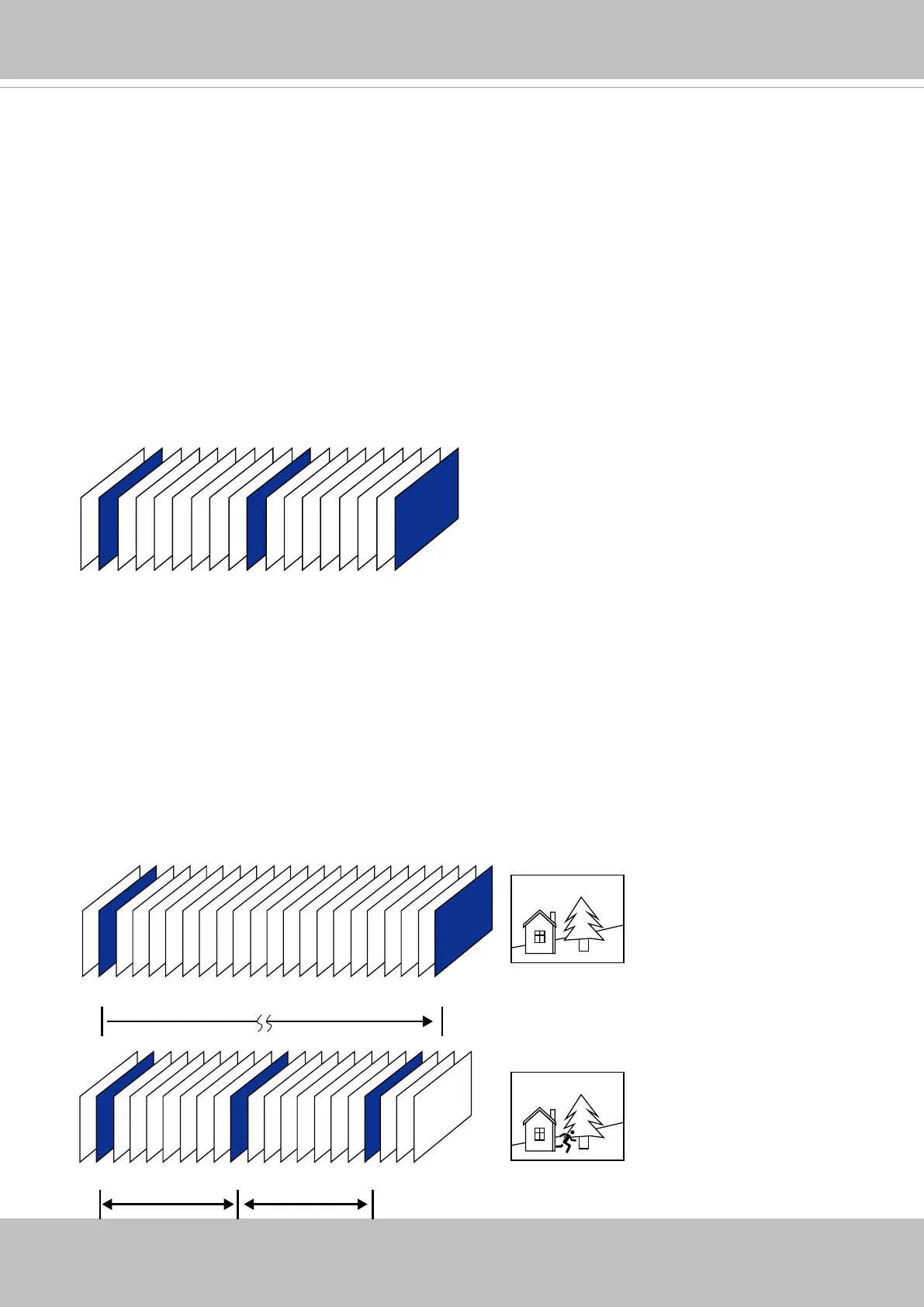
The encoding parameters are summarized and illustrated below. The I-frames are completely self-
referential and they are largest in size. The P-frames are predicted frames. The encoder refers to the
previous I- or P-frames for redundant image information.
P I P P P P P P P P P P P P P P P P P P P I
P I P P P P P P P I P P P P P P P I
Static scene
Activities
P P P
P I P P P P P P P I P P P P P P P I
By dynamically prolonging the intervals for I-frames insertion to up to 10 seconds, the bit rates required
for streaming a video can be tremendously reduced. When streaming a video of a static scene,
the Dynamic Intra frame feature can save up to 53% of bandwidth. The amount of bandwidth thus
saved is also determined by the activities in the eld of view. If activities occur in the scene, rmware
automatically shortens the I-frame insertion intervals in order to maintain image quality. In the low
light or night conditions, the sizes of P-frames tend to be enlarged due to the noises, and hence the
bandwidth saving effect is also reduced.
Streaming a typical 2MP scene normally requires 3~4Mb/s of bandwidth. With the Dynamic Intra frame
function, the bandwidth for streaming a medium-trafc scene can be reduced to 2~3Mb/s, and during
the no-trafc period of time, down to 500kb/s.
H.264 Frame Types
Dynamic Intra Frame w/
static scenes
Dynamic Intra Frame w/
activities in scenes
■ Smart stream II














 To Next Page