VIVOTEK
34 - User's Manual
Conguration
Click Configuration on the main page to enter the camera setting pages. Note that only
Administrators can access the conguration page.
VIVOTEK offers an easy-to-use user interface that helps you set up your network camera with
minimal effort.
In order to simplify the user interface, the detailed information will be hidden unless you click on
the function item. When you click on the rst sub-item, the detailed information for the rst sub-
item will be displayed; when you click on the second sub-item, the detailed information for the
second sub-item will be displayed and that of the rst sub-item will be hidden.
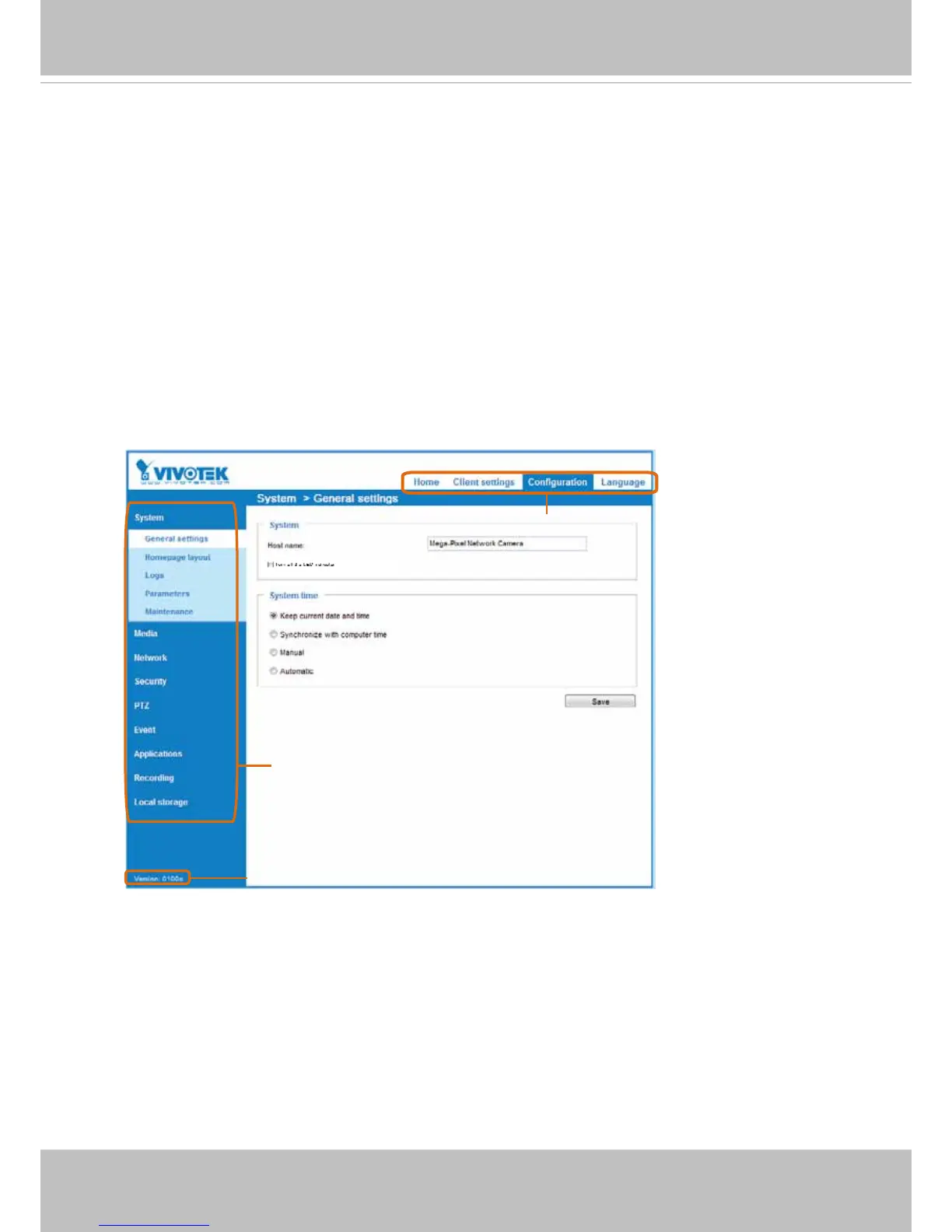
The following is the main page interface:
Each function on the conguration list will be explained in the following sections.
Navigation Area provides an instant switch among Home page (the monitoring page for live viewing),
Client settings, Conguration page, and multi-language selection.
Configuration List
Firmware Version
Navigation Area



 To Next Page