VIVOTEK
350 - User's Manual
© 2020 VIVOTEK INC. All Right Reserved
226
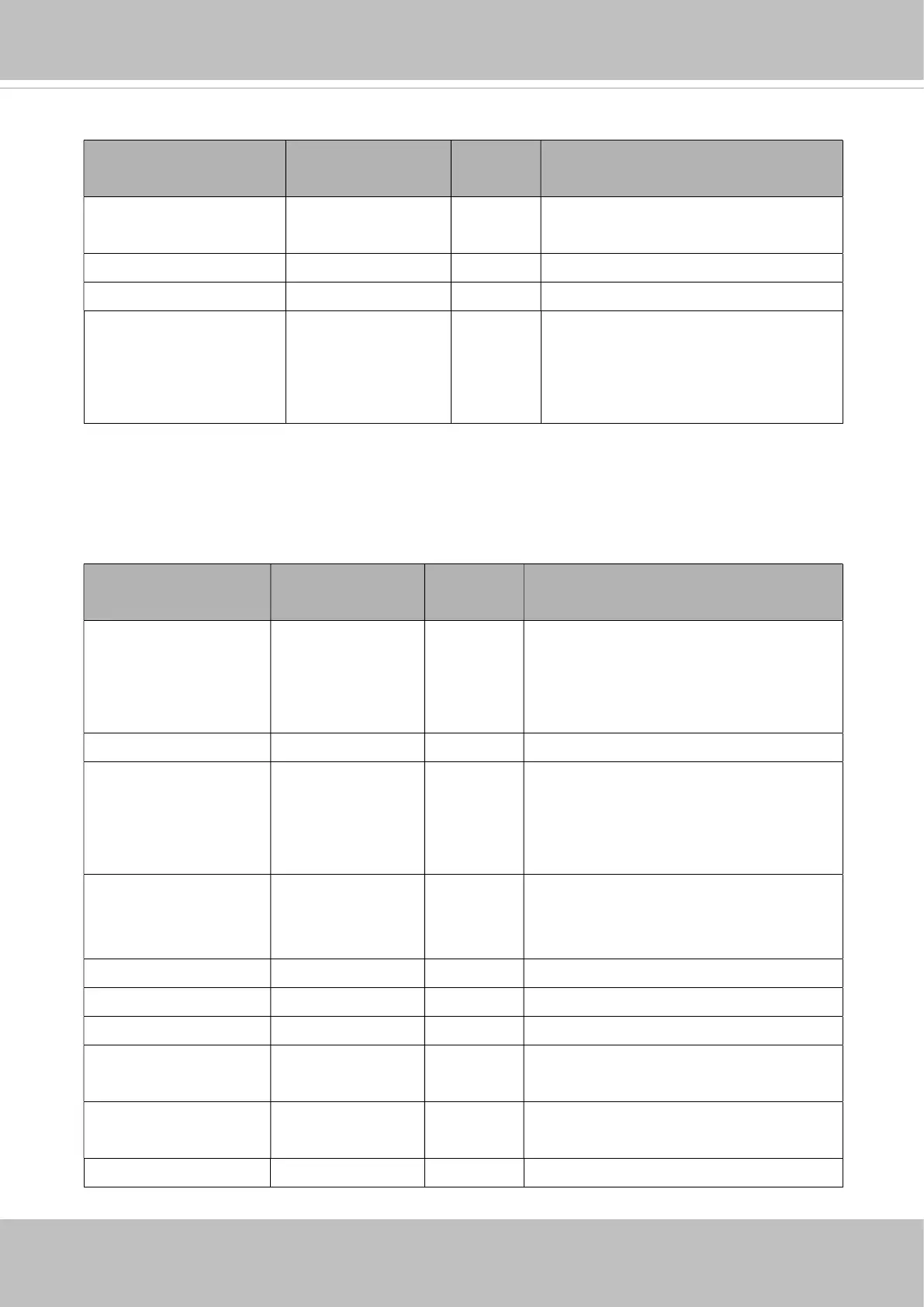
Maximum of n=10 hyperlink is supported.
NAME VALUE
(get/set)
DESCRIPTION
moduleidx 0,<positive
integer>
1/7 Refer to the package index.
title string[40] 1/7 Name of the vadp hyperlink.
url string[120] 1/7 The URL address of vadp hyperlink.
status string[40] 1/7 Value of “on” indicates a valid
connection of vadp hyperlink.
Value of “off” indicates a invalid
connection of vadp hyperlink.
7.38.2. VADP Settings for Each Package
Group: vadp_module_i<0~(n-1)> for n VADP package number (capability_vadp_npackage > 0)
n denotes the value of "capability_vadp_npackage".
NAME VALUE SECURITY
(get/set)
DESCRIPTION
enable <boolean> 6/6 Indicate if the module is enabled or
not.
If yes, also add the index of this module
to the module_order.
name string[40] 6/6 Module name
extendedname string[40] 6/6 Extended module name. If this value is
not blank, it will be shown on the VADP
UI first instead of
vadp_module_i<n>_name.
url string[120] 6/6 Define the URL string after the IP
address if the module provides it own
web page.
vendor string[40] 6/6 The provider of the module.
vendorurl string[120] 6/6 URL of the vendor.
version string[40] 6/6 Version of the module.
license string[40] 6/6 Indicate the license status of the
module.
licmsg string[128] 6/6 Indicate the message that will be show
on license status when mouse over.
path string[40] 6/6 Record the storage path of the module.














 To Next Page