VIVOTEK
User's Manual - 365
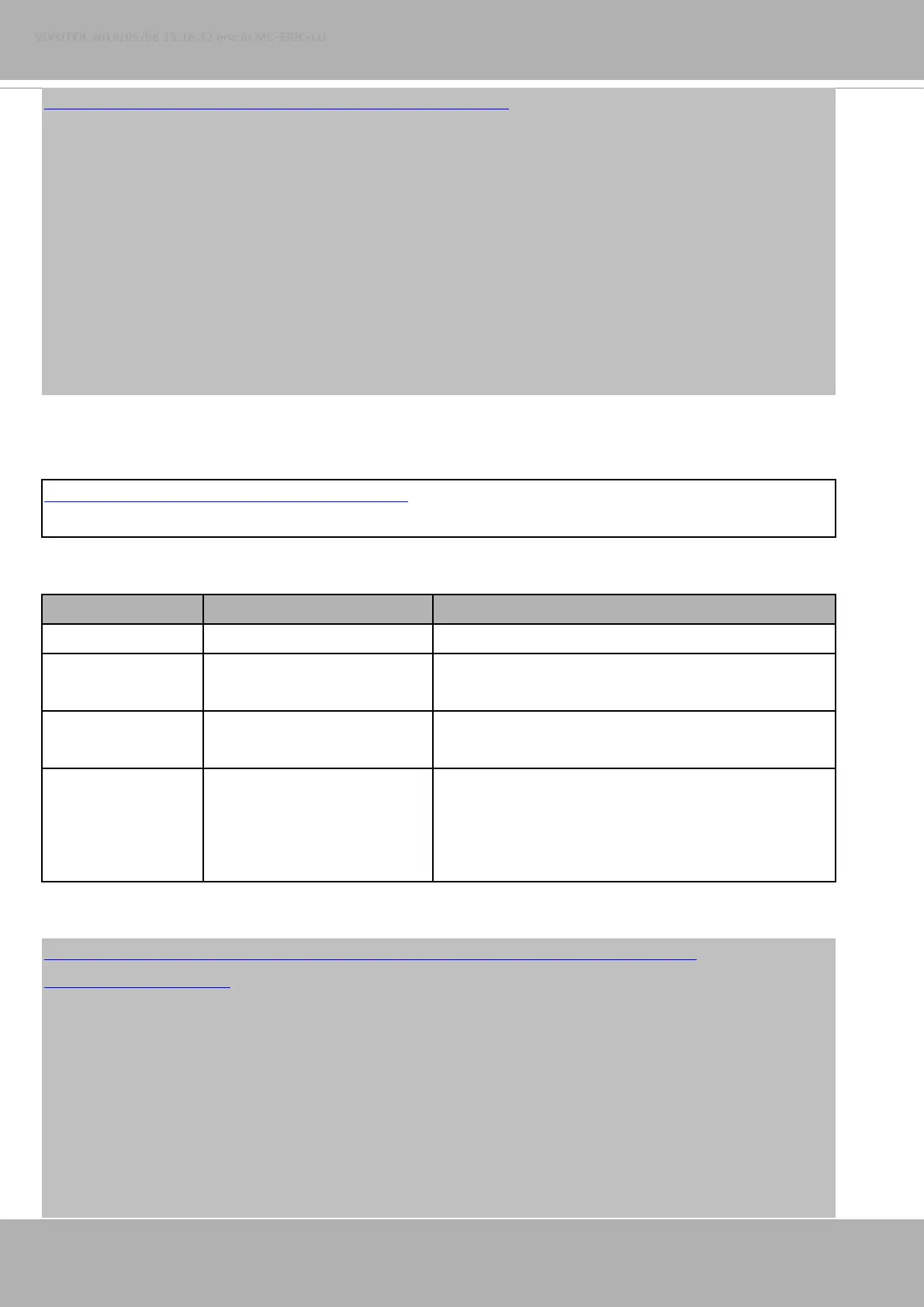
http://myserver/cgi-bin/admin/optimizedir.cgi?function=getstatus
Response:
HTTP/1.0 200 OK\r\n
Cache-control: no-cache\r\n
Pragma: no-cache\r\n
\r\n
"optimizedir_c0_irmode='auto'"
"optimizedir_c0_irnum='5'"
"optimizedir_c0_irstrength='1,97,100,100,100'"
"optimizedir_c0_irstatus='normal'"
Syntax: (for control API)
http://<servername>/cgi-bin/admin/optimizedir.cgi
?channel=<value>&operation=<value>&irmode=manual
[&strength=<value>] – Set IR strength
PARAMETER VALUE DESCRIPTION
channel 0~"capability_nvideoin"-1 Channel of the video source.
operation set,
settoall
"set": set the strength of each IR LED separately
"settoall": use fixed strength for all IR LED
irmode auto,
manual
Irmode needs to be set as manual for adjusting IR LED
strength.
strength 1~100 If the operation is set as "set", the number of strength
values need to be the same as it of irnum. However, it
needs only one value for strength when the operation is
set as "settoall".
Example:
http://myserver/cgi-bin/admin/optimizedir.cgi?channel=0&operation=set&irmode=manual&
strength=50,70,50,50,50
Response:
HTTP/1.0 200 OK\r\n
Cache-control: no-cache\r\n
Pragma: no-cache\r\n
\r\n
"optimizedir_c0_irstrength='50,70,50,50,50'"
"optimizedir_c0_irmode='manual'"















 To Next Page