VIVOTEK
38 - User's Manual
In order to be able to install applications through the Device Management Portal, the
camera has to be connected to the Security and Safety Things cloud. That process is
called claiming.
The prerequisites for connecting the camera to the cloud are:
• You have an account on the S&ST Device Management Portal.
• Cameras have a non-restricted access to the Internet.
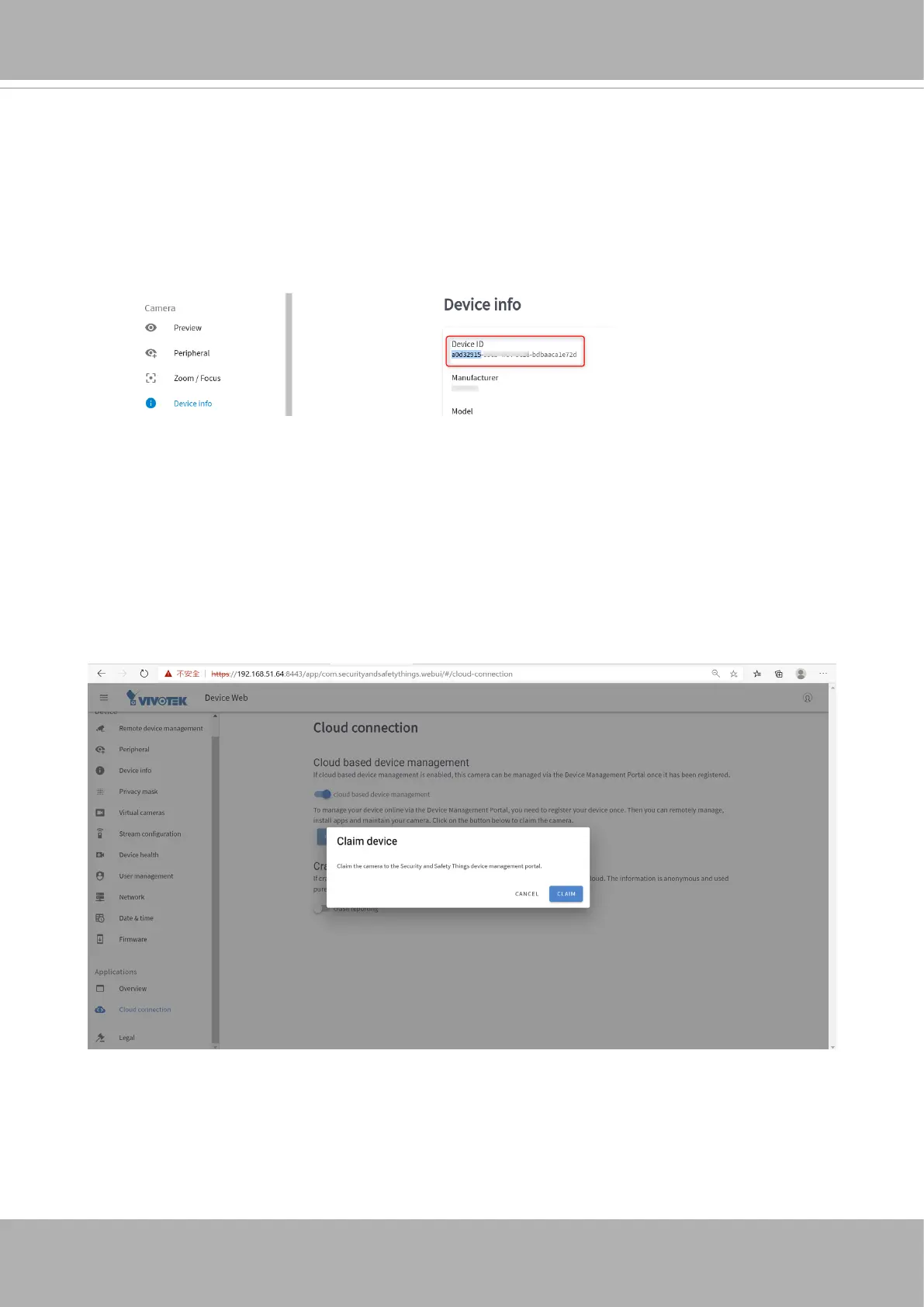
• Your camera has a valid certicate. Please verify this by accessing the camera using a
web browser and go to the Device info page. Then check if a Device ID is present:
• Your device has a proper date/time setting. This can be veried and set on the Date &
time page on the camera’s front end.
Proceed with the following for connecting the camera to the Device Management Portal:
1. Go to the Date & time option on camera’s web console and enable “Use network-
provided time”. If necessary, please congure your own NTP server
2. Go to Cloud connection option and enable “cloud based device management”. A pop-
up will appear with a message. Click Continue.
3. Click on “CLAIM DEVICE.”
Clicking the CLAIM button will redirect you to the Device Management Portal page where you can
enter some additional information regarding this camera:














 To Next Page