EN-8
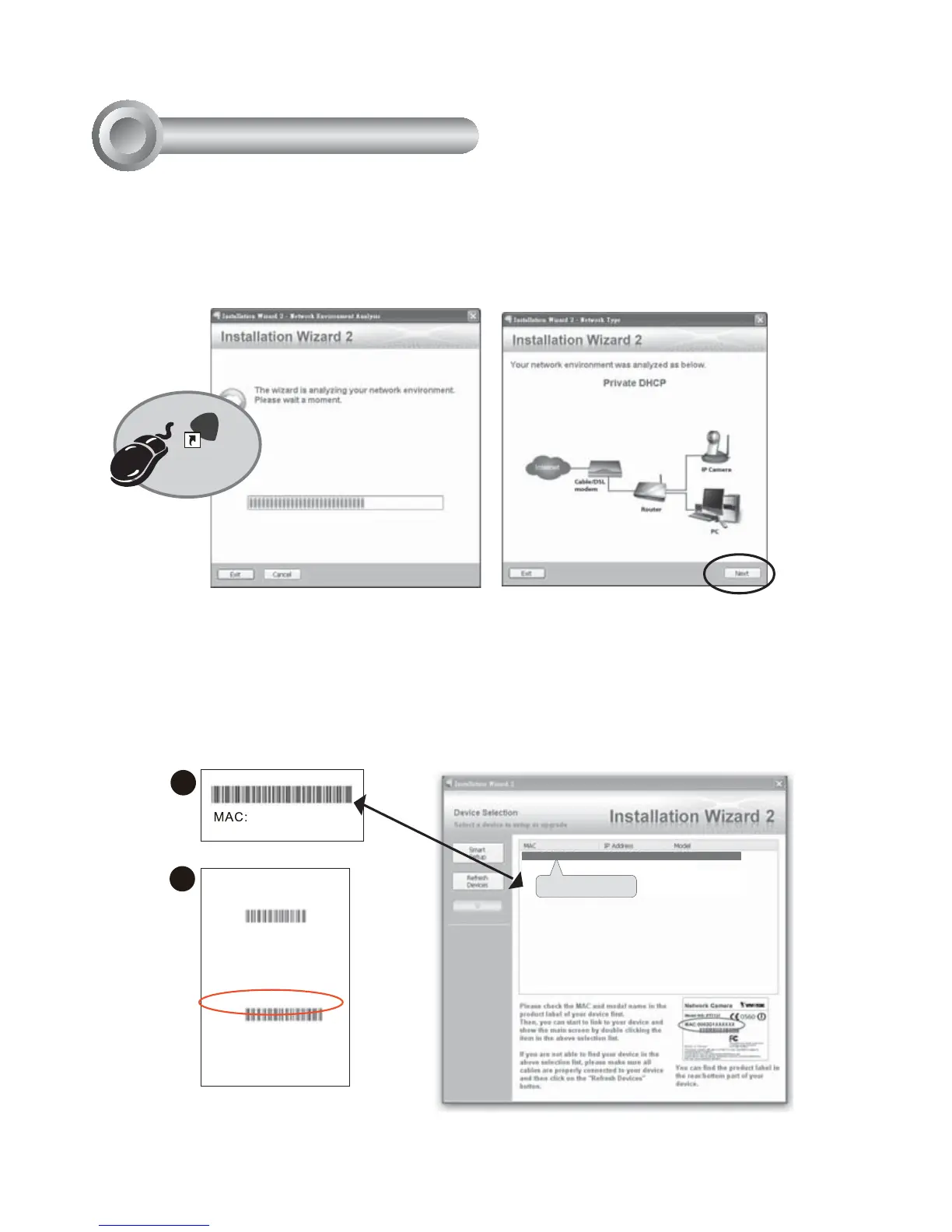
1. Install "Installation Wizard 2" from the Software Utility directory on the software CD.
2. The program will conduct an analysis of your network environment. After your network
is analyzed, please click on the "Next" button to continue the program.
3. The program will search for VIVOTEK Video Receivers, Video Servers, and Network
Cameras on the same LAN.
4. After searching, the main installer window will pop up. Click on the MAC that matches
the one labeled on the side of the camera or S/N number on the label of carton to
connect the Internet Explorer to the Network Camera.
0002D17151CD
1
2
Model No.: IP7361
P/N: 100043690G
F/W Ver.: 0100d
CARTON OF NO. 01
MADE IN TAIWAN
!!0!!
Q'ty: 1 PCS
EAN: 4712123671550
S/N: 0002D17151CD
0002D17151CD
00-02-D1-07-25-8A 192.168.5.151 IP7361
Installation
Wizard 2
IW
2
Assigning an IP Address
6



 To Next Page