VIVOTEK
8 - User's Manual
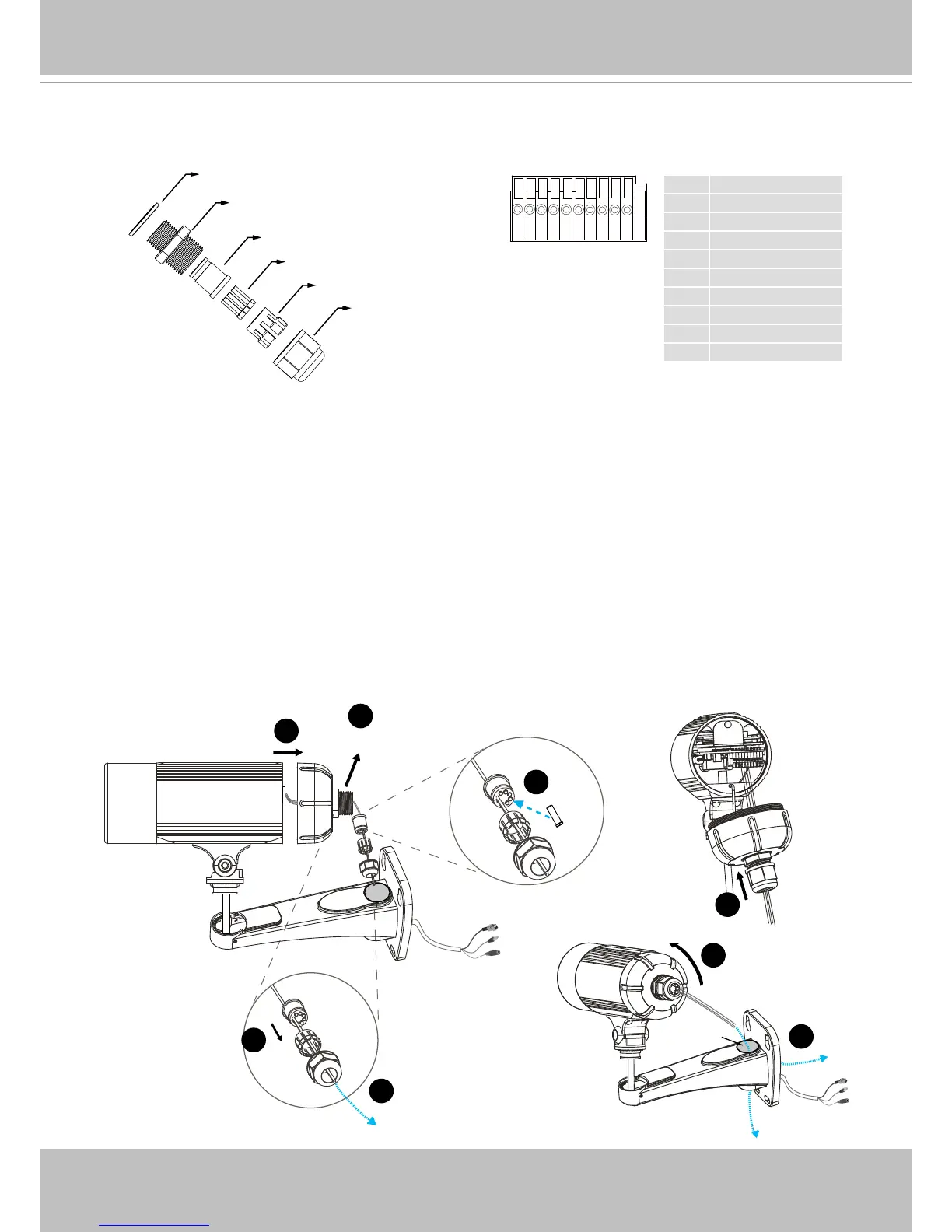
1 Power +12V
2 Digital Output
3 Digital Input
4 Ground
5 RS485 +
6 RS485 -
7 Ground
8 Audio Input
9 Ground
10 Audio Output
87654321 109
Waterproof Connector
1� Disassemble the components of the waterproof connector into part (A) ~ (F) as shown above�
2� Remove the rubber stopper from the bottom of the Network Camera and secure the rubber (A)
and screw nut (B) tightly�
3� Open the back cover of the Network Camera�
4� If you have external devices such as sensors and alarms, feed the cables through the
waterproof connector (F --> E --> C --> A+B) as the illustration shown below� Then refer to
the pin denition to connect them to the general I/O terminal block. Note: The recommended
cable gauge is 2�0 ~ 2�8 mm�
5� Push the seal (C) into the housing (E)�
6� Insert the seals (D) into the empty holes on the seal (C) to avoid moisture�
7� Secure the sealing nut (F) tightly�
8� Tighten the back cover�
9� Remove rubber (G) and feed the cables through the wall mount bracket�



 To Next Page