VIVOTEK
User's Manual - 11
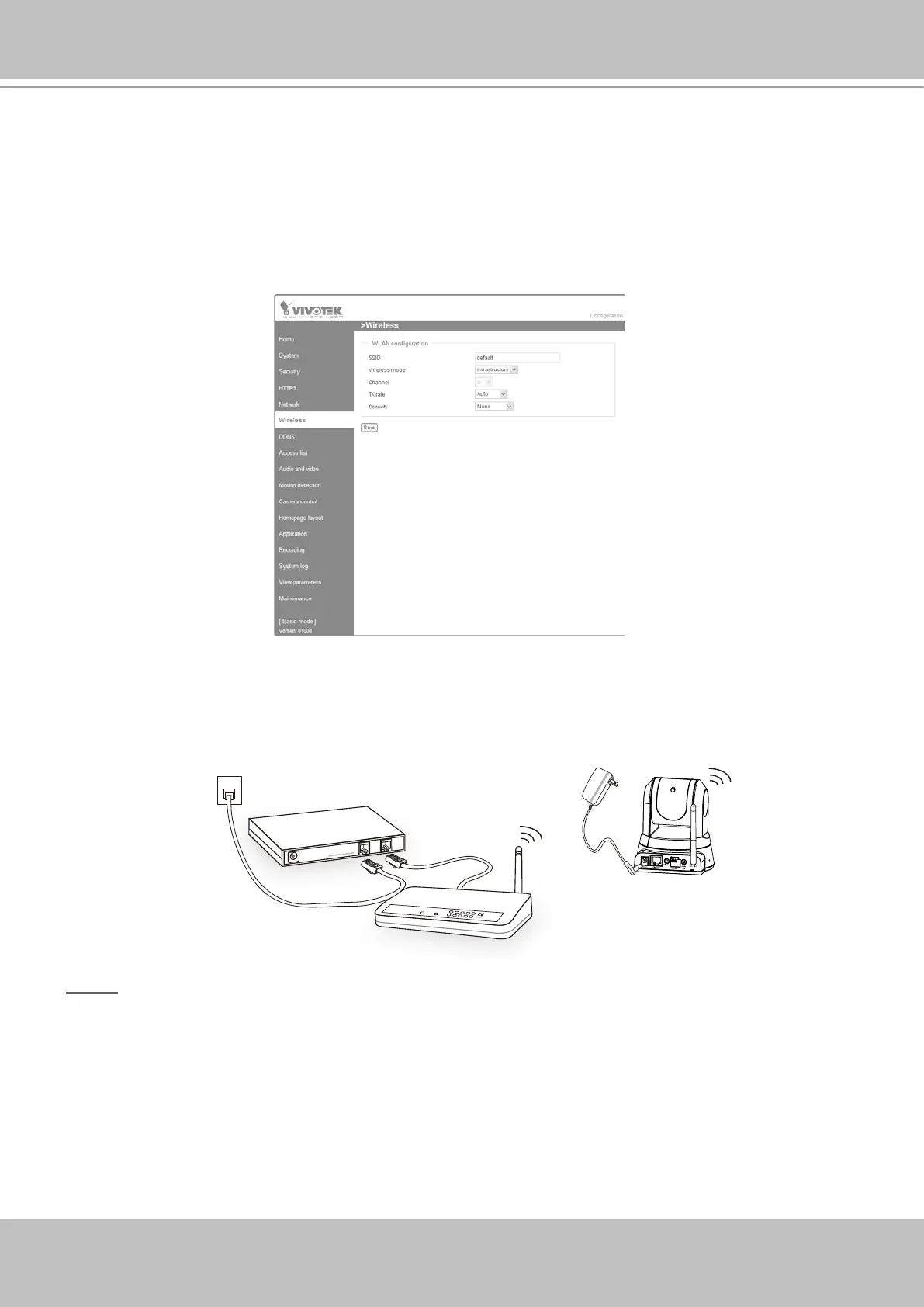
Set up the Network Camera through Wireless Connection (PZ7132 only)
1� Check the SSID currently set on your wireless access point (AP)�
2. Go to PZ7132's Conguration > Advanced mode > Wireless.
3� Type in the SSID consistent with the setting on your AP�
4� Select the Wireless mode as "Infrastructure"�
5� Click Save� The Network Camera starts to reboot�
6� Wait for the live image is reloaded to your browser� Then, unplug the power cable and
Ethernet cable from the Network Camera�
7� Replug the power cable to the camera� The Network Camera now operates in wireless mode�
NOTE
► SSID, abbreviated from Service Set Identier, is the name assigned to the wireless network.
The PZ7132's factory SSID setting is set to "default"�
► Select "Ad-Hoc" wireless mode if you want the PZ7132 to communicate without using an AP
or wireless router�
►
For detailed information about wireless connection, please refer to Wireless LAN on page 44�
POWER
COLLISION
LINK
RECEIVE
PARTITION
1
2
3
4
5
ADSL/Cab le/ Hu b
AP
PZ7132


 To Next Page
 Loading...










