VIVOTEK
70 - User's Manual
Measurement Window: This function allows users to set measurement window(s) for low light
compensation. For example, where low-light objects are posed against an extremely bright background.
You may want to exclude the bright sunlight shining through a building's corridor.
■ Full view: Calculate the full range of view and offer appropriate
light compensation.
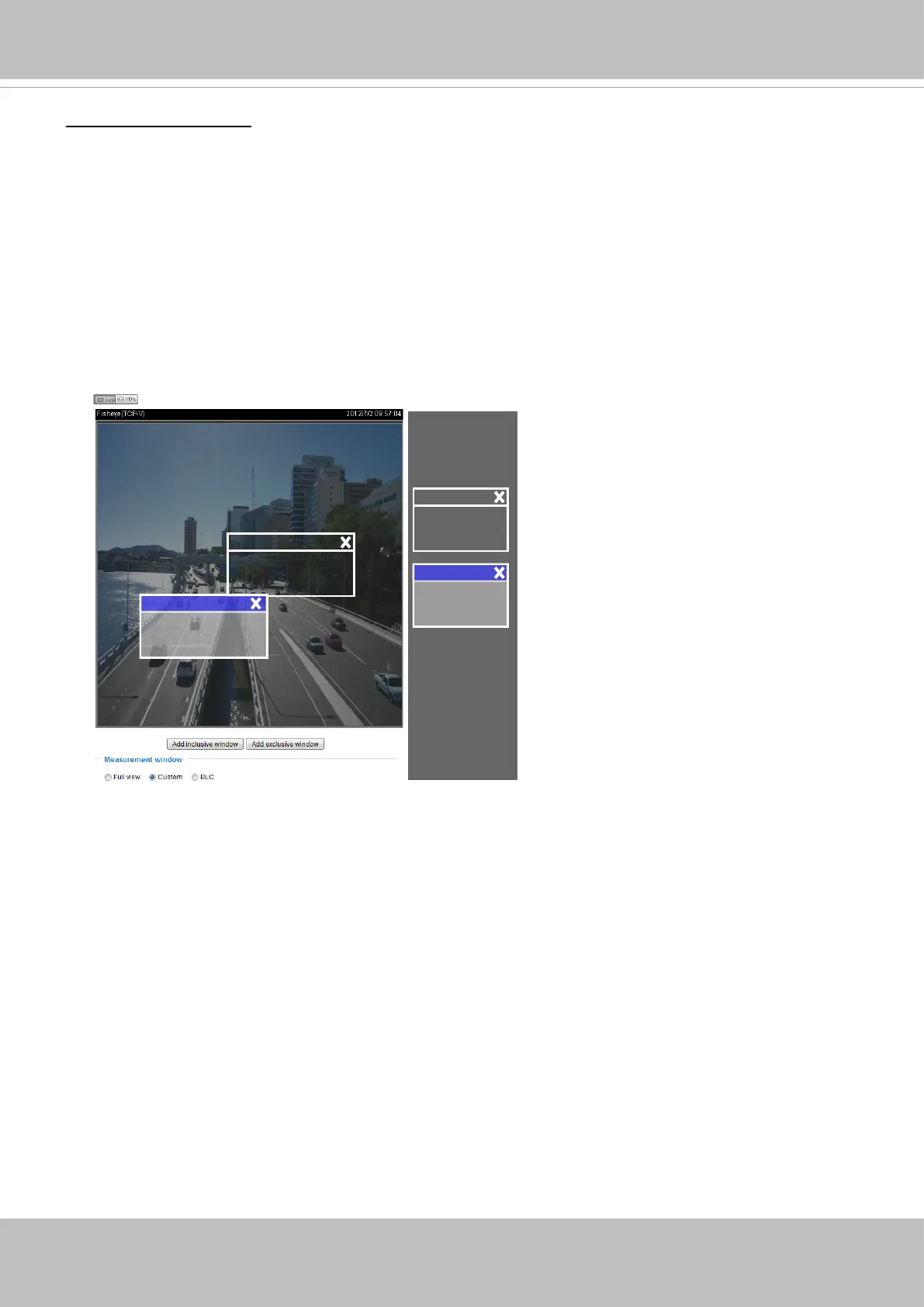
■ Custom: This option allows you to manually add customized windows as inclusive or exclusive regions.
A total of 10 windows can be congured. Please see below for details.
The inclusive window refers to the “weighed window“; the exclusive window refers to “ignored window“.
It adopts the weighed averages method to calculate the value. The inclusive windows have a higher
priority. You can overlap these windows, and, if you place an exclusive window within a larger inclusive
window, the exclusive part of the overlapped windows will be deducted from the inclusive window. An
exposure value will then be calculated out of the remaining of the inclusive window.
■ BLC (Back Light Compensation): This option will automatically add a “weighted region“ in the middle of
the window and give the necessary light compensation.
Include
Exclude
Weighted region
Ignored region
Include
Exclude
■
HLC: (Highlight Compensation). Firmware detects strong light sources and compensates on affected
spots to enhance the overall image quality. For example, the HLC helps reduce the glares produced by
spotlights or headlights.













 To Next Page