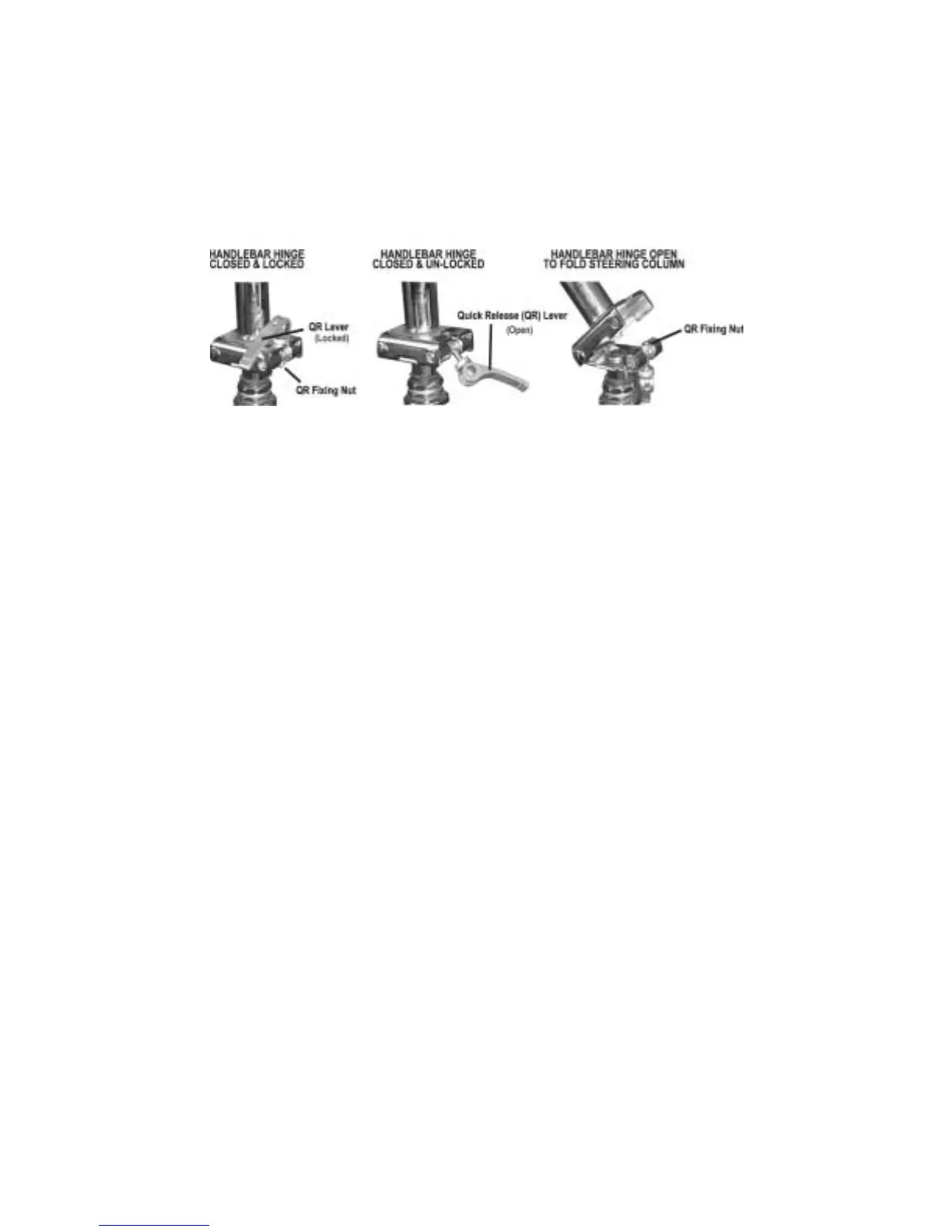
STEERING COLUMN OPERATION
The handle bar is designed for changing direction and
balancing. Do not use excessive force on it. Be careful
with brake and throttle cables. Make sure they are not
folded or damaged while folding or erecting the steering
column.
KICK-STAND
Make sure to correctly fold kick stand in before riding
your Viza scooter.
1. Raise the handlebar to its upright position.
2. While holding the Quick Release (QR) lever, slide the locking
shaft to the far right. This allows the square handlebar hinge
plate to rest on its mate.
3. While still holding the QR lever, slide the shaft to the far left.
4. With the QR lever in the open position, raise the QR lever up
into the slot of the upper square hinge plate. (If it is too tight
to go into the slot, adjust the QR fixing nut located on the op-
posite end of the QR shaft until the QR lever slides into the
slot. Do not over loosen the nut or the QR lever will not prop-
erly lock the hinge.
5. Close the QR lever by rotating the lever down toward the
square hinge, until the cam action of the QR has firmly tight-
ened the handlebar. If the QR does not close tightly, open the
QR lever and adjust the QR fixing nut until the QR tightens
tightly with the lever in the fully closed position while still al-
lowing the hinge to be folded.



 To Next Page