VIZIO E260MV User Manual
20
www.VIZIO.com
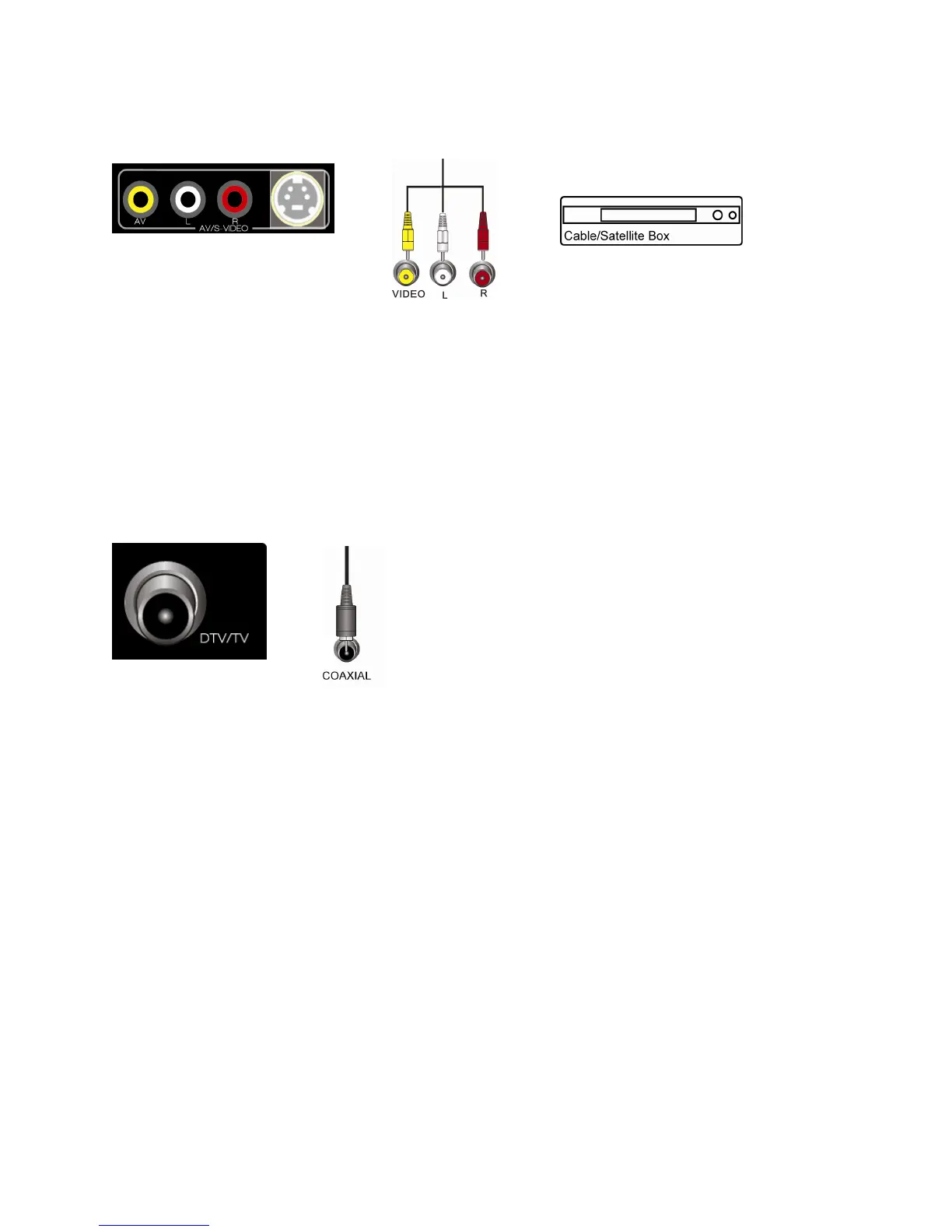
Using Composite Video (Compatible)
1. Turn off your HDTV and Cable/Satellite Box.
2. Connect the video cable (yellow) from your Cable/Satellite Box to the AV jack (yellow) on
your HDTV.
3. Connect the audio cables (white and red) from your Cable/Satellite Box to the
corresponding L and R AUDIO jacks on your HDTV.
4. Turn on your HDTV and Cable/Satellite Box.
5. Select AV using the INPUT button on the remote control, or directly by pressing the AV
button on the remote control.
Using Coaxial (Antenna) (Compatible)
1. Turn off the power to your HDTV.
2. Connect the coaxial (RF) connector from your Cable Set-Top Box or Satellite Set Top
Box to the DTV/TV connector on your HDTV.
3. Turn on the power to your HDTV.
4. Select TV using the INPUT button on the remote control, or directly by pressing the TV
button on the remote control.
5. Perform an Auto Channel scan. See Adjusting Your HDTV/TV Settings for more
information.


 To Next Page