VIZIO E422VA User Manual
26
www.VIZIO.com
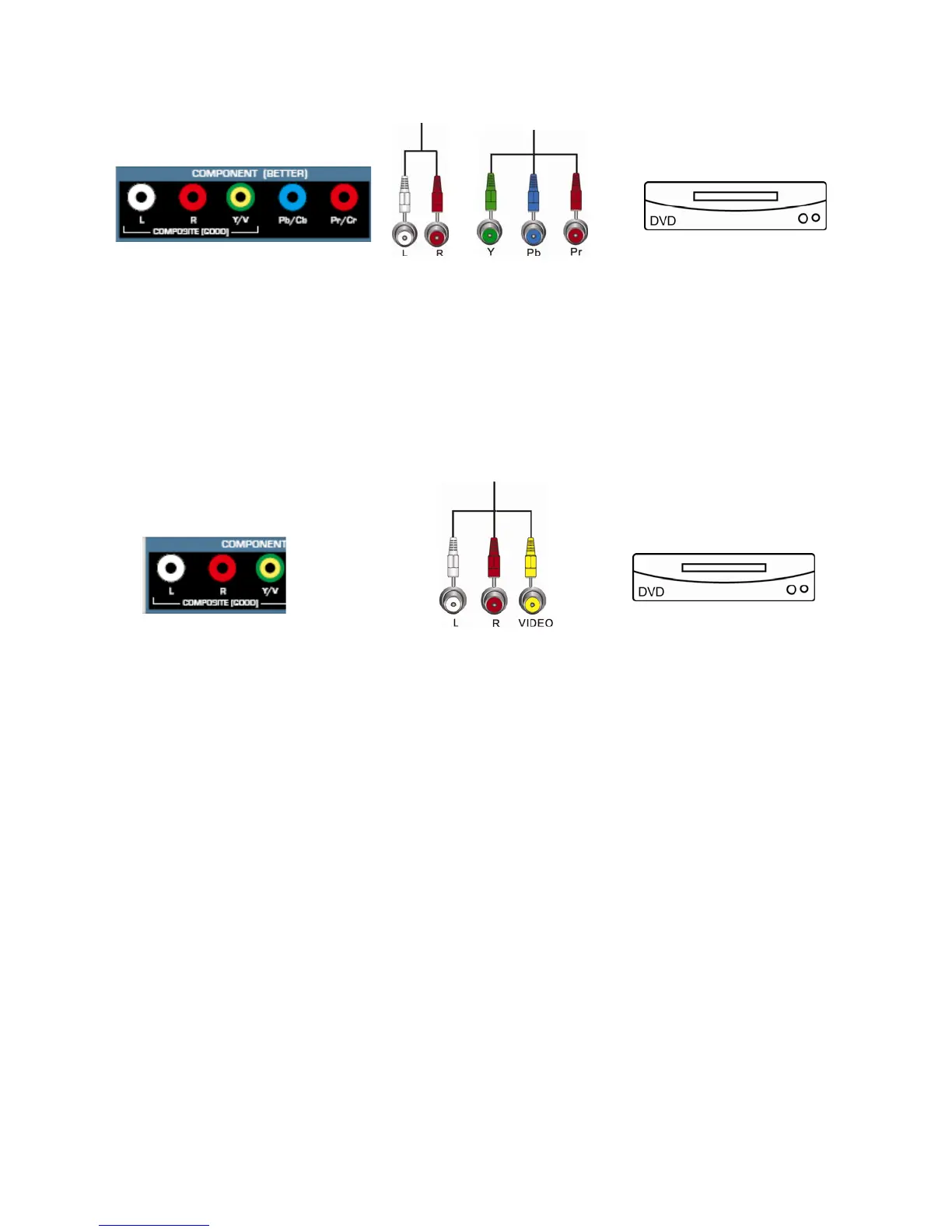
Using Component Video (Better)
1. Turn off the power to your HDTV and DVD player.
2. Connect the Component cable (green, blue, and red) from your DVD player to the COMPONENT
jacks on your HDTV.
3. Connect the audio cables (white and red) from your DVD player to the COMPONENT L and R
AUDIO jacks on your HDTV.
4. Turn on the power to your HDTV and DVD player.
5. Select COMP using the INPUT button on the remote control or side of the TV.
Using Composite (AV) Video (Good)
1. Turn off the power to your HDTV and DVD player.
6. Connect the Video cable (yellow) from your DVD player Box to the Y/V jack (green/yellow
connector) on your HDTV.
2. Connect the audio cables (white and red) on your DVD player to the L and R AUDIO jacks on
your HDTV.
3. Turn on the power to your HDTV and DVD Player.
4. Select AV using the INPUT button on the remote control or side of the TV.
Note: You can use your HDTV Component input to accept A/V signal (Composite) from a source
with A/V out, please plug your video signal (yellow connector) into the Component input (green
connector) and match up the audio connectors (R and L) for the sound. Expect to see a
black/white video in the Component input, if it is selected by accident.


 To Next Page