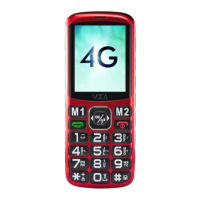
0: short press for space in typing text. In
home screen, long press for slient mode.
#: Short press to switch input method.
SOS key: Long press to trigger emergency
process . Short press to cancel the
previous trigger.
Natvigation Pad: It is short cut key in home
screen. It becomes natvigation pad after
pressing menu key.
Volume Boost Key: Short press will on/off
earpiece volume amplification switch, long
press will on/off FM radio.
M1: Quick dial in home screen, Move left or
go to previous track/file in other screen.
M2: Quick dial in home screen, Ok, confirm
or play in other screen.
M3: Quick dial in home screen. Move right,
or go to next track/file
2.6
2.7
2.8
2.9
2.10
2.11
2.12
2.13
3. SETTING UP YOUR PHONE
Please turn on the phone by long press the
Power key. Instructions normally start from the
home screen.
6
EN



 To Next Page