
 Need help?
Do you have a question about the volkano Scorpio VK-1121-WT and is the answer not in the manual?
Lists essential features of the earphones and the items included in the package.
Details technical aspects such as Bluetooth version, connectivity range, battery capacity, and driver size.
Visual guide identifying the LED indicators, touch buttons, charging ports, and magnetic pins.
Step-by-step guide for charging the charging case and earphones, including LED indicator meanings.
Instructions on how to turn the earphones on and off using the multi-function touch button.
Guides on pairing the earphones with each other and with external Bluetooth-enabled devices.
Instructions for answering, rejecting, and ending phone calls using the earphone touch controls.
Details touch operations for music playback, volume adjustment, track navigation, and voice assistant activation.
Guidance on finding Bluetooth settings on iPhone, iPad, iPod, and Android devices for pairing.
Solutions for common issues such as device not found, pairing failures, and unstable connections.
Addresses problems related to music playback, call handling, and remote control functions.
Important safety guidelines for product use, children, water exposure, physical damage, and battery handling.
Instructions for safe cleaning methods using a soft cloth and proper storage conditions.
Guidelines for correct product and battery disposal according to European directives and regulations.
Statement regarding trademark ownership for Bluetooth and product names, and usage terms.
Details the 12-month limited warranty, including exclusions, proof of purchase, and return procedures.
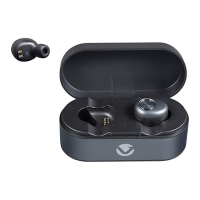
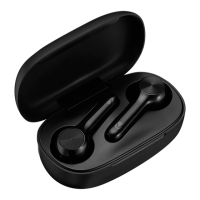
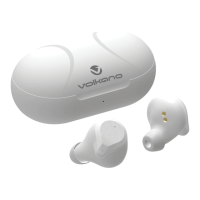
The Volkano Scorpio Series True Wireless Stereo Earphones are a compact and versatile audio solution, designed for everyday use with a focus on convenience and portability. These earphones utilize True Wireless Bluetooth® Technology, offering a cable-free listening experience and the freedom of movement.
At its core, the Volkano Scorpio Series provides high-quality stereo audio playback and hands-free calling. The earphones are equipped with a built-in microphone, enabling users to make and receive calls directly through the earbuds when paired with a smartphone. Touch controls integrated into each earphone allow for intuitive management of audio playback and calls. Users can play or pause tracks, navigate to the next or previous track, and adjust volume directly from the earphones. Furthermore, the earphones are compatible with voice assistants like Siri and Google Assistant, allowing for voice-activated commands and queries.
The device comes with a charging case that not only protects the earphones but also provides extended battery life. The case itself is rechargeable via a Type-C USB port, ensuring broad compatibility with modern charging solutions. The earphones automatically power on when removed from the charging case and power off when reinserted, streamlining the user experience. They are designed for auto-reconnect, meaning once paired with a device, they will automatically connect again when in range.
The Volkano Scorpio Series earphones are designed for ease of use from the moment they are unboxed. Before initial use, it is recommended to fully charge both the charging case and the earphones.
To charge the charging case, connect the provided Type-C Charging Cable to the DC 5V charging slot on the case. The other end of the USB cable should be connected to a wall charger or an available USB port on a compatible device. A blue LED indicator light on the case will pulse to show that charging is in progress. If the LED indicator pulses repeatedly, it indicates a flat battery. Once fully charged, the red LED will display a solid light.
To charge the earphones, simply place them into the charging case. A red light will illuminate on the earphones to indicate that charging has begun. This red light will remain lit during charging and will turn off once charging is complete. The earphones will automatically power on when removed from the charging case. Conversely, they will power off when inserted into the charging case, even if they were powered on beforehand.
To manually switch on an earphone, touch and hold the Multi-Function Touch Button for approximately 3 seconds until a blue LED light turns on. To switch off an earphone, touch and hold the Multi-Function Touch Button for about 3 seconds until the LED lights turn on and then off. A voice prompt will confirm that the earphones have been powered off. It's important to note that earphones need to be turned on individually if not removed from the case.
When the earphones are turned on, they will automatically pair with each other, establishing a stereo connection. This allows for individual use of each earphone if desired.
To use the earphones with a Bluetooth® device, ensure the device's Bluetooth® function is enabled. Search for "Scorpio" in the list of available Bluetooth® devices and select it to confirm pairing. Once successfully paired, the earphones will emit a beep, indicating they are ready for calls and music playback. This pairing process only needs to be done once per device.
When paired with a smartphone, the earphones enable hands-free calling. To answer an incoming call, simply touch the Multi-Function Touch Button on either earphone. To reject an incoming call, touch and hold the Multi-Function Touch Button on either earphone. To end an ongoing call, touch the Multi-Function Touch Button on either earphone.
To activate Siri or Google Assist, touch and hold either earphone's Multi-Function Touch Button. To turn off Siri or Google Assist, touch and hold either earphone's Multi-Function Touch Button again.
Proper care and maintenance are essential to ensure the longevity and optimal performance of the Volkano Scorpio Series earphones.
By following these guidelines, users can ensure a safe and enjoyable experience with their Volkano Scorpio Series True Wireless Stereo Earphones.
 General
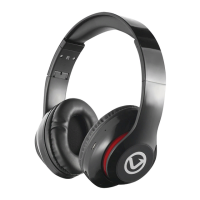
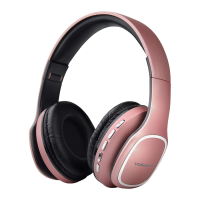
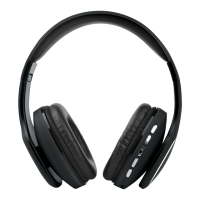
| Type | Over-ear |
|---|---|
| Connectivity | Wireless |
| Bluetooth Version | 5.0 |
| Operating Distance | 10 m |
| Driver Size | 40mm |
| Impedance | 32 Ω |
| Sensitivity | 108 dB |
| Frequency Response | 20Hz - 20kHz |
| Charging Time | 2 hours |
| Microphone | Yes |
| Cable Length | 1.2m |
| Features | Foldable design |
| Connector | 3.5mm |


 To Next Page