
 Need help?
Do you have a question about the volkano VK-1120-BK and is the answer not in the manual?
How to charge the charging case using a USB cable and indicator lights.
How to charge the earphones by placing them in the case and their status indicators.
Instructions on how to turn the earphones on and off using the touch button.
Process for the earphones to automatically pair with each other when turned on.
Steps to connect the earphones to a Bluetooth-enabled device, including music and call functions.
How to answer, reject, and end calls using the earphone's multi-function touch button.
Guide on finding the Bluetooth settings on different devices (iPhone/iPad, Android).
Details on controlling playback, volume, and track navigation using touch gestures.
Instructions for activating and deactivating voice assistants like Siri and Google Assistant.
Specific operations for handling incoming and ongoing calls using touch controls.
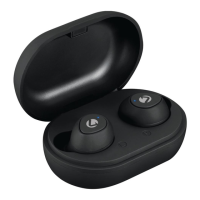
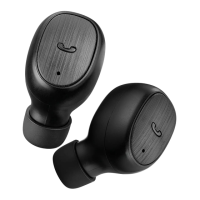
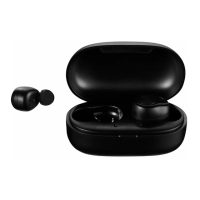
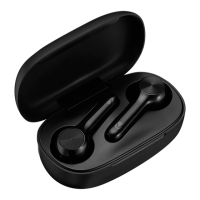
The Volkano Taurus Series True Wireless Earphones are a compact and feature-rich audio solution designed for everyday use. These earphones offer a truly wireless experience, allowing for freedom of movement without the hassle of tangled cables. They are compatible with both Siri and Google Assistant, providing convenient voice control for various tasks.
The primary function of these earphones is to provide high-quality audio playback and hands-free calling. They utilize True Wireless Bluetooth® Technology to connect wirelessly to your smartphone, tablet, or other Bluetooth-enabled devices. Once paired, users can enjoy music, podcasts, and other audio content, as well as make and receive phone calls.
The earphones come with a portable charging case that not only protects them but also recharges them on the go. This case extends the overall playtime, ensuring that your earphones are ready for use whenever you need them. The USB Type-C charging port on the case allows for convenient and fast charging.
True Wireless Bluetooth® Technology: The earphones connect wirelessly to each other and to your device, offering a seamless and untethered listening experience.
Touch Control: Each earphone is equipped with a Multi-Function Touch Button, allowing users to control various functions with simple taps. This includes playing/pausing music, skipping tracks, adjusting volume, and managing calls.
Pocket-Sized Design: The compact size of both the earphones and the charging case makes them highly portable and easy to carry in a pocket or small bag.
Hands-Free Calling: With a built-in microphone on each earphone, users can answer, reject, and end calls directly from the earphones without needing to interact with their phone.
Extended Playtime with Charging Case: The charging case provides multiple recharges for the earphones, significantly extending their total playback time. This is ideal for long commutes, travel, or extended listening sessions.
USB Type-C Charging: The charging case features a modern USB Type-C port, offering reversible connectivity and often faster charging speeds compared to older USB standards.
Auto-Reconnect: Once initially paired, the earphones are designed to automatically reconnect to your device when taken out of the charging case, streamlining the user experience.
Siri and Google Assistant Compatibility: Users can activate their device's voice assistant (Siri for iOS, Google Assistant for Android) directly from the earphones, enabling voice commands for navigation, information retrieval, and other smart functions.
Pairing with Each Other: When powered on, the left and right earphones automatically pair with each other, creating a stereo sound experience. There is also an option to use a single earphone independently.
Pairing with Bluetooth® Devices: To connect to a smartphone or tablet, users simply need to enable Bluetooth on their device, search for "Taurus" in the list of available devices, and confirm pairing. A beep indicates successful pairing.
Charging the Case: The charging case is charged by connecting the provided USB Type-C cable to its charging port and then to a wall charger or a compatible USB port. A red LED indicator light pulses during charging and remains solid when fully charged.
Charging the Earphones: The earphones are charged by placing them into the charging case. A red light pulses on the earphones to indicate charging, remains lit during charging, and turns off when complete. The earphones automatically power off when placed in the case, even if they were on.
Switching On/Off: To switch on, touch and hold the Multi-Function Touch Button for about 3 seconds until the red LED lights turn on. To switch off, touch and hold the button for about 3 seconds until the LED lights turn on and then off, accompanied by a voice prompt. Each earphone needs to be turned on individually if not using the auto-on feature from the charging case.
Troubleshooting: The manual provides guidance for common issues such as difficulty finding Bluetooth devices, pairing problems, music/call playback issues, driver requirements for computers, and remote control functionality. It emphasizes checking pairing mode, effective working range, smartphone compatibility with A2DP and HSF profiles, and device support for AVRCP.





 To Next Page
 General