
 Need help?
Do you have a question about the volkano Virgo Series and is the answer not in the manual?
Instructions on how to charge the charging case using a USB cable and wall charger.
Details on placing earphones in the case for charging and indicator lights.
How to turn the earphones on and off using the multi-function button.
Explains functions like Play/Pause, Next Track, and Previous Track via button presses.
Instructions for activating and turning off Siri/Google Assistant.
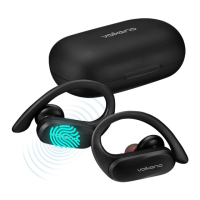
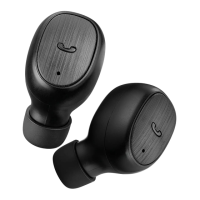
The Volkano Virgo Series True Wireless Earphones are a compact and portable audio solution designed for everyday use, offering a blend of convenience and functionality. These earphones are engineered for a true wireless experience, meaning there are no cables connecting the two earpieces or to your audio source, providing maximum freedom of movement.
At its core, the Volkano Virgo Series provides high-quality stereo audio playback from any Bluetooth®-enabled device. This allows users to enjoy music, podcasts, audiobooks, and other audio content wirelessly. The earphones are equipped with Bluetooth® technology, enabling seamless pairing with smartphones, tablets, and other compatible devices. Once paired, the earphones maintain a stable connection within an effective working range, ensuring uninterrupted audio streaming.
Beyond audio playback, these earphones also facilitate hands-free calling. Integrated microphones allow users to answer, reject, and end calls directly through the earphones, without needing to interact with their connected smartphone. This feature is particularly useful for multitasking or when the phone is not immediately accessible. The multi-function button on each earphone serves as the primary control interface for managing both audio playback and phone calls.
The Volkano Virgo Series is designed to be compatible with popular voice assistants, including Siri and Google Assistant. This integration allows users to activate their preferred voice assistant with a simple press and hold gesture, enabling voice commands for various tasks such as setting reminders, checking weather, or initiating calls, all without touching their phone.
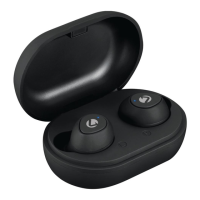
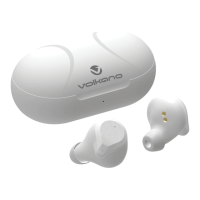
The included charging case is an integral part of the system, serving multiple functions. It not only protects the earphones when not in use but also acts as a portable power bank, extending the earphones' usage time significantly. The case itself is rechargeable via a standard USB charging cable, making it easy to power up using a wall charger or any available USB port on a compatible device. LED indicator lights on both the earphones and the charging case provide visual feedback on charging status and battery levels.
The Volkano Virgo Series True Wireless Earphones are designed for ease of use from the moment they are unboxed. Before initial use, it is crucial to fully charge both the charging case and the earphones to ensure optimal performance. The charging case features a USB charging port, and a red LED indicator light pulses during charging, becoming solid once fully charged. The earphones themselves charge when placed inside the case, with a white light indicating active charging, which then turns off upon completion. A low battery warning voice message alerts users when only a few minutes of playtime remain, prompting them to recharge.
Switching on the earphones involves pressing and holding the multi-function button on each earphone for approximately three seconds. A voice prompt confirms that the earphones have been powered on. For a true stereo experience, both earphones are designed to pair with each other automatically a few seconds after being powered on. Alternatively, they can be used individually, offering flexibility for users who prefer single-ear use.
Pairing the earphones with a Bluetooth® device is a straightforward process. Users need to enable Bluetooth® on their device and search for "Virgo" in the list of available devices. Once selected and confirmed, the earphone will emit a beep, signifying a successful connection. This pairing process only needs to be done once per device.
Controlling audio playback and calls is intuitive. A short press of the multi-function button on either earphone will play or pause music. To navigate tracks, a double press on the right earphone advances to the next track, while a double press on the left earphone returns to the previous track. For phone calls, a short press answers an incoming call or ends a call in progress. To reject an incoming call, a double press is required. Additionally, a triple press on the multi-function button can redial the last dialed number. Activating or deactivating Siri or Google Assistant is achieved by pressing and holding the multi-function button.
The in-ear design of the earphones, coupled with multiple earphone cap sizes, ensures a comfortable and secure fit for various users, enhancing the listening experience and providing passive noise isolation.
Proper maintenance is key to prolonging the lifespan and ensuring the continued performance of the Volkano Virgo Series True Wireless Earphones. Before any cleaning or maintenance, it is essential to ensure that the earphones are turned off.
For general cleaning, the surface of the earphones and the charging case can be wiped down with a soft, slightly damp cloth. It is crucial to avoid using harsh or abrasive cleaning chemicals or materials, as these can damage or scratch the surface finish of the device. Gentle cleaning helps maintain the aesthetic appeal and prevents the accumulation of dirt or grime that could affect functionality.
Storage conditions also play a significant role in maintenance. The earphones and charging case should not be exposed to direct sunlight or high temperatures for extended periods. Similarly, storing them in temperatures exceeding 60°C should be avoided. The battery, in particular, should not be exposed to excessive heat sources such as fire. Storing the device in a cool, dry place is recommended to protect the internal components and battery integrity.
Users should also be mindful of water exposure. The earphones are not designed for use near water or in areas where they can come into contact with liquids. If the product accidentally comes into contact with water while charging, it poses a safety hazard and should be immediately disconnected. Handling the earphones if they have been dropped into water or any other liquid is not advised.
To prevent overcharging, which can shorten the lifespan of the built-in battery and potentially cause overheating, users should monitor the charging process. If the battery shows signs of overheating, smoke, or fumes during charging, the charging cable should be removed immediately. Disassembling the battery or disposing of it in a fire is strictly prohibited due to safety risks.
The product is designed for household use and is not intended for commercial use. It should not be used by small children or individuals with diminished mental capabilities without supervision from a guardian or parent. All optional accessories, small parts, and packaging should be kept out of reach of babies and small children to prevent choking hazards.
In case of malfunctions, drops, or damage, the device should not be operated. For troubleshooting, the manual provides guidance on common issues such as pairing difficulties, inability to find Bluetooth® devices, or problems with music playback and call answering. If the device does not play music or answer calls when connected, users should ensure their smartphone supports A2DP and HSF profiles and is within effective range. For computer pairing issues, compatible drivers should be sought online. If remote control functions (Pause, Play, Previous, Next) are not working, it's important to verify that the paired Bluetooth® device supports the AVRCP profile.
The Volkano Virgo Series comes with a standard 12-month limited warranty against manufacturing defects and faults, underscoring the importance of retaining proof of purchase and original packaging for any exchange or repair needs. This warranty does not cover damage from excessive wear and tear, misuse, neglect, accidental damage, force majeure, or use contrary to the instructions.
 General
| Bluetooth Version | 5.0 |
|---|---|
| Driver Size | 40 mm |
| Impedance | 32 Ω |
| Sensitivity | 110 dB |
| Charging Time | 2 Hours |
| Charging | Micro USB |
| Wireless Range | 10m |
| Frequency Response | 20Hz-20kHz |
| Connector | 3.5 mm |


 To Next Page