34
b) Inserting several rechargeable batteries and charging them
automatically
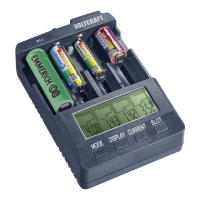
• Insert the rst rechargeable battery in a charging slot in the correct polarity. For this, pull the
sliding contact back and let the contact slide against the rechargeable battery. Observe the
polarity information in the charging slot and ensure good contact.
• After inserting each, the cell voltage of the rechargeable battery will be displayed in the
corresponding display for approx. 3 seconds. Then the pre-set charging current will be
displayed for 3 seconds.
• If no button is pushed within these 6 seconds, charging will take place automatically at a
charging current of 500 mA. This current is specied and can be used for most rechargeable
batteries without danger of overcharging.
• Repeat this with up to 4 rechargeable batteries.
• After the end of charging, charging is ended automatically, or maintenance charging starts
for Ni-Cd and Ni-MH rechargeable batteries for each cell separately. The end of charging is
signalled with the display “FuLL”.
• Remove the full rechargeable battery from the charging slot and disconnect the charger if no
rechargeable battery is in the charging slot anymore.
c) Inserting a rechargeable battery and charging it manually
• Insert the rechargeable battery in a charging slot in the correct polarity. For this, pull the
sliding contact back and let the contact slide against the rechargeable battery. Observe the
polarity information in the charging slot and ensure good contact.
• After insertion, the cell voltage of the rechargeable battery will be displayed for approx.
3 seconds. Then the pre-set charging current will be displayed for 3 seconds.
• Within these 6 seconds, push the “CURRENT” (8) button to set the charging current for your
rechargeable battery. Every push will change the current value. After this setting, the current
display will continue to ash for another 10 seconds. The current value can be corrected
again during this time. To abbreviate the setting, you can push the “SLOT” (9) button to
conrm. Charging begins.
• After the end of charging, charging is ended automatically, or maintenance charging starts
for Ni-Cd and Ni-MH rechargeable batteries. The end of charging is signalled with the
display “FuLL”.
• Remove the full rechargeable battery from the charging slot and disconnect the charger.





 To Next Page