29
b) Display Lighting
The display lighting will switch on every time a button is pushed and will turn off again auto-
matically after approx. 30 seconds. To keep the lighting on permanently, keep the “DISPLAY”
button (7) pushed for at least 3 seconds. The lighting will remain on until the next deactivation.
The lighting can also be deactivated again manually in permanent light mode. Keep the “DIS-
PLAY” button (7) pushed for at least 5 seconds for this. The lighting will switch off. Automatic
mode (approx. 30 seconds when a button is pushed) is active again.
c) Button Functions
“MODE” button
The “MODE” button permits selection of the rechargeable battery programme.
“DISPLAY” button
The “DISPLAY” button permits switching of the displayed measuring parameters. Each push
will switch the display.
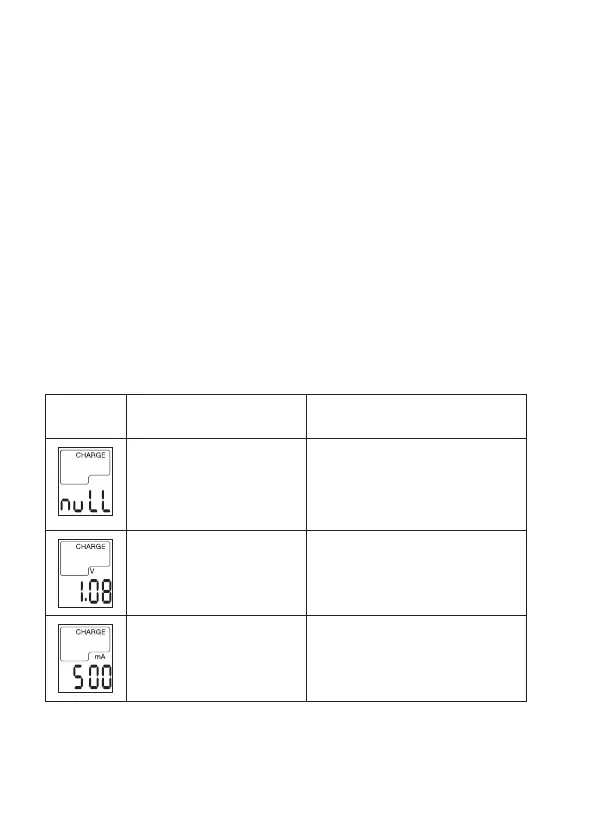
The following measuring parameter displays are possible:
Display Parameter Possible rechargeable battery
programmes
No rechargeable battery
recognised or no rechargeable
battery inserted.
The cell voltage shows the
current rechargeable battery
voltage.
Charging (CHARGE)
Discharging (DISCHARGE)
Test (CHARGE/DISCHARGE TEST)
The currently measured current
is displayed.
Charging (CHARGE)
Discharging (DISCHARGE)
Test (CHARGE/DISCHARGE TEST)





 To Next Page