25
5. Battery replacement
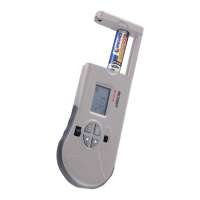
When the low battery icon ashes in the display (3), replace the battery.
1. Switch off the tester through the “ON/OFF” switch (9) and remove all batteries under testing.
2. Open the battery compartment (10).
3. Insert two LR44/AG-13/L1154 button cells into the battery compartment (10) while observing the polarity (“+” = positive). The
positive pole of the button cells should face left.
4. Close the battery compartment (10).
6. Operation
Test batteries should be removed from the appliance before measurement.
1. Switch on the tester through the “ON/OFF” switch (9).
2. Press the “MODE/START” button (4) to set the rated voltage of the test battery. The voltage selection indicator will ash.
3. Press “
” (7) or “ ” (8) button to choose the battery voltage (1.2, 1.5, 3, 6, 9, 12V).
4. Press the key “SET” to conrm the selected test voltage.








 To Next Page