49
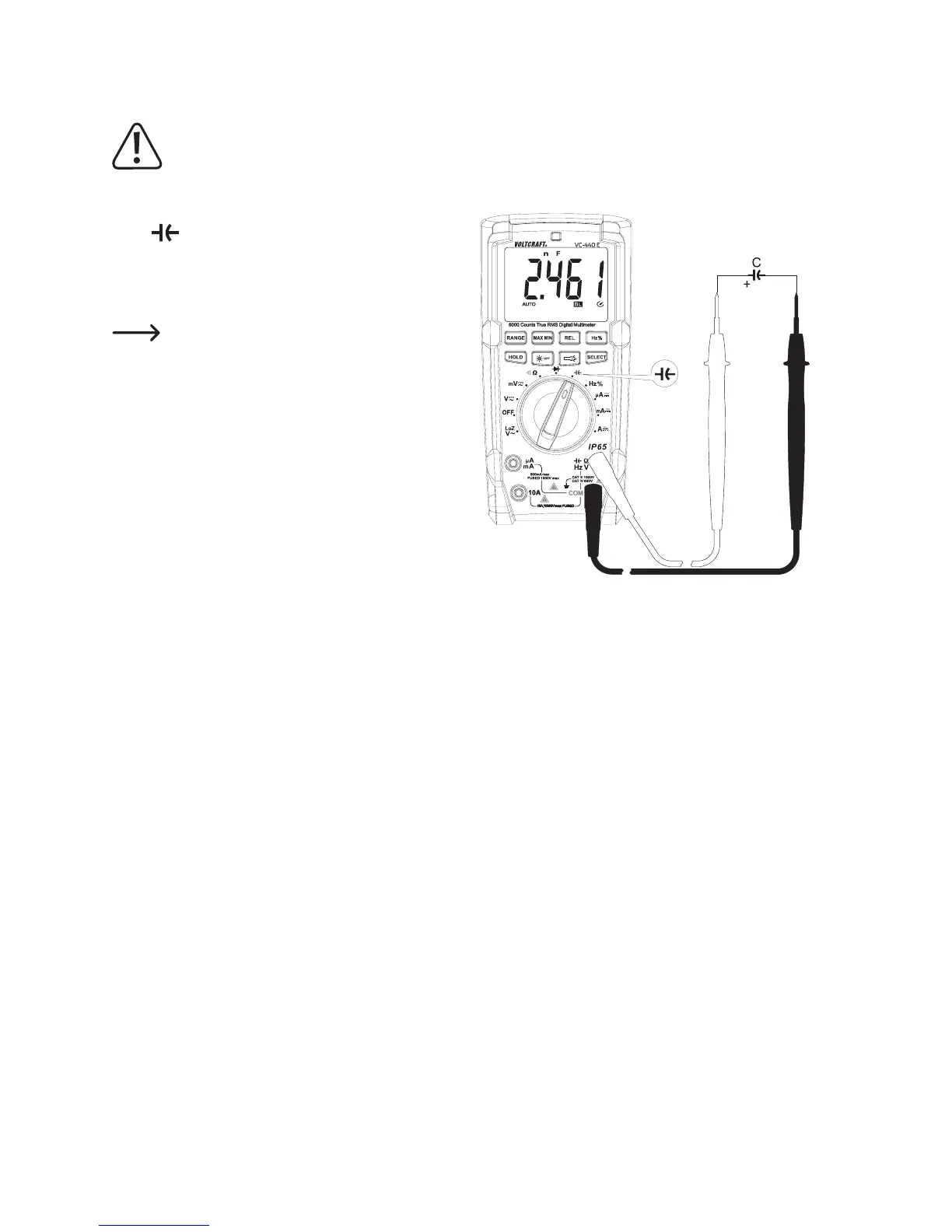
j) Capacity Measuring
Make sure that all circuit parts, circuits and components and other objects of measurement are
disconnected from the voltage and discharged.
Always observe polarity with electrolyte capacitors.
- Turn the DMM on and select measuring function “Capac-
ity”
- PlugtheredmeasuringlineintotheΩmeasuringjack
(E) and the black measuring line into the COM measur-
ing jack (D).
Due to the sensitive measuring input, the display
may show a value if the measuring lines are
“open”.Bypressingthebutton“REL”,thedisplay
issetto“0”.TheAutorangefunctionremainsac-
tive.
- Connect the two measuring prods (red = plus/black = mi-
nus) with the object to be measured (capacitator). After
a short time the display shows the capacity. Wait until
the displayed value has stabilised. This may take a few
seconds for capacities of >40 µF.
- If“OL”(overload)appearsonthedisplay,youhaveex-
ceeded the measuring range.
- Remove the measuring lines from the object to be meas-
ured after completion of the measurement and switch off
the DMM.


 To Next Page