47
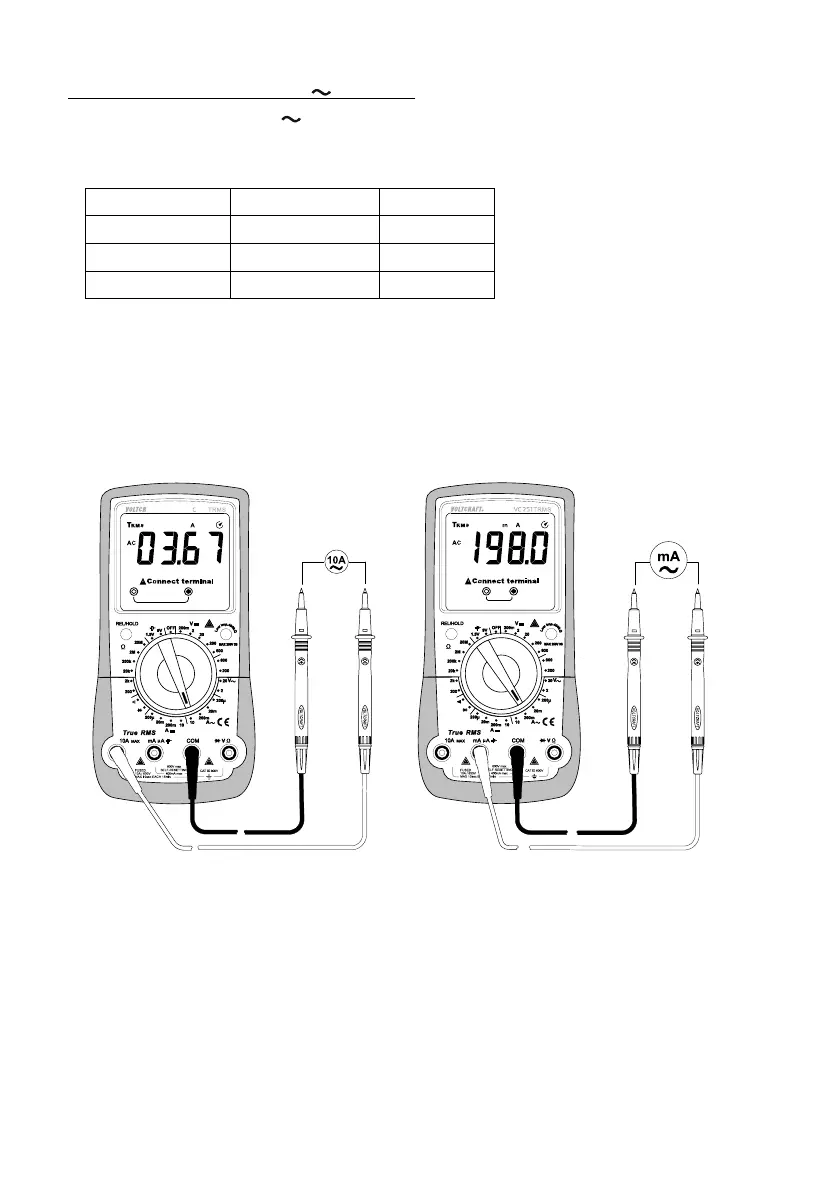
Follow the steps below to measure AC currents (A):
- Switch on the DMM and select “A
” mode.
- The table shows the different measuring modes and the corresponding measurement ranges. Select the desired
measurement range and connect the corresponding terminals.
Measurement mode Measurement range Terminals
µA <200 µA COM + mAµA
mA 200 µA - 199 mA COM + mAµA
A 200 mA – 10 A COM + 10A
- Insert the red lead into the mA µA or 10 A terminal. Plug the black test lead into the COM terminal.
- Connect the two measuring probes in series to the object that you want to measure (e.g. battery or circuit). The
electrical circuit must be disconnected before you connect the probes.
- Reconnect the circuit. The measurement will appear on the display.
- After measuring, disconnect the circuit and remove the test leads from the measured object. Switch off the DMM.



 To Next Page