10 Infotainment system
CD functions
10
``
* Option/accessory, for more information, see Introduction.
237
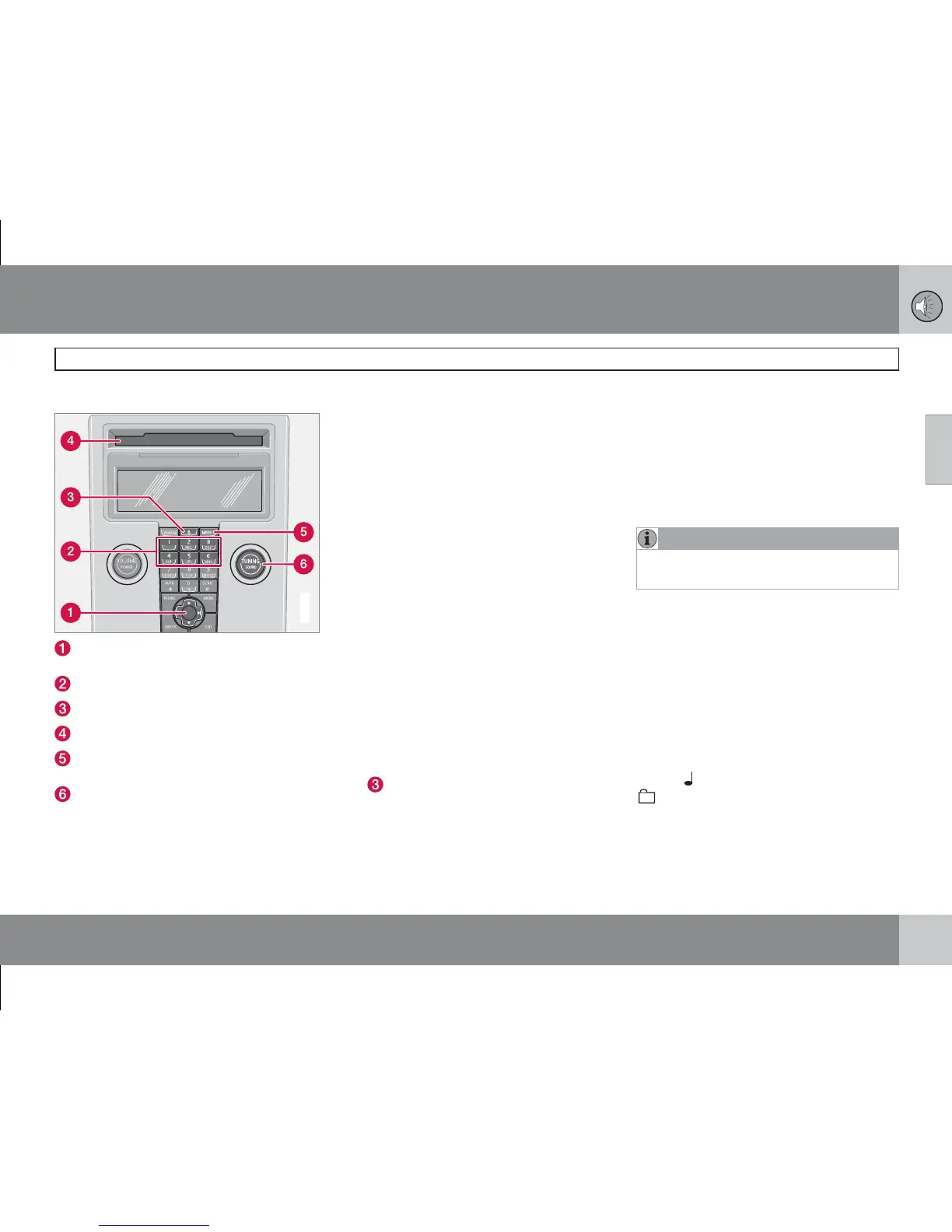
CD function controls
G019807
Navigation button – Fast forward/rewind,
track selection and menus
CD changer position selection*
CD insertion/eject
CD insertion/eject slot
MODE - Audio source selection CD or
AUX*
TUNING - Knob for track selection
Starting playback (CD player)
If a music CD is in the player when the audio
system is in CD mode then playback is started
automatically. Otherwise, load a disc and
change to CD mode by pressing MODE.
Starting playback (CD changer*)
If a CD position with a music CD is already
selected when the audio system is activated
then playback starts automatically. Otherwise
change to CD changer mode using MODE and
select a disc with the number buttons 1–6 or
Up/Down on the navigation button.
Insert a CD
1.
Select an empty position with buttons 1–
6 or Up/Down on the navigation button.
> An empty position is marked on the dis-
play. The text
Insert disc shows that a
new disc can be inserted. The
CD changer can hold up to 6 CD discs.
2. Inserting a CD in the CD changer.
CD eject
A CD will stay in the ejected position for
approx. 12 seconds. Following which it is re-
inserted in the player and playback continues.
Eject individual discs by pressing the eject but-
ton
.
Eject all discs with a long press on the eject
button. The entire magazine is emptied disc by
disc. The message Eject all is shown in the
display.
Pause
If the volume is turned down completely, the
CD player is stopped. The player is restarted
when volume is increased.
Audio files*
The CD player also supports MP3 and WMA
format audio files.
NOTE
Certain types of copy-protected audio files
cannot be read by the player.
When a CD containing audio files is inserted
into the player the disc's directory structure is
read in. It may take a while before playback
starts due to the quality of the disc.
Navigation and playback
If a disc containing audio files is inside the
CD player then ENTER displays the disc's
directory structure. The directory structure is
navigated in the same way as the audio sys-
tem's menu structure. Audio files have the
symbol
and directories have the symbol
. Start audio file playback with ENTER.
When the playback of a file is finished the play-
back of the other files in the same directory
continues. Directory change takes place auto-








 To Next Page