10 Infotainment system
Bluetooth handsfree*
10
``
* Option/accessory, for more information, see Introduction.
251
General
G029503
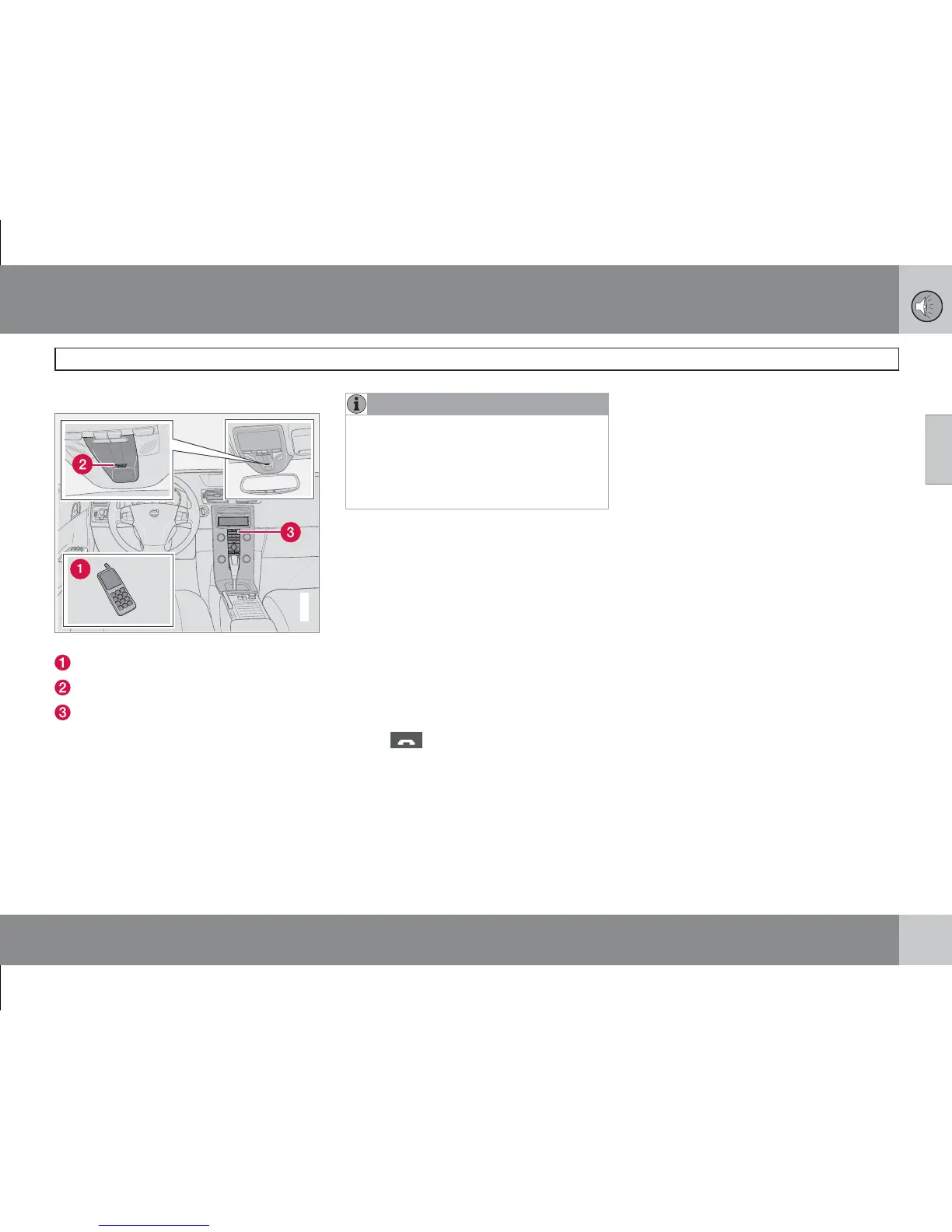
System overview.
Mobile phone
Microphone
Centre console
Bluetooth
TM
A mobile phone equipped with Bluetooth
TM
can be connected wirelessly to the audio sys-
tem. The audio system then works handsfree,
with the option to control a range of the mobile
phone's functions remotely. The microphone is
fitted in the roof console (2). The mobile phone
can always be operated by its own keys irre-
spective of whether or not it is connected.
NOTE
Only a selection of mobile phones are fully
compatible with the handsfree function.
Volvo recommends that you seek assis-
tance from an authorised Volvo dealer or
www.volvocars.com for information on
compatible phones.
Menus and controls
The menus are navigated using the control
panel in the centre console (3), see page 243.
Remember
The menus are controlled from the centre con-
sole and the steering wheel keypad. For gen-
eral information on menus, see page 248.
Activating/deactivating
A short press on PHONE activates the hands-
free function. The text PHONE at the top of the
display shows that it is in phone mode. The
symbol
shows that the handsfree func-
tion is active.
One long press on PHONE deactivates the
handsfree function and disconnects a con-
nected phone.
Connect mobile phone
A mobile phone is connected in different ways
depending on whether or not it has been con-
nected previously. To connect a mobile phone
for the first time, follow the instructions below:
Alternative 1 - via the car's menu system
1. Make the mobile phone detectable/visible
via Bluetooth
TM
, see the mobile phone's
manual or www.volvocars.com.
2. Activate the handsfree function with
PHONE.
>
Menu option
Add phone appears on
the display. If one or more mobile
phones have already been registered
then these are also shown.
3.
Select Add phone.
> The audio system searches for mobile
phones in the vicinity. The search takes
approximately 30 seconds. The mobile
phones detected are specified with their
respective Bluetooth
TM
name in the dis-
play. The handsfree function's
Bluetooth
TM
name is shown in the
mobile phone as
My Car.
4. Choose one of the mobile phones in the
audio system display.
5. Enter the number series shown in the audio
system display via the mobile phone key-
pad.







 To Next Page