10 Infotainment system
Phone functions*
10
``
* Option/accessory, for more information, see Introduction.
243
Double SIM cards
Many network operators offer two SIM cards
for the same phone number. The extra SIM
card can be used in the car.
Inserting the SIM card
1. Switch off the phone and open the glove-
box.
2. Pull out the SIM card holder from the SIM
card reader, see illustration on page 242.
3. Position the SIM card in the holder with the
metal surface visible. The bevelled edge of
the SIM card should align with the bevel of
the SIM card holder.
4. Carefully press in the SIM card holder.
Menus
Page 248 describes how to control phone
functions with the menu system.
Traffic safety
For safety reasons, parts of the phone menu
system cannot be accessed at speeds in
excess of 8 km/h.
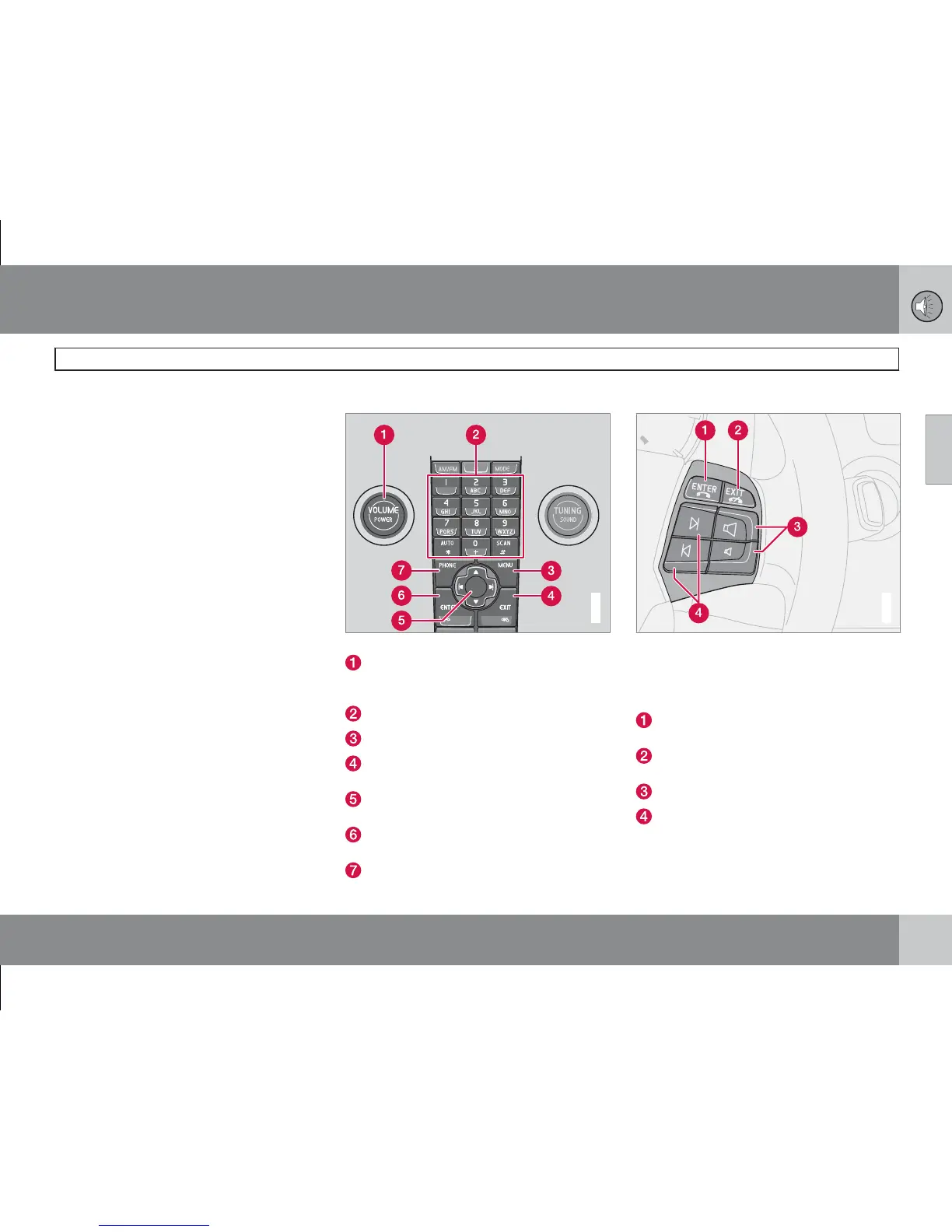
Phone controls
G019809
Centre console control panel.
VOLUME - Control the background vol-
ume from the radio, for example, during a
call
Number and letter buttons
MENU - Opens the main menu
EXIT - End/refuse calls, clear entered char-
acters
Navigation button – Scroll in menus and
character rows
ENTER – Accept calls. A press of the but-
ton reveals latest dialled numbers
PHONE - On/off and standby mode
Steering wheel keypad
G020243
When the phone is active, the steering wheel
keypad is locked to phone functions. To con-
trol the audio system, the phone must be in
standby mode (standby).
ENTER – Works the same as on the control
panel
EXIT – Works the same as on the control
panel
Call volume – Increase/decrease
Navigation buttons – Scroll in menus









 To Next Page