02 Getting to know your navigation system
Navigation system controls
02
24
Voice control
See the section "Voice control" beginning on
page 26.
Remote control
1
The remote control can be used to control
various functions in the vehicle. The functions
described in this section pertain to the navi-
gation system.
•
To use the remote control, point it toward
the center console.
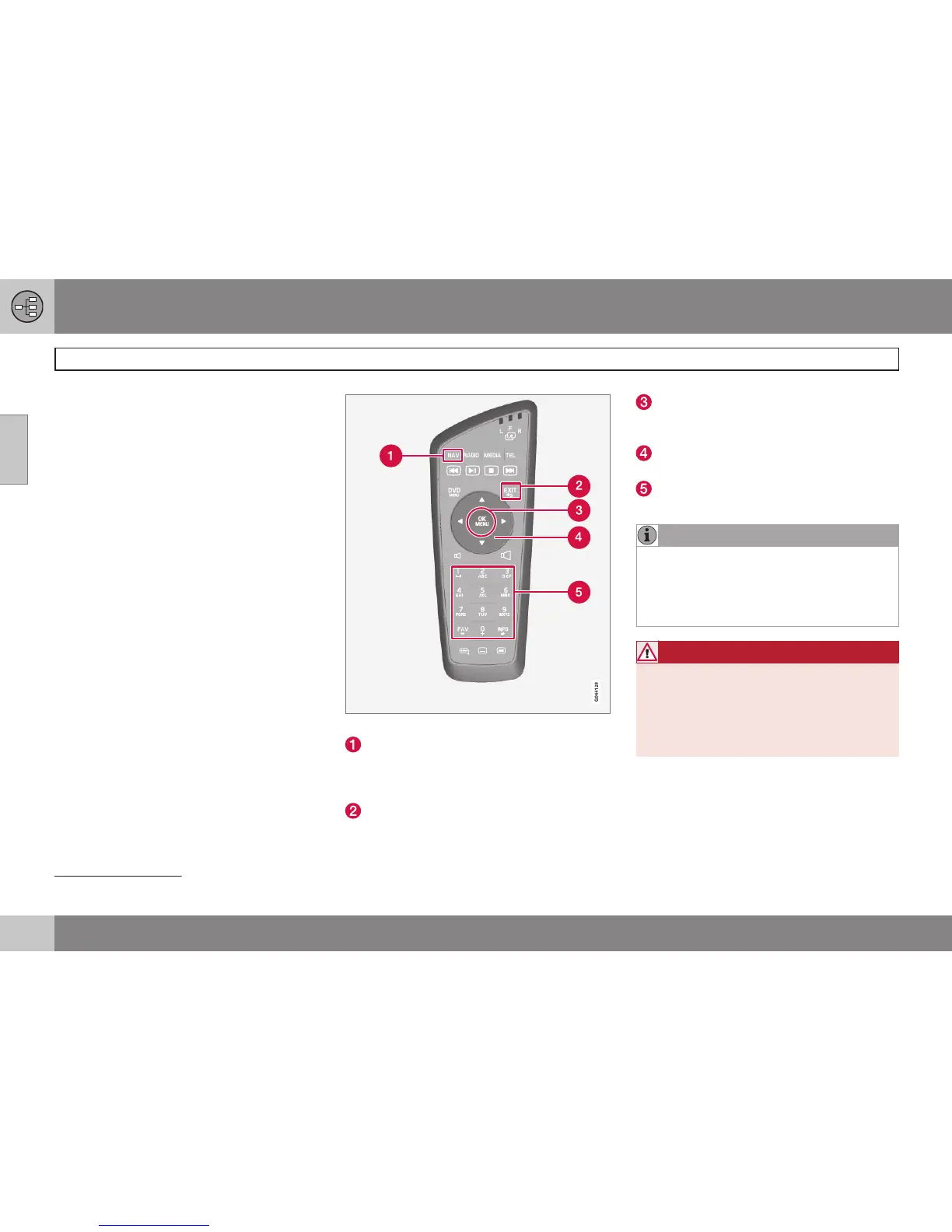
Buttons on the remote control
NAV: activates the navigation system on
the screen. With activated navigation sys-
tem; press to toggle Short-cut-menu
between on/off, see page 35.
EXIT: go back one step in a menu, cancel
a function or delete entered characters.
OK/MENU: confirm a selection. This but-
ton is described in the manual as the "OK
button" or "+ OK".
Arrow keys: use to move the cursor
among menu selections.
Number key pad: use to e.g., enter a
name/address or to scroll on a map.
NOTE
The batteries' normal service life ranges
from 1-4 years, depending on how often
the remote is used. If the remote is not
working properly, try replacing the four
AA/LR6 batteries.
WARNING
To help avoid the risk of injuries in the
event of sudden braking or a collision,
always stow loose objects such as the
remote control, cell phones, cameras, etc.
in the glove compartment or other storage
compartments when not in use.
1
Available in certain models only.



 To Next Page