03 Planning your trip
Setting a destination
03
42
Address
There are several different ways of program-
ming a destination.
It is enough to only enter the name of a town,
village, etc. to be guided to the center of the
specified town/villages.
If you know the destination's latitude and lon-
gitude, this information can also be used.
See page 29 for information about entering
text/numbers in the system's various text
fields.
NOTE
The definition of a city or area may vary
from state to state, and also within the
same state. It will sometimes be an entire
city, or a particular section of a city.
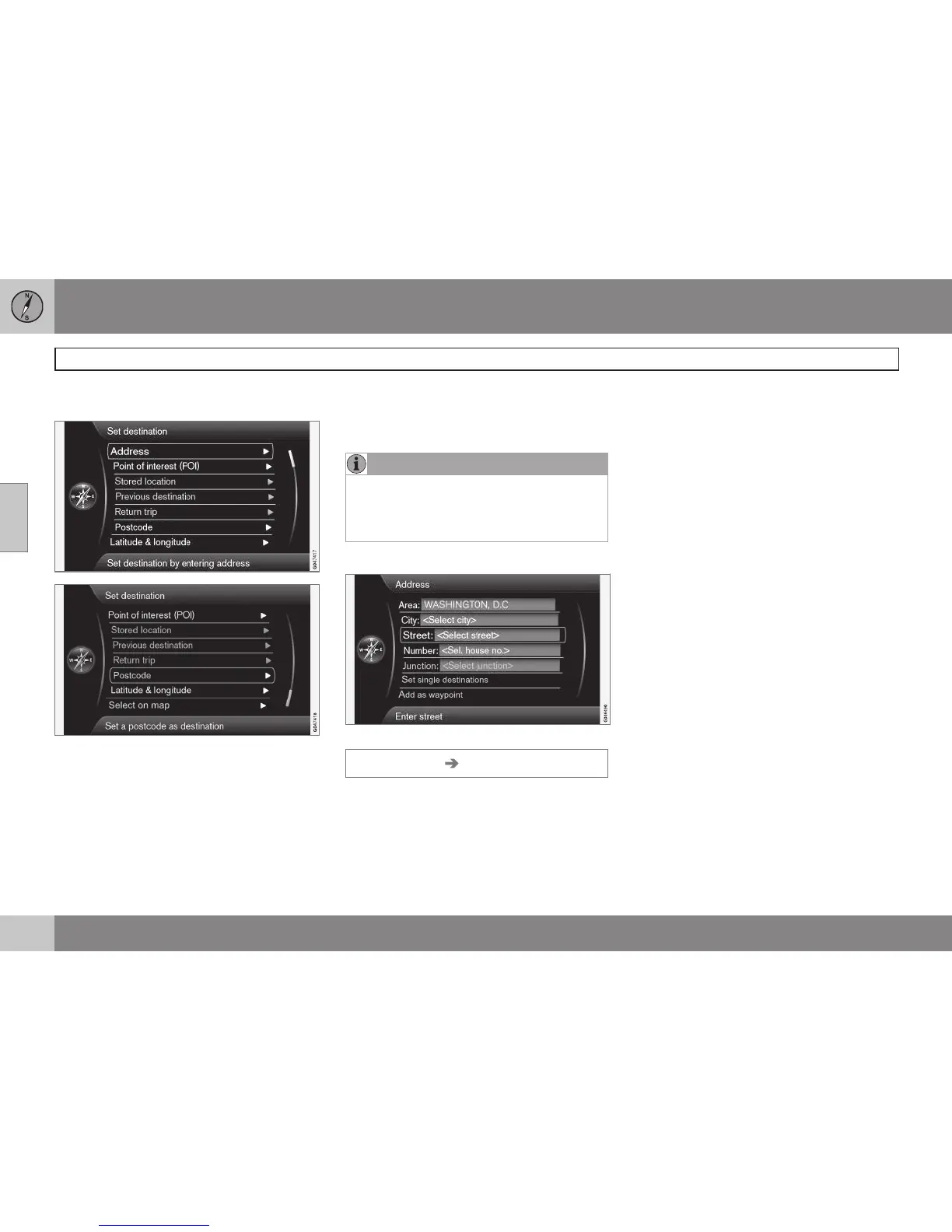
City or street
Street is marked first
Set destination Address
Searching for a destination:
1. With the previous illustration's view on
the screen, press OK to activate the pre-
selected text field.
2.
Enter a name in the
Street: field using the
text wheel or the center console keypad
and then select City:.
3.
Or select
City: + OK and begin entering
the name.
The following search criteria can be used:
•
Area: (country)
•
City:
•
Postcode: a zip code can also be used
for a search under City:
•
Street:
•
Number:
•
Junction: (intersection) select an inter-
section as a destination.
•
Set single destination – deletes any
destinations in the itinerary and starts
guidance to the selected destination.
•
Add as waypoint: mark the selection +
OK to add the address to the itinerary.
•
Information: mark the information + OK
to display information about the selected
destination.



 To Next Page