03 Planning your trip
Setting a destination
03
46
•
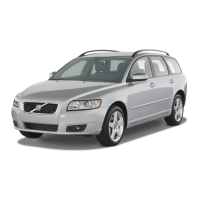
Name: enter the name of the location of
your choice
•
Icon: select a symbol to represent the
location on the map
•
Address: enter an address
•
Phone: enter a phone number
•
Edit voice tag: record a voice tag. Follow
the on-screen instructions.
•
Show name on map: select whether to
show or hide the location's name on the
map.
•
Store: save the changes by pressing OK.
Sort by
Select to sort the entries in the list by:
•
Name
•
Icon
•
Distance
•
Chronological
Delete
•
Delete a stored location.
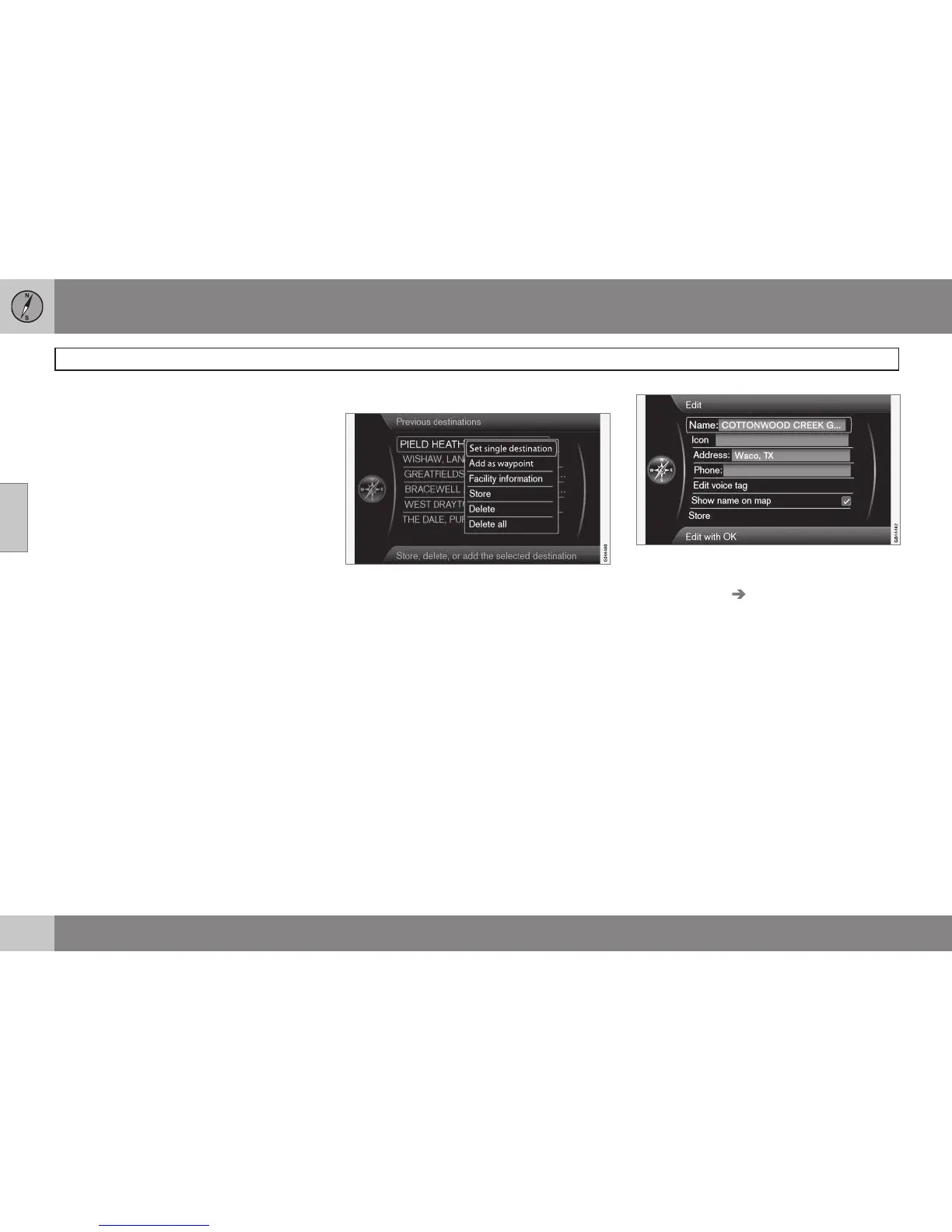
Previous destination
Existing destinations are stored here. Select
one of them and then do one of the following:
•
Set single destination
•
Add as waypoint
•
Information
•
Store: see the following illustration for
more information.
•
Delete
•
Delete all.
Store displays this editing menu
Store displays the same editing menu as for
Stored location Edit.
For more information, see page 45.
•
To supplement or change the information
for a destination, select
Store + OK.
Return trip
This alternative enables you to return to the
itinerary's starting point and can be selected
at any time during an itinerary.
Select among:
•
Start guidance
•
Add as waypoint
•
Edit itinerary: select between Clear
itinerary and Route options.



 To Next Page