03 Planning your trip
Itinerary
03
50
•
Clear itinerary: erase the current itiner-
ary.
•
Route options: opens a shortcut to
Settings Route options, see
page 53.
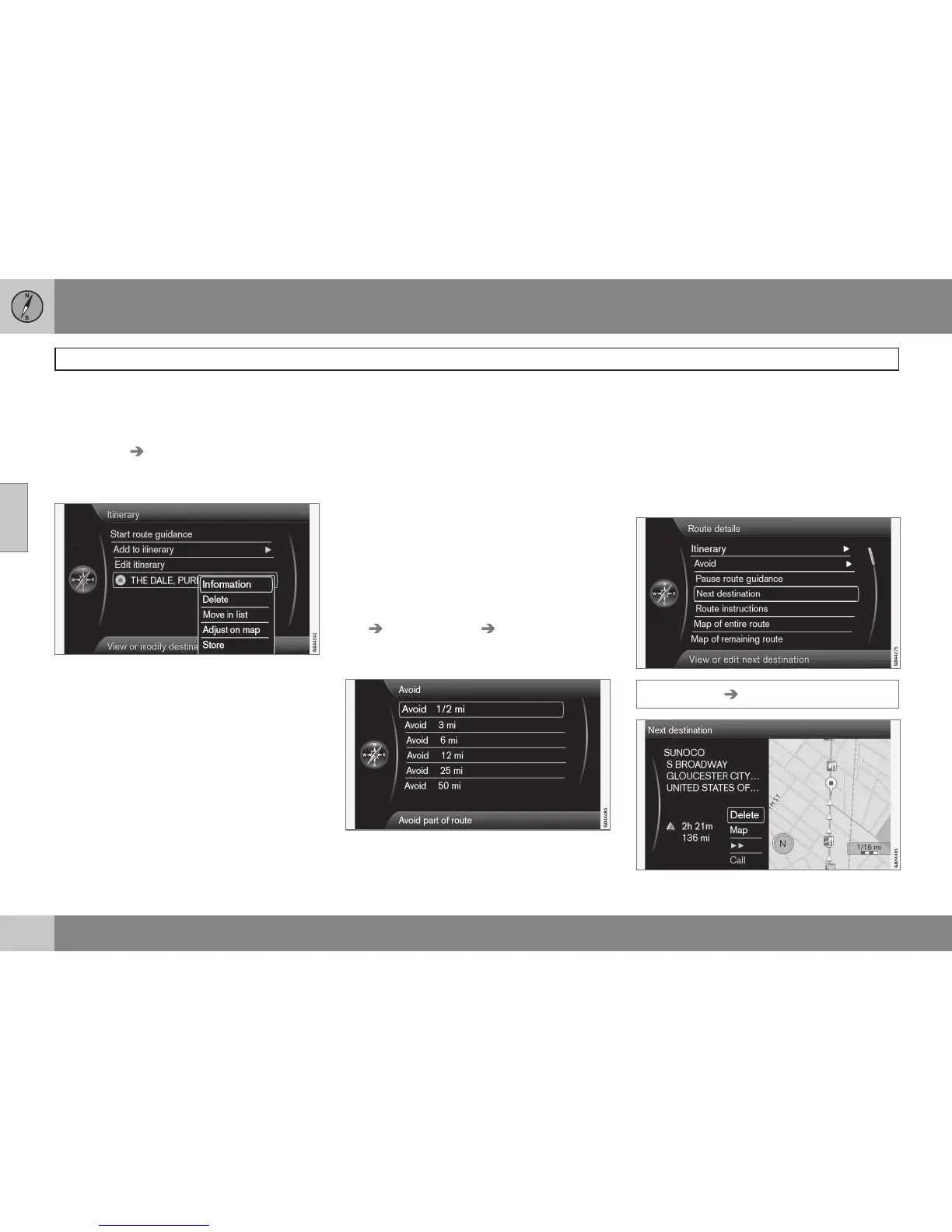
Intermediate destinations in an itinerary
Each intermediate destination in the itinerary
can be updated by marking it and pressing
OK.
•
Information: complete name/address/
phone number (where applicable), and
longitude and latitude. If a phone number
is displayed, a call can be made through
a Bluetooth
®
-enabled cell phone. See the
section "Bluetooth
®
hands-free connec-
tion" in your Owners's Manual for addi-
tional information. Any POIs or parking
areas near the destination or will be
shown.
•
Delete: remove the intermediate destina-
tion from the itinerary.
•
Move in list: change the order in which
the intermediate destinations appear in
the itinerary.
•
Adjust on map: uses crosshairs on the
map to mark a position. The crosshairs
can be scrolled (moved) to another posi-
tion, which can be selected by pressing
OK. See page 35 for more information on
the scroll function.
•
Store: opens the menu Set destination
Stored location Edit, see page 45.
Avoiding areas
This feature makes it possible to avoid certain
parts of the route (due to traffics jams, con-
struction, etc.) The various distances shown
on the screen are calculated from the vehi-
cle's current position. The system will then
select another route.
•
Mark a selection and press OK.
Next destination
Route details Next destination



 To Next Page