||
01 Introduction
01
16
Related information
Related information refers to other articles
containing closely-associated information.
Images
The manual's images are sometimes sche-
matic and may deviate from the car's appear-
ance depending on equipment level and mar-
ket.
To be continued
}} This symbol is located furthest down to
the right when an article continues on the fol-
lowing page.
Continued from previous page
|| This symbol is located furthest up to the
left when an article continues from the previ-
ous page.
Related information
•
The owner's manual and the environment
(p. 24)
•
Support and information about the car on
the Internet (p. 20)
Digital owner's manual in the car
The owner's manual can be read on the
screen in the car
2
. The content is searchable
and it is easy to navigate between different
sections.
Open the digital owner's manual - press the
MY CAR button in the centre console, press
OK/MENU and select
Owner's manual.
For basic navigation, see Operating the sys-
tem. See below for a more detailed descrip-
tion.
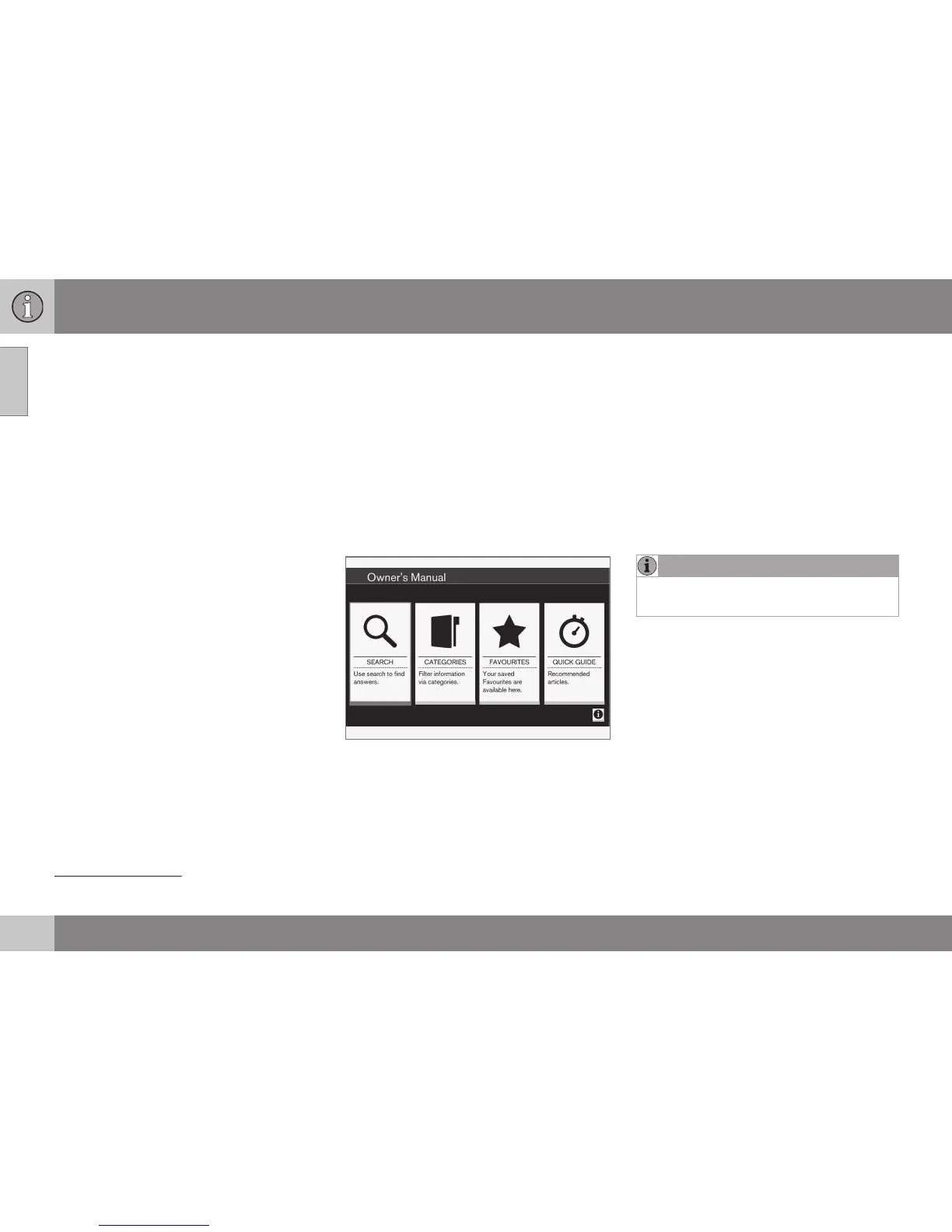
Owner's manual, start page.
There are four options for finding information
in the digital owner's manual:
•
Search - Search function for finding an
article.
•
Categories - All articles sorted into cate-
gories.
•
Favourites - Quick access to favourite-
bookmarked articles.
•
Quick Guide - A selection of articles for
common functions.
Select the information symbol in the lower
right-hand corner in order to obtain informa-
tion about the digital owner's manual.
NOTE
The digital owner's manual is not available
while driving.
2
Applies to certain car models.


 To Next Page