www.vonets.com VAP11G User Manual
- 8 -
Sales Tel
Sales TelSales Tel
Sales Tel:
::
:+86
+86+86
+86-
--
-755
755755
755-
--
-26642519
2664251926642519
26642519、
、、
、26645879
2664587926645879
26645879
E
EE
E-
--
-mai
maimai
mail:sales@vonets.com
l:sales@vonets.com l:sales@vonets.com
l:sales@vonets.com
Technical
TechnicalTechnical
Technical
support: +86
support: +86support: +86
support: +86-
--
-755
755755
755-
--
-26645879
2664587926645879
26645879-
--
-807
807 807
807
E
EE
E-
--
-mail: support@vonets.com
mail: support@vonets.commail: support@vonets.com
mail: support@vonets.com
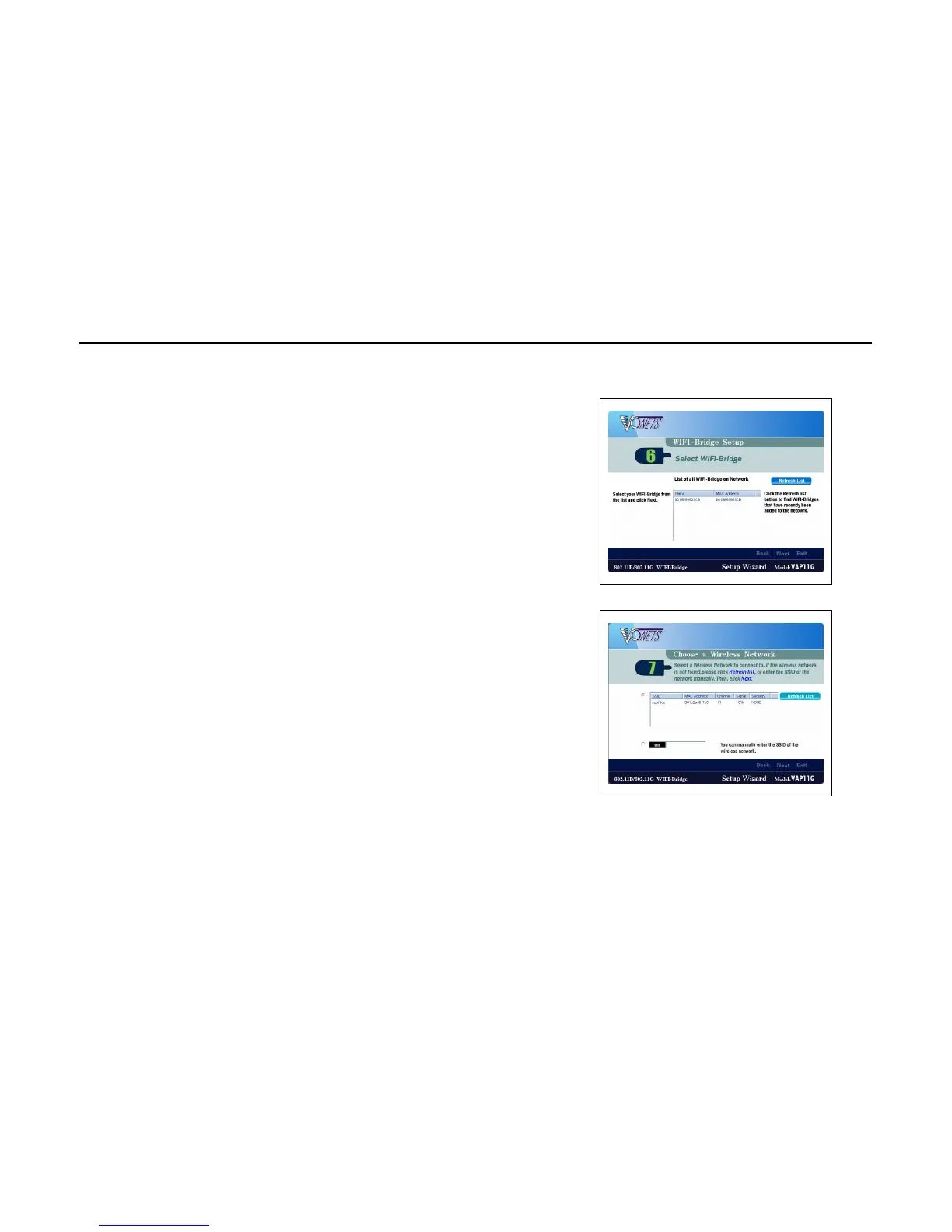
5. Users can see a list of all VAP11G WiFi bridge can be detected
by the wizard, select the one you are installing, click Next to
continue. You can also click Refresh List button to check again.
6. Screen 7 will show a list of available wireless network can be
detected and their specific information, including SSID,
MAC address, Signal Strength, Channel and Security type, select
one you are planning to enter.


 To Next Page