To charge, unscrew the fluid tank and connect to power with a USB-C cable. The device
can be charged either ON or OFF. Charging in the ON position will give a detailed
battery level readout but will take marginally longer to charge.
Battery swaps
Li-ion batteries can be very dangerous when handled
improperly. Only store batteries within MicroFogger or in
safety cases, provided with spares.
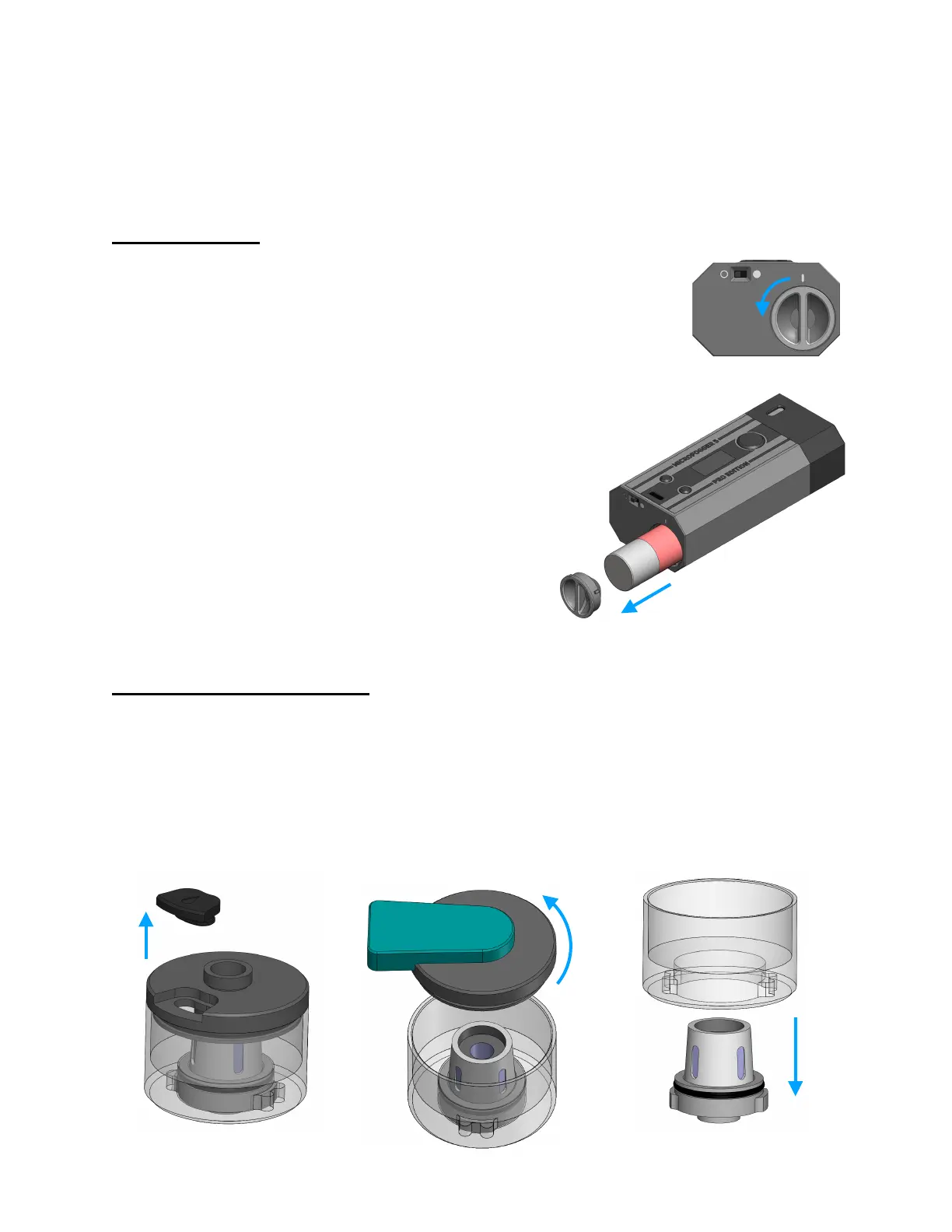
To remove battery, turn device OFF and gently push in
on the battery cap while rotating it anti-clockwise.
Remove cap and hold MicroFogger vertical. Gently tap
device on soft surface to eject battery. Pull battery out
and immediately store in safety case!
To re-install, gently push battery in, ensuring it is the
correct way around as marked on casing. Re-install
battery cap by pushing in and rotating 90° clockwise,
while in correct cap orientation. !
Tip: If you want to store the MicroFogger and prevent
the switch from turning it on, install battery in reverse
orientation, as it will be disconnected this way.
Heating coil replacement
If, during normal use, you notice that the smoke produced smells burnt, immediately
stop and either swap fluid tank (if spare is available) or replace coil in existing tank:
1. Unscrew the fluid tank and remove fill port cap. Drain fluid by holding upside-down
2. Use the tank tool to unscrew the top cap, while holding the clear housing
3. Remove the tank base by pushing it out of the clear housing



 To Next Page