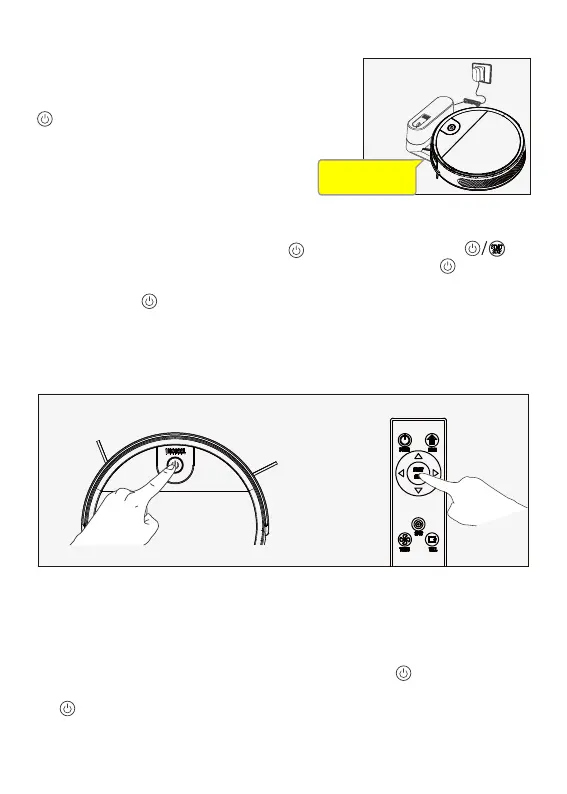
2.Charge Robot
Charging Contacts on robot and the Charging Dock
Pins make a connection.
Button in breathing status when robot is charg
ing. Button stops glowing after robot is fully charged.
Usually take 5.5 hours from low battery mode to
fully charged.
Start/Stop Cleaning
1. Start or stop by pressing the Start button key or the remote control's key.
Note: Before starting the Robot, make sure that the outer ring of the key is white
and the Robot is in the state of being awakened. If the Robot does not wake up,
short press the key to wake it up.
The appliance enters the sleep state after 10 minutes of standby, and the key light is
off.
2. If you need to select another mode, please refer to the(Mode Selection)section.
Mode Selection
In order to adapt to different ground conditions and achieve deep cleaning, this product has
a variety of cleaning modes, which can be selected by remote control as needed.
The remote control can switch any mode directly.
Before starting the mode, make sure that the outer ring of the key is white and the
appliance is in the state of being awakened. If the appliance does not wake up, short press
the key to wake it up.
Contacts on robot and
the Charging Dock Pins
make a connection.


 To Next Page