Need help?
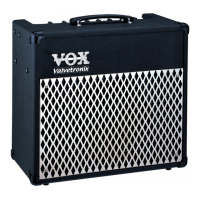
Do you have a question about the Vox AD15VT and is the answer not in the manual?
Warning regarding FCC compliance for digital devices and potential interference.
Explanation of the CE mark indicating conformity with European Directives.
Advice for consumers regarding product usage country and warranty.
Welcomes the user and advises reading the manual for trouble-free operation.
Highlights the key features of the Valvetronix amps, including Valve Reactor technology and effects.
Step-by-step instructions for connecting and powering on the amplifier.
How to select and listen to the pre-programmed amp sounds.
Instructions on how to switch between the two programmable channels (CH1 and CH2).
Explains how to enter Manual mode and adjust amp settings to create custom sounds.
Details all controls and sections on the amplifier's top panel, from Input to Master.
How to select and use pre-programmed amplifier settings and sounds.
How to select and recall saved programs stored in CH1 and CH2.
Step-by-step process for building a custom sound from scratch.
How to view the original settings of a stored preset or user program.
How to use the left foot switch to alternate between CH1 and CH2 programs.
How to use the right foot switch to toggle effects bypass or switch to Manual mode.
Introduces the eleven modeled amp types and how controls adapt to each.
Description of the Boutique CL amp model and its tube compliment.
Description of the Black 2x12 amp model and its sound characteristics.
Description of the Tweed 4x10 amp model and its tonal properties.
Details the AC15 amp model, its history, and control functions.
Description of the AC30TB amp model, its history, and tone characteristics.
Description of the UK '70s amp model, its sound, and usage.
Description of the UK '80s amp model, known for its crunch and heavy sound.
Description of the UK MODERN amp model, focusing on high gain and aggressive tone.
Description of the NUMETAL amp model, suited for heavy, low-tuned guitar playing.
Description of the US HIGAIN amp model, known for its powerful, saturated sound.
Description of the BOUTIQUE OD amp model, offering a smooth, soulful overdrive.
A table summarizing the types of effects and how to adjust their parameters using TAP, EDIT 1, etc.
Explanation of the auto-wah effect and its adjustable parameters.
Describes the compressor effect and its sensitivity and attack adjustments.
Details the phaser effect and its speed and resonance adjustments.
Explains the chorus effect and its speed and mix adjustments.
Describes the flanger effect and its speed and resonance adjustments.
Explains the tremolo effect and its speed and depth adjustments.
Details the rotary speaker simulation effect and its speed and sensitivity adjustments.
Describes the delay effect, its time, mix, and feedback parameters.
Explains the reverb effect and its time, mix, and dampening adjustments.
Steps to diagnose and fix issues where the amplifier does not turn on.
Troubleshooting steps for when no audio output is heard from the amplifier.
Addresses problems related to the amplifier's output volume being too low.
Troubleshooting steps for no audio output from the headphone/line-out jack.
Solutions for when effects are not audible or not working correctly.
 General
| Type | Hybrid |
|---|---|
| Power Output | 15 Watts |
| Valve Complement | 1 x 12AX7 (preamp) |
| Number of Channels | 2 |
| Channels | Clean, Overdrive |
| Amp Models | 11 |
| Outputs | 1 x 1/4" Headphone/Line Out |
| Speaker | 1 x 8" Vox Original |
| Effects | Reverb, Delay, Chorus |
| Controls | Gain, Volume |
| Inputs | 1 x Instrument |
| Footswitch | Optional |

 To Next Page