10
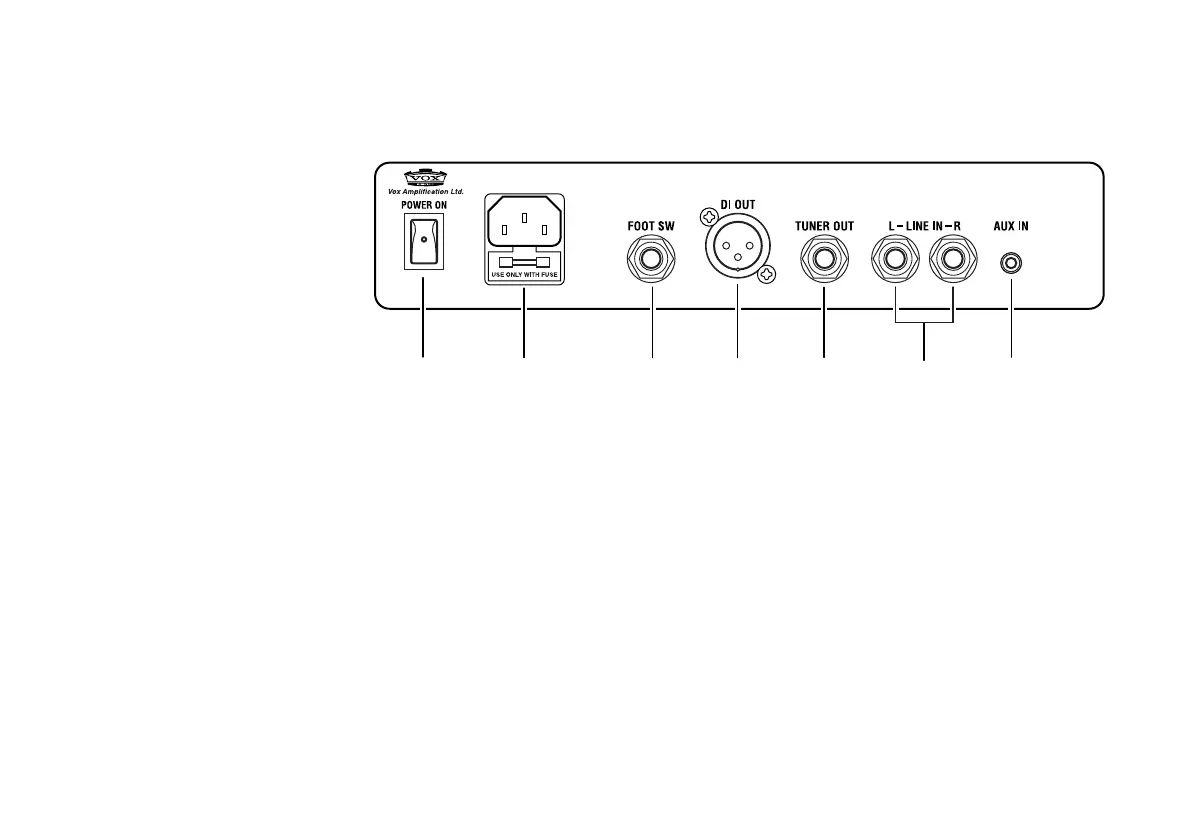
Rear Panel
1 2 3 4 5 67
The Illustration shows the AGA150.
1. [POWER] switch
When you turn this power switch on, the [POWER] indicator on the front panel will light up.
2. AC power connector
Connect the supplied power cord here.
3. [FOOT SW] connector
Connect an optional VFS2 dual foot switch here. For information on using the foot switch, please refer
to “Controlling the Amplifier with VFS2 Dual Foot Switch” on page 12.
4. [DI OUT] connector
Connect a PA device to this balanced XLR output connector to output the direct sound of a musical
instrument connected to the AGA70/150.
NOTE:The Direct Out signal is not affected by either the [ALL MUTE] switch or the [MASTER] volume
control.


 To Next Page