S60
63
ENGLISH
PART NAMES AND FUNCTIONS
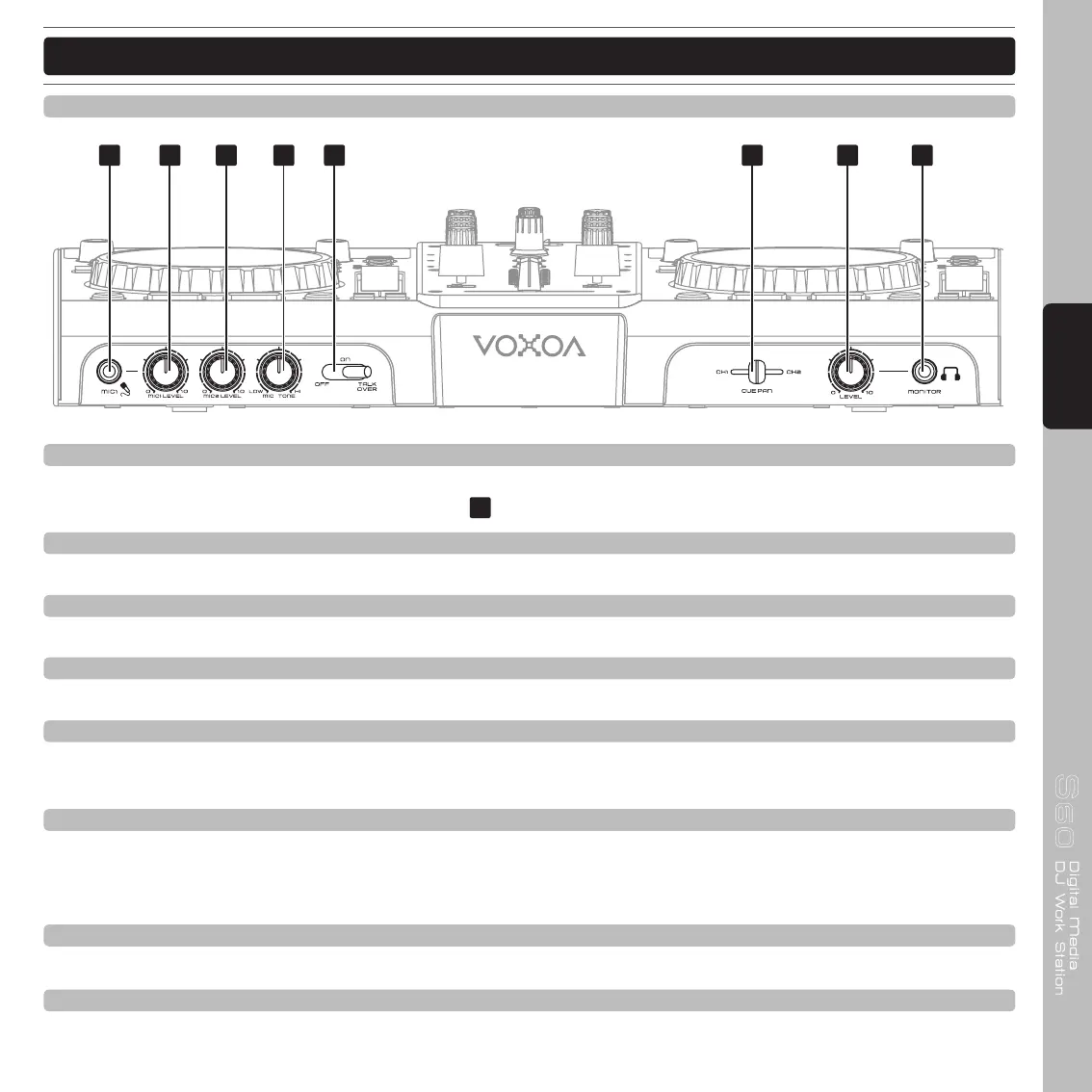
67. MIC 1 Input jack
This jack will accept a standard 1/4” male plug. The volume output level for microphone will be controlled by its
own respective MIC 1 LEVEL CONTROL knob
.
68. MIC 1 Level Control knob
This CONTROL knob is used to adjust microphone 1 level.
69. MIC 2 Level Control knob
This CONTROL knob is used to adjust microphone 2 level.
70. MIC Tone Control konb
This CONTROL knob is used to adjust microphone tone.
71. MIC On/Off/Talk Over switch
This switch is used to set MIC on and off, when switch at the TALKOVER position, the MIC1 and 2 on, the
sound level for everything other than that from the MIC will decrease to around 20dB.
72. Cue Pan fader
Used to preview channel audio to your headphones. This mini fader used to mix between Channel A and B in
the headphones. When all the way to the left, only Channel A will be heard. When all the way right, only Channel
B will be heard.
73. Cue Level Control knob
This knob is used to adjust the headphone output level.
74. Headphones jack
This jack is used to connect your headphones.
Front Panel



 To Next Page