58
ENGLISH
PART NAMES AND FUNCTIONS
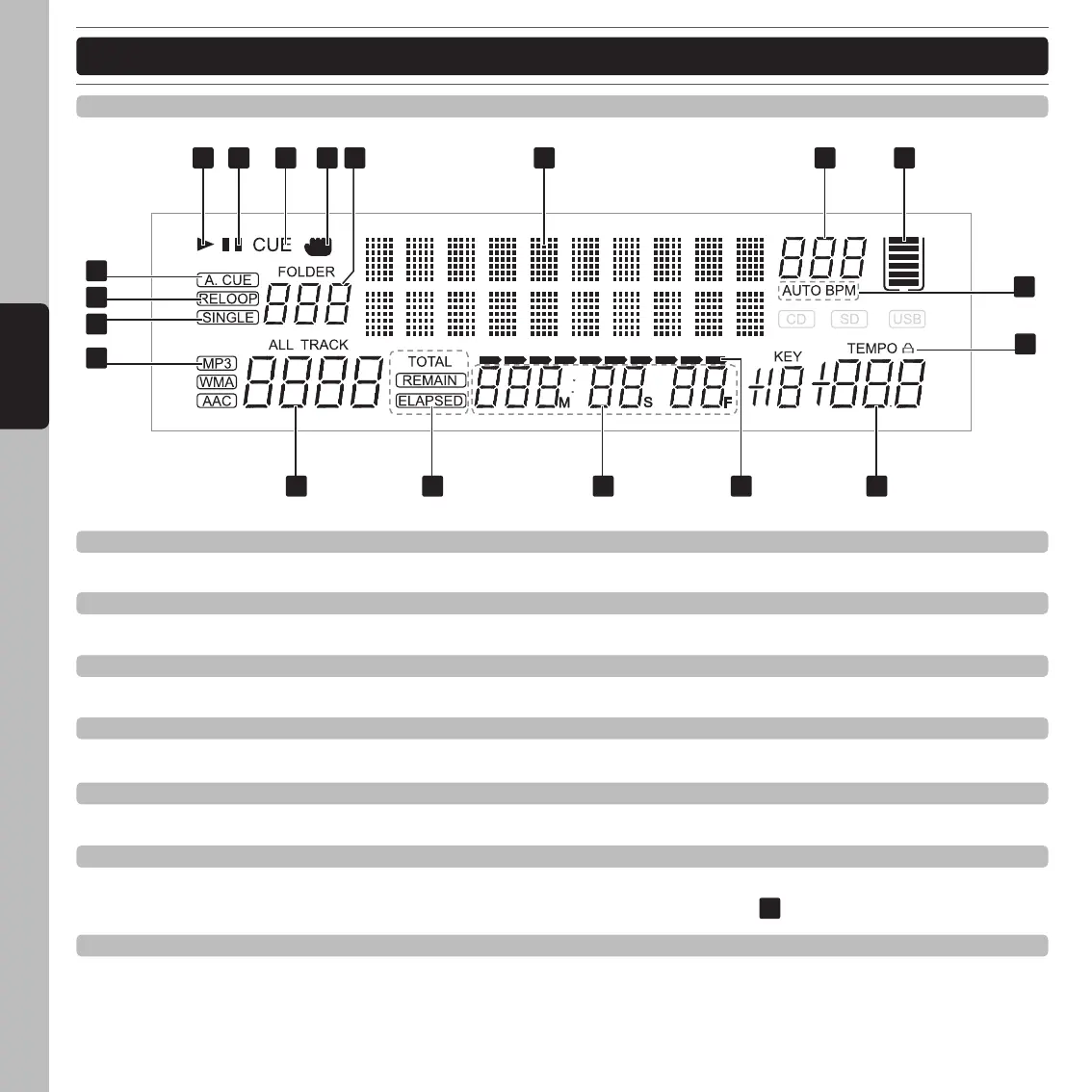
33. Play indicator
The play indicator will glow when the unit is in play mode.
34. Pause indicator
The pause indicator will glow when the unit is in pause mode.
35. Cue indicator
This indicator will glow when the unit is in cue mode and will flash every time a new cue point is set.
36. Touch indicator
This appears when you touch the surface of the JOG WHEEL.
37. Folder display
Indicates the number of the current folder.
38. Dot Matrix Information display
Indicates the name of the folder, artist, file, album, genre and title while playing a MP3 with ID3 TAG . To change
between the name of a folder, artist and title of a MP3, press the TRACK knob
.
39. BPM display
Indicates the current BPM value of the track.
DISPLAY SECTION
33 34 35 38 39 4036 37
41
42
49
50
51
48
43454647 44



 To Next Page