Need help?
Do you have a question about the Voxx Electronics Prestige PE1BTWZ and is the answer not in the manual?
How to arm the system, including LED status and silent choice feature.
How to disarm the system, including LED status and silent choice feature.
How to unlock doors in two stages using the remote.
How to arm the system and bypass shock sensor stages.
How to enter City Mode to change alarm sound.
How to toggle ARM/DISARM chirps ON/OFF.
How to toggle the system LED ON/OFF when armed.
LED flashes indicate the number of programmed transmitters for security.
How to activate/deactivate Valet Mode, disabling functions.
How to disarm the system without a transmitter using the valet button.
How to disarm via brake pedal if transmitter/valet button fails.
User personalized code for higher security valet override.
Steps to disarm the alarm using a custom code.
Steps to program a user-selected custom code for valet override.
How to activate remote start function and safety checks.
How to turn off the vehicle using the remote start button.
Steps to take over driving a remotely started vehicle.
How to set climate controls for remote start comfort.
Conditions that prevent or shut down remote start activation.
How to enable Remote Start Ready Mode for manual transmissions.
Procedure to enter/exit vehicle without cancelling ready mode.
Conditions that cause the system to exit remote start ready mode.
How to keep the vehicle running while unattended.
Steps to engage the Quick-stop feature.
Keeps the engine running for turbo cooldown.
Steps to engage the Turbo Timer feature.
Meanings of different LED flash patterns.
Meanings of different siren/horn chirp patterns.
Meanings of different parking light flash patterns.
Parking light flash codes for remote start shutdown reasons.
Explains BEEPS/LED FLASHES for functions like Lock, Unlock, Remote Start.
Steps to replace batteries in Model 181SPR remote.
Steps to replace batteries in Model 181TWSP remote.
Details of the limited lifetime warranty, exclusions, and limitations.
 General
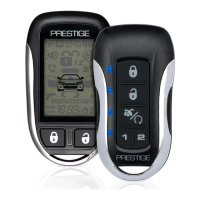
| Number of Buttons on Remote | 5 |
|---|---|
| Remote Start | Yes |
| Security System | Yes |
| Alarm | Yes |
| Engine Start | Yes |
| Transmitter | 2-Way LCD |
| Features | Keyless Entry |


 To Next Page