EasyManua.ls Logo

Voxx Electronics PRESTIGE APS901Z - User Manual

Default Icon
8 pages
Print Icon
To Next Page IconTo Next Page
Loading...
OWNER’S GUIDE
MODEL APS901Z
VOXXELECTRONICS.COM
Question and Answer IconNeed help?

Do you have a question about the Voxx Electronics PRESTIGE APS901Z and is the answer not in the manual?

Summary

Remote Control Functions

Remote Start and Shutdown

Activate, deactivate, and manage remote start operation and vehicle entry.

Vehicle Interior Climate Control

Prepare the vehicle's interior temperature before entering using remote start features.

Service Mode Engagement

Temporarily disable remote start functionality for vehicle maintenance or servicing.

Security System Operations

Arming and Disarming Vehicle

Lock and secure the vehicle, or unlock and disarm the security system.

Remote Start and Valet Modes

Utilize remote start features and enable/disable valet mode for basic locking/unlocking.

System Override Without Remote

Disarm the security system using the valet button on the antenna.

System Status Indicators

Interpreting LED and Horn Signals

Understand system status through LED flashes and horn chirps.

Remote Start Shutdown Diagnostics

Interpret parking light flashes to diagnose remote start shutdown reasons.

Remote Control Management

Programming New Remotes

Add or replace remote controls by following the system's programming sequence.

Battery Replacement Guide

Instructions for replacing the battery in the 1 Button Remote Control Model 181BP.

Warranty Information

FCC Compliance Information

Overview

This document is the owner's guide for the Prestige Model APS901Z, a vehicle security and remote start system manufactured by Voxx Electronics Corporation. It provides instructions for using, programming, and maintaining the system, including its remote control.

Function Description

The Prestige APS901Z system offers both remote start and optional security features for a vehicle.

  • Remote Starting Your Vehicle: Allows the user to start the vehicle's engine remotely. This feature can be activated by pressing and releasing a specific button on the remote control twice. The vehicle will run for a predetermined time, selectable from 5 to 60 minutes during installation.
  • Door Unlock (while remote started): While the engine is running via remote start, the doors can be unlocked by pressing, releasing, and holding a specific button on the remote for three seconds.
  • Remote Start Shutdown: The remote start can be turned off by pressing a specific button on the remote control twice, or by pressing the vehicle's brake pedal.
  • Entering the Vehicle while it is Running via Remote Start (Optional): This feature allows the user to enter the vehicle while it is running via remote start without shutting off the engine. The steps involve unlocking doors, entering the vehicle (without pressing the brake pedal), inserting the key into the ignition and turning it to the ON or RUN position, and then pressing the brake pedal. The remote starter will disengage, and the vehicle will operate normally. It's noted that this feature may not be available on all vehicle makes/models, and in some cases, the remote start may shut down upon entry, requiring a normal restart.
  • Preheating or Precooling the Vehicle's Interior: By setting the vehicle's temperature controls before exiting, the system can activate the heater or air conditioner to heat or cool the interior to the desired setting once the vehicle is remote started.
  • Remote Start Service Mode: For safety during vehicle servicing, the remote start feature can be disabled to prevent accidental starting. To engage this mode, the user presses and holds the valet button, cycles the ignition ON/OFF three times, and then releases the valet button. The LED will flash to indicate activation. Repeating these steps disengages the mode.
  • System Arm (Optional Security System): To arm the security system and lock the vehicle doors, a specific button on the remote is pressed and released once. The LED on the antenna will flash once while armed.
  • System Disarm (Optional Security System): To disarm the security system and unlock the vehicle doors, a specific button on the remote is pressed and released twice.
  • System Override (Optional Security System): This allows disarming the system without the remote control. It involves entering the vehicle, turning the ignition to the ON position, and pressing and releasing the valet button on the antenna once. The system remains disarmed until the button is pressed again.
  • Valet Mode (Optional Security System): This mode allows locking or unlocking the vehicle without arming the security system. To enter or exit, turn the ignition to the ON position, then press and hold the valet button for five seconds. The LED on the antenna will turn solid.

Important Technical Specifications

  • Remote Control Programming: The system supports one-button programming for all channels. It can store up to four remote controls in memory. Programming a fifth remote will erase the oldest one.
  • Remote Control Battery: The remote control uses a CR2032 battery. Under normal use, the battery is expected to last approximately one year. A weak battery will result in reduced remote control range and a dim LED on the remote.
  • FCC Compliance: The device complies with Part 15 of the FCC rules and RSS-210 of Industry Canada. It is subject to two conditions: it must not cause harmful interference, and it must accept any interference received, including undesired operation.
  • Warning: Changes or modifications not expressly approved by the party responsible for compliance could void the user's authority to operate the equipment.
  • Patents: The device is patented, with information available at www.voxxintl.com/company/patents.

Usage Features

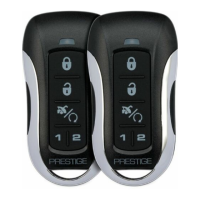
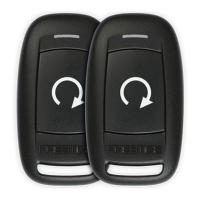
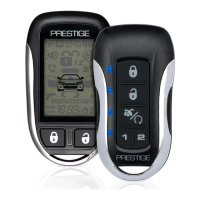
  • Remote Control Buttons: The remote control uses a single button for various functions, with different press sequences (single press, double press, press and hold) determining the action.
  • Status LED Indications: The system provides visual feedback through an LED.
    • OFF: Disarmed
    • Slow Flash: Armed
    • Fast Flash: Passive Arming Countdown
    • ON (Solid): Valet Mode
    • 2 Flashes/Disarmed: Zone 2 Trigger, Trunk / Hood
    • 3 Flashes/Disarmed: Zone 3 Trigger, Door
  • Horn Chirp Indications: Audible feedback is provided via horn chirps.
    • 1 Chirp: Arm
    • 2 Chirps: Disarm
    • 3 Chirps: Door Ajar Upon Arming
    • 4 Chirps: Disarm / Triggered
  • Parking Light Flash Indications: The parking lights also provide visual feedback.
    • 1 Flash: Arm
    • 2 Flashes: Disarm
    • 3 Flashes: Disarm / Triggered
    • ON (Solid or Slow Flash): Remote Started
  • Remote Start Shutdown Diagnostics (Parking Light Flashes): If the remote start shuts down unexpectedly, the parking lights will flash a specific number of times to indicate the reason.
    • 1 Flash: Runtime Expired
    • 2 Flashes: Remote Shutdown
    • 3 Flashes: Brake ON
    • 4 Flashes: NA (Not Applicable)
    • 5 Flashes: Hood Open
    • 6 Flashes: Low Tach Signal
    • 7 Flashes: Tach / Crank Average not learned
    • 8 Flashes: High Tach Signal

Maintenance Features

  • Replacing Remote Control Batteries:
    1. Use a coin to disassemble the two halves of the remote control.
    2. Remove the old CR2032 battery, noting the +/- symbols, and replace it with a new one.
    3. Reassemble the halves of the remote control.
    4. Test the operation of the remote control.
  • Warranty Information: Voxx Electronics Corporation provides a Limited Lifetime Warranty to the original purchaser for defects in material or workmanship under normal use. This warranty covers repair or replacement of the product. A transmitter for a vehicle security or remote start system is specifically warranted for 12 months from the date of original purchase.
    • To obtain warranty service, the product must be delivered with proof of warranty coverage (e.g., dated bill of sale), an authorization number, and specification of defect(s), transportation prepaid, to an approved warranty station. The warranty is non-transferable.
    • The warranty does not cover damage to the vehicle's electrical system, installation/removal costs, batteries, broken LCD transmitter display screens, or damage due to alteration, improper installation, mishandling, misuse, abuse, neglect, accident, or removal/defacement of serial numbers.
    • The warranty is in lieu of all other express or implied warranties, including merchantability, which are limited to the duration of this written warranty. Any action for breach of warranty must be brought within 24 months of original purchase.
    • The company is not liable for consequential or incidental damages and limits its liability to the repair or replacement of the product, not exceeding the purchase price paid by the purchaser without installation labor.
    • Some states may not allow limitations on implied warranties or exclusions of incidental/consequential damages, so these limitations may not apply to all users. The warranty provides specific legal rights, and other rights may vary by state.
  • Customer Service: For assistance, customers can contact Voxx Electronics Corporation Customer Service at 1-800-225-6074 or visit www.VoxxElectronics.com.

Voxx Electronics PRESTIGE APS901Z Specifications

General IconGeneral
BrandVoxx Electronics
ModelPRESTIGE APS901Z
CategoryRemote Starter
LanguageEnglish

Related product manuals