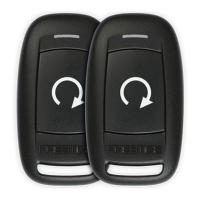
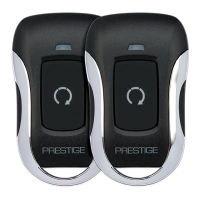
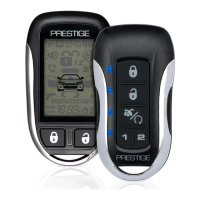
This document is an owner's guide for the Prestige Model APS787Z, a security and remote start system.
Function Description
The Prestige APS787Z system provides vehicle security and remote start capabilities. It includes features such as arming and disarming the security system, optional two-stage door unlock, trunk release, and auxiliary output activation. For personal safety, it incorporates a personal protection alarm (panic function). The system also features a shock sensor with warn-away and full trigger detection, which can be bypassed if needed.
The remote start function allows users to start their vehicle remotely, preheating or precooling the interior based on previous settings. It includes safety features that prevent remote start activation under certain conditions, such as an open hood or pressed brake pedal. For manual transmission vehicles, a "Remote Start Ready Mode" must be engaged before remote starting.
Additional operational modes include "City Mode" for changing alarm sounds, "Valet Mode" to disable security features during servicing, and "Remote Start Service Mode" for disabling remote start. The system also offers a "Quick-Stop" feature to keep the vehicle running securely for short stops and an optional "Turbo Timer" to allow the engine's turbo to cool down properly before shutting off. A 2/4 hour start-up timer mode is available for periodic engine starts, particularly useful in cold climates.
Important Technical Specifications
- Remote Control: 5-button remote control, Model 185SP.
- Battery: CR2032 battery for the remote control, with an approximate lifespan of 1 year.
- Remote Control Memory: The system can store up to four remote controls. Programming a fifth remote control will erase the oldest one.
- FCC Compliance: The device complies with Part 15 of FCC rules and RSS-210 of Industry Canada, ensuring it does not cause harmful interference and accepts any received interference.
- Warranty: Limited Lifetime Warranty for the main product (material and workmanship defects). Transmitters are warranted for 12 months. The warranty does not cover vehicle electrical system damage, installation costs, batteries, broken LCD screens, or damage from alteration, improper installation, mishandling, misuse, abuse, neglect, accident, or defaced serial numbers.
Usage Features
Remote Control Operation:
- Arming: Press the lock button once. Parking lights flash once. System is equipped with "Silent Choice," requiring a second press for an audible response if enabled.
- Disarming: Press the unlock button once. Parking lights flash twice. "Silent Choice" may require a second press for an audible response. For 2-stage unlock, a third press activates the audible response.
- Two-Stage Door Unlock (Optional): Press unlock once for the driver's door, then again within 5 seconds for remaining doors.
- Trunk Release (Optional): Press and hold the trunk release button for 3 seconds.
- AUX Output (Optional): Consult dealer for programming and use.
- Personal Protection Alarm (Panic): Press and hold the lock or unlock button for 3 seconds. Stops automatically after 30 seconds or by pressing and holding the same button again for 3 seconds.
Security System Features:
- Shock Sensor Bypass:
- Arm with shock sensor: Press lock once.
- Bypass Warn-Away stage: Press lock twice within 5 seconds.
- Bypass both detection stages: Press lock three times within 5 seconds.
- City Mode: Press lock four times within 10 seconds to change alarm sound.
- User Selectable Notification Chirps: Turn ignition ON then OFF, then press and release valet button three times. One chirp for ON, two chirps for OFF.
- User Selectable LED: Turn ignition ON, OFF, ON, OFF, then press and hold valet button for 5 seconds. One flash for ON, two flashes for OFF.
- Programmed Transmitter Notification: Status LED flashes the number of programmed remote controls when ignition is turned ON.
Override and Valet Modes:
- Valet Mode:
- Turn ignition ON.
- Push and hold valet button.
- LED turns solid.
- Release valet button.
- Exiting Valet Mode follows the same steps.
- Manual Override (without remote):
- Open vehicle door (alarm sounds).
- Turn ignition key to ON.
- Within 10 seconds, press and release valet button.
- Stand Alone Valet Override (Optional, without remote or valet button):
- Open vehicle door (alarm sounds).
- Cycle ignition key ON, OFF, ON.
- Within 10 seconds, press and release brake pedal three times.
- Custom Code Valet Override (Optional): A user-personalized 2-digit code (1-9). Default is "11".
- Override Procedure:
- Ignition ON.
- Within 5 seconds, press valet button once.
- Within 5 seconds, ignition OFF/ON.
- Within 5 seconds, press valet button once.
- Ignition OFF then ON to start.
- Programming Procedure (example "23"):
- Alarm disarmed, ignition ON.
- Within 10 seconds, press valet button three times.
- Within 10 seconds, cycle ignition OFF/ON, OFF/ON, OFF/ON (system beeps once).
- Within 10 seconds, press valet button two times (first digit).
- Within 10 seconds, cycle ignition OFF/ON.
- Within 10 seconds, press valet button three times (second digit).
- Cycle ignition OFF. LED flashes the code (e.g., 2 flashes, pause, 3 flashes) three times for confirmation.
Remote Start Features:
- Remote Starting: Press and release the remote start button twice within 2 seconds. Parking lights flash once. System attempts to start up to three times with 5-second pauses.
- Remote Start Shutdown: Press and release the remote start button twice.
- Entering Vehicle while Remote Started:
- Unlock doors.
- Enter (DO NOT PRESS BRAKE PEDAL).
- Insert key, turn to ON or RUN position.
- Press brake pedal.
- Preheating/Precooling: Set temperature controls before exiting the vehicle.
- Remote Start Ready Mode (Manual Transmission Only):
- Activation:
- Engine running by ignition key, transmission in neutral, parking brake set.
- Foot off brake pedal.
- Press and release remote start button (parking lights turn ON).
- Remove keys (vehicle remains running).
- Exit vehicle, close all doors.
- Within 2 minutes of step 3, press lock button (vehicle shuts down, two short chirps, one long chirp confirms ready mode).
- Entering/Exiting while Ready Mode is Active:
- Activate remote start.
- Open door to retrieve items.
- Exit vehicle, close all doors.
- Press lock button (unit waits 3 seconds, shuts down, confirms ready mode with chirps/flashes).
- Cancellation: Ready mode cancels if any door, hood, or trunk is opened, brake or parking brake is pressed, or ignition is turned ON.
- Quick-Stop Feature:
- Automatic Transmission:
- Stop vehicle, transmission in PARK.
- Foot off brake, press and release remote start button twice within 2 seconds (parking lights turn ON).
- Remove keys, exit, press lock button to secure.
- Manual Transmission:
- Vehicle running, foot off brake, parking brake ON.
- Press and release remote start button.
- Exit vehicle, close all doors.
- Press and release lock button.
- Within 3 seconds, press remote start button (enters Quick Stop, Ready Mode active).
- Turbo Timer (Optional):
- Vehicle running by ignition key, foot off brake, parking brake engaged.
- Parking lights turn ON.
- Turn ignition key OFF (vehicle continues running for pre-programmed time: 1, 3, or 5 minutes).
- Disengage by pressing brake pedal.
- 2/4 Hour Start Up Timer Mode:
- Configuration:
- Press and hold valet button.
- Cycle ignition ON/OFF once.
- Press valet button two times for 2-hour (default) or four times for 4-hour (default) (parking lights flash for confirmation).
- Activation:
- Start vehicle, let run for >15 seconds.
- Cycle ignition to OFF.
- Press and release remote start button four times (parking lights flash four times).
- Exit: Remote start vehicle with remote or start normally with ignition key.
- Remote Start Service Mode:
- Press and hold valet override button.
- Cycle ignition ON/OFF three times.
- Release valet override button.
- LED flashes two short, one long to indicate active. Repeat steps to disengage.
Status Indications:
- LED Flashes:
- OFF: Disarmed
- Slow Flash: Armed
- Fast Flash: Passive Arming Countdown
- ON (Solid): Valet Mode
- 1 Flash: Zone 1 Trigger, Shock Sensor
- 2 Flashes: Disarmed Zone 2, Trigger (Trunk/Hood)
- 3 Flashes: Disarmed Zone 3, Trigger (Door)
- Siren/Horn Chirps:
- 1: Arm
- 2: Disarm
- 3: Door Ajar Upon Arming
- 4: Disarm / Triggered
- Parking Light Flashes:
- 1: Arm
- 2: Disarm
- 3: Disarm / Triggered
- ON (Solid or Slow Flash): Remote Started
- Remote Start Shutdown Diagnostics (Parking Light Flashes):
- 1 Flash: Runtime Expired
- 2 Flashes: Remote Shutdown
- 3 Flashes: Brake ON
- 4 Flashes: Manual Transmission Ready Mode
- 5 Flashes: Hood Open
- 6 Flashes: Low Tach Signal
- 7 Flashes: Tach / Crank Average not learned
- 8 Flashes: High Tach Signal
Maintenance Features
Replacing Remote Control Batteries:
- Use a coin to disassemble the remote control halves.
- Remove the old CR2032 battery, noting +/- symbols, and replace with a new one.
- Reassemble the remote control halves.
- Test the remote control's operation.
Warranty Information:
- The product is covered by a Limited Lifetime Warranty for material and workmanship defects in the original vehicle.
- Transmitters have a 12-month warranty.
- To obtain service, the product must be delivered with proof of warranty coverage (dated bill of sale), authorization number, and defect specification, transportation prepaid, to an approved warranty station.
- The warranty does not cover batteries, broken LCD screens, or damage from improper use, installation, or alteration.

 Need help?
 General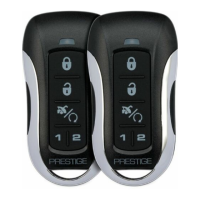

 To Next Page