25
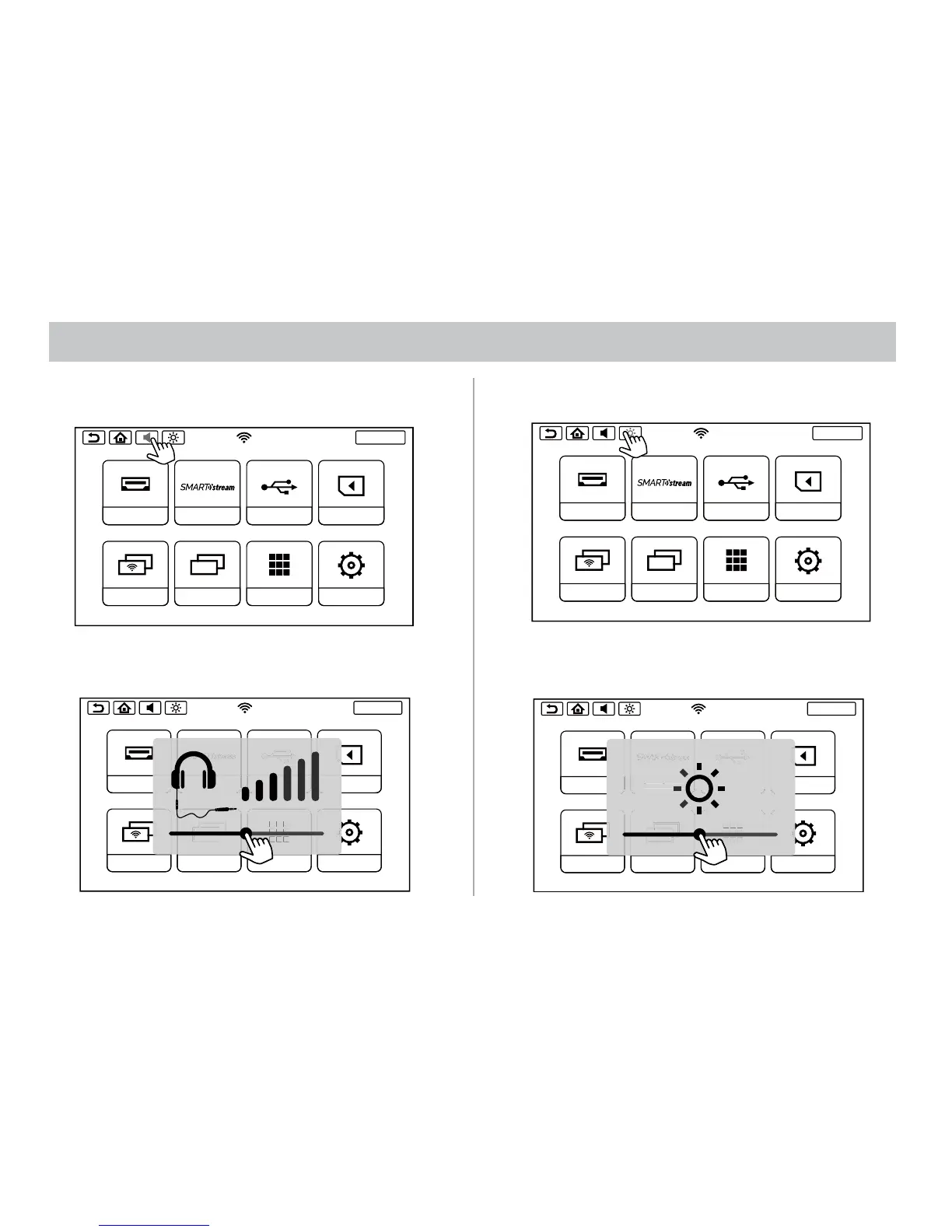
VOLUME CONTROL
1. Touch the Volume Button inside the Info Bar.
2. Touch and hold on the button and then slide right to increase
the volume and slide left to decrease the volume for the Wired
Headphone.
SCREENOFF
HDMI
SmartStream
USB
SD
DUAL SCREEN WIFI DUAL SCREEN
APPS
SETUP
SCREENOFF
HDMI
SmartStream
USB
SD
DUAL SCREEN WIFI DUAL SCREEN
APPS
SETUP
SCREENOFF
HDMI
SmartStream
USB
SD
DUAL SCREEN WIFI DUAL SCREEN
APPS
SETUP
SCREENOFF
HDMI
SmartStream
USB
SD
DUAL SCREEN WIFI DUAL SCREEN
APPS
SETUP
BRIGHTNESS CONTROL
1. Touch the Brightness Button.
2. Touch and hold on the button and then slide right to increase the
brightness and slide left to decrease the brightness.
SCREENOFF
HDMI
SmartStream
USB
SD
DUAL SCREEN WIFI DUAL SCREEN
APPS
SETUP
SCREENOFF
HDMI
SmartStream
USB
SD
DUAL SCREEN WIFI DUAL SCREEN
APPS
SETUP
SCREENOFF
HDMI
SmartStream
USB
SD
DUAL SCREEN WIFI DUAL SCREEN
APPS
SETUP
SCREENOFF
HDMI
SmartStream
USB
SD
DUAL SCREEN WIFI DUAL SCREEN
APPS
SETUP
tream
VOLUME CONTROL & BRIGHTNESS CONTROL


 To Next Page