7
Setting the Azimuth
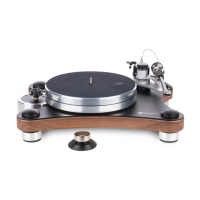
Using the supplied aluminum rod or a fireplace match or coffee stirrer (something light and
about 6” long) place one of them into the groove behind the mounting screws on the
tonearm headshell.
If it is not level loosen the thumbscrew on the drop counterweight and rotate the
counterweight around the shaft until the headshell is parallel to the record. Be careful not
to change the tracking force setting.
With the new 3D arm on the Prime you can also rotate the side weights for even finer
azimuth adjustment, this lets you leave the tracking force as set. You want the rod to be
parallel to the record.


 To Next Page